136
Functions Used As Needed
Set Mode
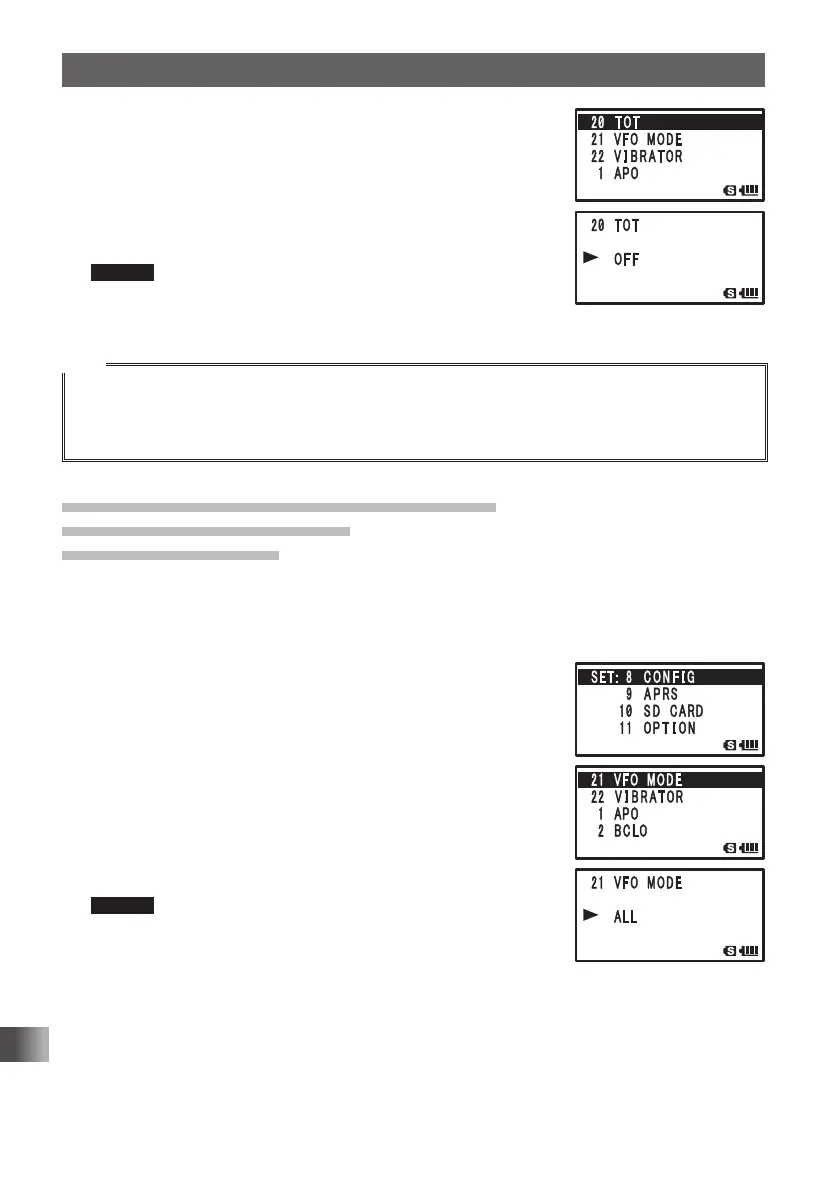
4 Turn O to select [20 TOT].
5 Press H.
6 Turn O to select the time.
Set the time for the transceiver to automatically return to
the reception state in steps of 30 seconds.
OFF/30 SEC to 10 MIN
Remark Default: OFF
7 Press p to save the TOT function setting, and exit the Set
mode.
Tips
• When the time-out timer function is active, a beep is emitted when it comes near the set time. About
10 seconds later, the transceiver returns to the reception state.
• Once the time is set, it is retained until “OFF” is selected in step 6 of the above-mentioned
procedure.
Setting the frequency selection range for
operation in the VFO mode
VFO MODE Function
You can set the frequency selection range for operating in the VFO mode.
Enter the Set mode:
1 Press and hold M over 1 second.
2 Turn O to select [8 CONFIG].
3 Press H.
4 Turn O to select [21 VFO MODE].
5 Press H.
6 Turn O to select a frequency range.
ALL: Switches to the next band when the end of a band is
reached.
BAND: Moves to the other end of the band when the end of
that band is reached.
Remark Default: BAND
7 Press p to save the frequency selection range setting,
and exit the Set mode.
FT1DRDEEng.indb136FT1DRDEEng.indb136 13/06/2815:1713/06/2815:17



 To Next Page