95
Functions Used As Needed
Set Mode
1 Press % while pressing V, and P.
Then turn the transceiver on. When a beep is heard, release the keys.
2 When [SET MODE RESET PUSH F KEY] appears, press F.
A beep is emitted.
Tip To cancel resetting, press any key other than F.
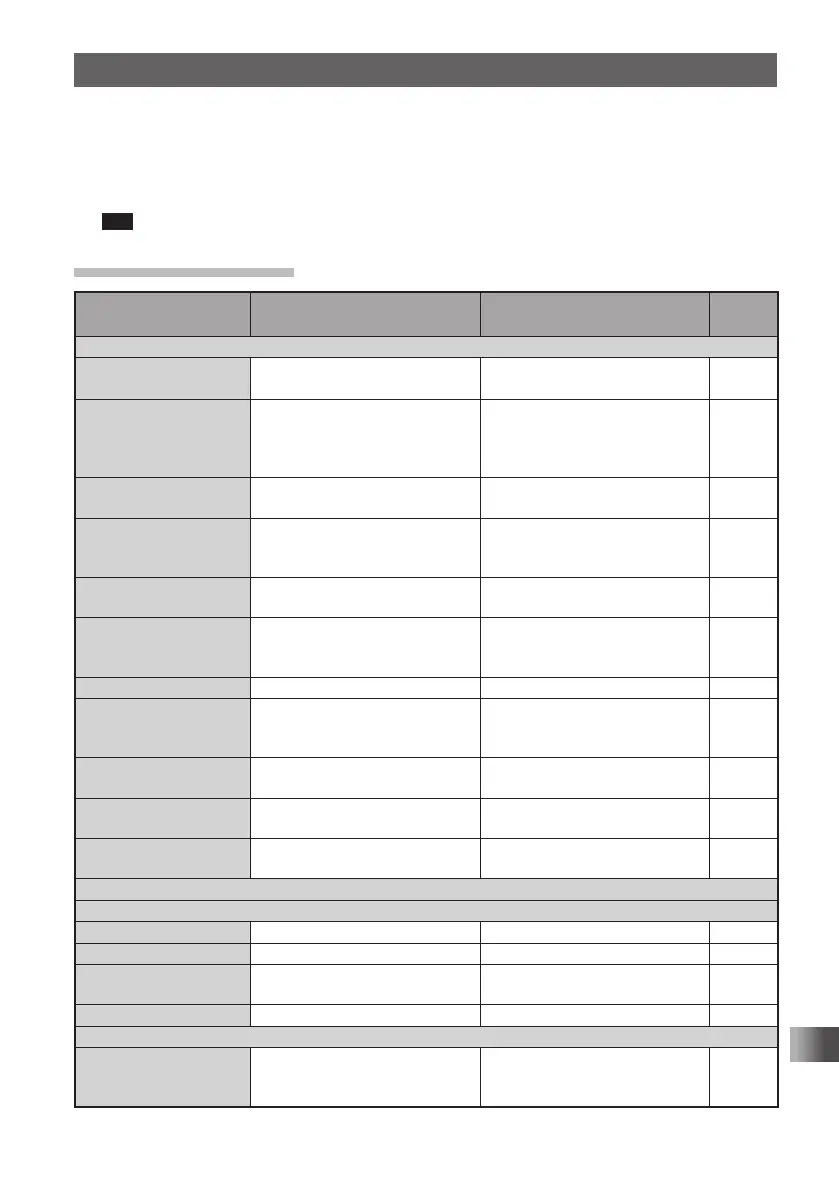
Set Mode Option List
Set mode option No./
setting Item
Description of function
Setting Item
(Bold letters: Default)
Reference
page
1 DISPLAY
1-1 GPS INFO
Press H to open the GPS
screen.
– 103
1-2 TARGET LOCATION Set the display method for
the BACKTRACK screen that
appears when using the GM
Function.
COMPASS / NUMERIC 104
1-3 COMPASS Set the display method for
BACKTRACK Compass.
HEADING UP / NORTH UP 104
1-4 BAND SCOPE Switch the Search Channel for
the BAND SCOPE operation
mode.
11ch / 19ch / 33ch / 49ch / 101ch 105
1-5 LAMP Set the duration time of backlight
and keys to be lit.
OFF / 2 to 10 SEC (KEY) /
CONTINUOUS KEY 5sec
105
1-6 LANGUAGE Select Japanese or English as
the display language for Set
mode options, setting items, etc.
JAPANESE / ENGLISH 106
1-7 LCD CONTRAST Set the LCD contrast level. LEVEL 1 to LEVEL 15 Level 7 106
1-8 LCD DIMMER Set the brightness level of the
LCD backlight and keypad key
light.
LEVEL 1 to LEVEL 6 Level 6 107
1-9 OPENING
MESSAGE
Select an opening message type. NORMAL / OFF / DC /
MESSAGE / CALLSIGN
107
1-10 SENSOR INFO Display function for electrical
voltage and temperature.
Voltage & Temperature 108
1-11 S-METER SYMBOL Select a S/PO meter symbol
display type.
4 types 109
2 TX / RX
2-1 MODE
2-1-1 ANTENNA AM Select an AM radio antenna type. BAR & EXT / Bar Antenna 33
2-1-2 ANTENNA ATT Set the attenuator to ON or OFF. OFF / ON 109
2-1-3 HALF DEVIATION Set the transmission modulation
level.
OFF / ON 110
2-1-4 RX MODE Select a reception mode. AUTO / FM / AM 38
2-2 DIGITAL
2-2-1 DIGITAL MODE Select DIGITAL to switch to
DIGITAL mode
MODE: DIGITAL / AMS /
ANALOG
DIG TX: DN / VW
111
FT1DRDEEng.indb95FT1DRDEEng.indb95 13/06/2815:1613/06/2815:16



 To Next Page