33
Basic Operation
Listening to the Radio
Listening to the AM/FM Radio
AM broadcast stations can be easily received using “Preset Memory Receiver” (See
page 52), where many major broadcast stations are already saved to this transceiver, or
the stations can be directly tuned in by inputting the frequency of the desired broadcast
station with the O and key pad.
1 Press A
Set A band as the operating band.
2 Press B
Select either the “AM broadcast” or “FM broadcast” bands. The “R” icon will
appear on the display while in the Broadcast Reception mode.
3 Adjust the frequency by turning O or using the key pad (See page 30).
Tip
• Broadcast stations that are frequently listened to can be saved to memory (See page 43).
• If you would like to scan a radio band, set A band as the operating band and press F, then 2.
• If a signal is detected during the scan, a beep will sound; the transceiver will receive the signal for 5
seconds then resume scanning.
• The decimal point will flash when the scan is stopped.
Switching between AM Antennas
When listening to AM broadcast stations, the Bar and external antennas may be
switched for best reception according to conditions. During normal use, you may not
need to switch between AM antennas.
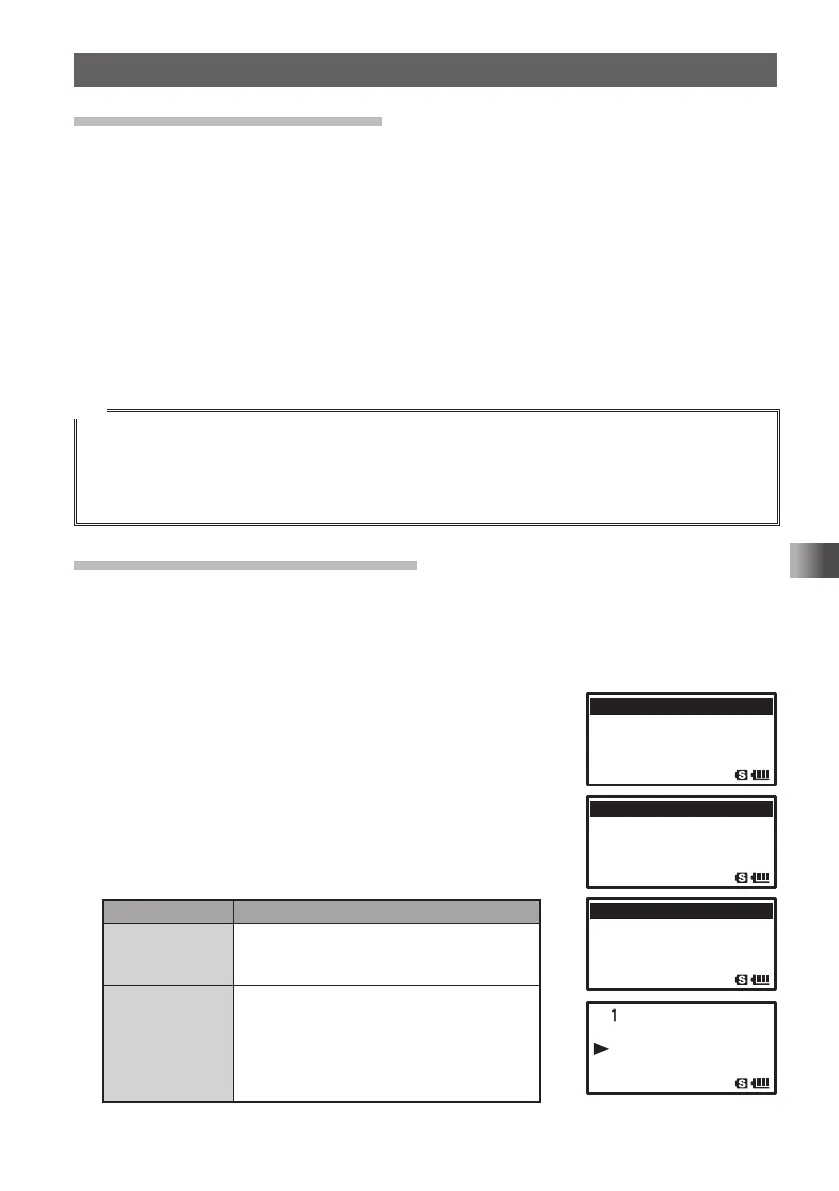
Enter the Set mode:
1 Press and hold M for over 1 second.
2 Turn O to select [2 TX/RX].
3 Press H.
4 Turn O to select [1 MODE].
5 Press H.
6 Turn O to select [1 ANTENNA AM].
7 Press H.
8 Turn O to switch to the desired antenna.
Display Operation
BAR & EXT
ANTENNA
AM broadcasts can be received using both
the whip antenna provided at the top of the
transceiver and the built-in bar antenna.
BAR ANTENNA When receiving AM broadcasts, the
transceiver uses only the built-in bar
antenna.
Rotate the transceiver to adjust the AM
broadcast (middle wave band) for the best
receiving sensitivity.
9 Press p to exit from the Set mode.
䎶䎨䎷䎝䎃䎃䎕䎶䎨䎷䎝䎃䎃䎕䫹 䎷 䎻 䎒 䎵 䎻
䎃䎃䎃䎃䎃䎃䎃
䎖䫹䎰䎨䎰䎲䎵䎼䎖䫹䎰䎨䎰䎲䎵䎼
䎃䎃䎃䎃䎃䎃䫹䎗䎃䎃䎃䎃䎃䎃䫹䎗䫹 䎶 䎬 䎪 䎱 䎤䎯 䎬 䎱䎪䎱䎪
䎃䎃䎃䎃䎃䎃䎃䎃䎘䎃䎃䎃䎃䎃䎃䎃䎃䎘䫹 䎶 䎦 䎤 䎱
䎔䎃䎔䎃䎃 䎰䎲䎧䎨䎰䎲䎧䎨
䎕 䫹 䎧 䎬 䎪 䎬
䎷䎤䎯䎷䎤䎯
䎖 䫹 䎤 䎸 䎧 䎬 䎲
䎔䎃䎔䎃䎃 䎤䎱䎷䎨䎱䎱䎤䎃䎃䎤䎰䎤䎱䎷䎨䎱䎱䎤䎃䎃䎤䎰
䎕 䫹
䎤䎱䎷䎨䎱䎱䎤䎃䎃䎤䎷䎷䎤䎱䎷䎨䎱䎱䎤䎃䎃䎤䎷䎷
䎖 䫹 䎩 䎸 䎯
䎯䎃䎯䎃䎃䎧 䎸 䎳 䎯 䎨 䎻
䎗䎃
䎩䎃䎃䎧 䎨 䎹 䎬 䎤 䎷 䎬 䎲䎱䎲䎱
䎤䎱䎷䎨䎱䎱䎤䎤䎱䎷䎨䎱䎱䎤䎃 䎃䎤䎰
䎥䎤䎵䎥䎤䎵䎃 䎃䎉 䎃 䎃䎨䎻䎷䎨䎻䎷
FT1DRDEEng.indb33FT1DRDEEng.indb33 13/06/2815:1613/06/2815:16



 To Next Page