76
Convenient Functions
Dual Reception (DW) Function
5 Press F and then V to start Dial Dual Reception, and [VDW] appears on the
LCD.
6 Press V stop the Dial Dual Reception.
Memory Channel Dual Reception
Memory channel Priority memory channel
1 Switch to the Memory mode.
2 Press and hold F over 1 second to enter the Write mode;F and the channel
number blink on the LCD.
3 Turn O to select a memory channel and press B.
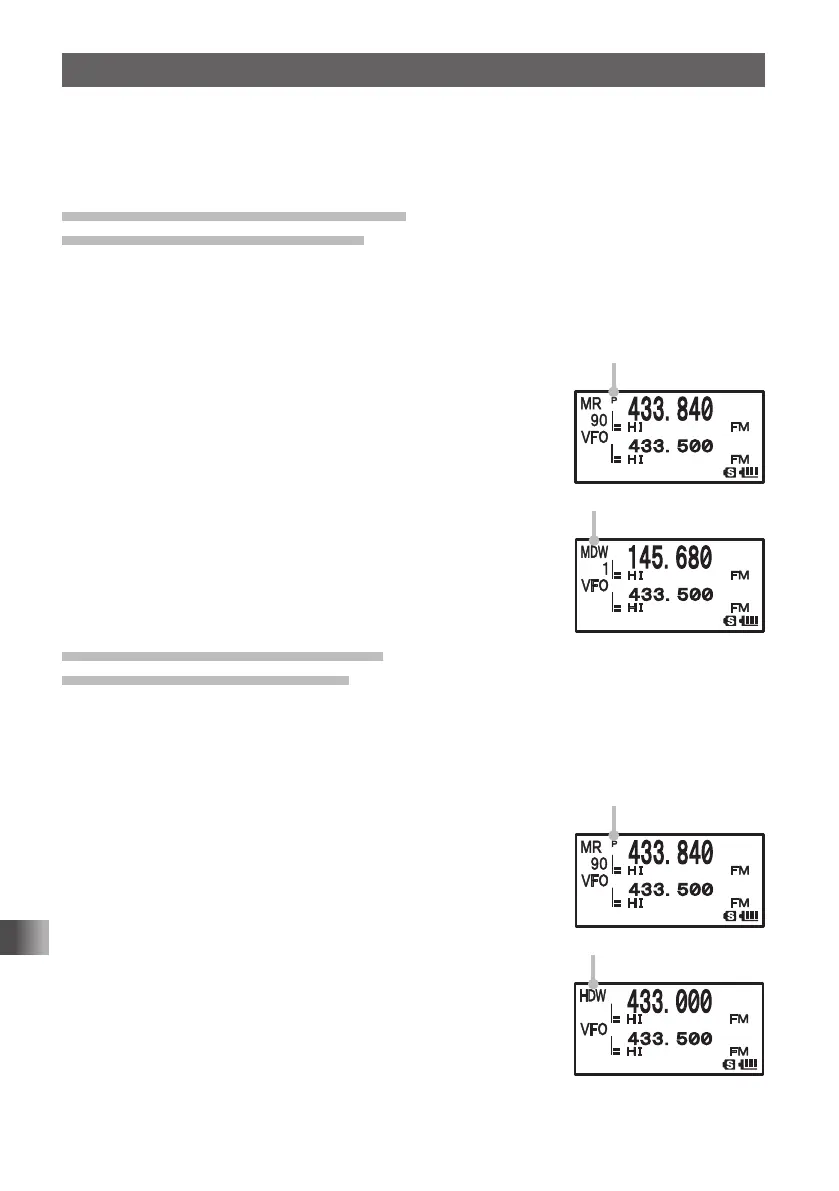
Select a memory channel to prioritize for signal reception
(Priority Memory Channel) (standby side). The “P” appears
on the LCD.
4 Select a memory channel for signal reception.
Select a memory channel for signal reception at all times
(active side).
5 Press F and then V to start Memory Channel Dual
Reception; and [MDW] appears on the LCD.
6 Press V to stop the memory channel dual reception.
Home Channel Dual Reception
Home channel Priority memory channel
1 Switch to the Memory mode.
2 Press and hold F over 1 second to enter the Write mode.
F and the channel number blink on the LCD.
3 Turn O to select a memory channel and press B.
Select a memory channel to prioritize for signal reception
(Priority Memory Channel) (standby side). The “P” appears
on the LCD.
4 Press F and then 4 to recall a HOME channel (active
side).
5 Press F and then V.
HOME Channel Dual Reception starts and [MDW] appears
on the LCD.
6 Press V to turn home channel dual reception OFF.
“P” is displayed.
“MDW” is displayed.
“P” is displayed.
“HDW” is displayed.
FT1DRDEEng.indb76FT1DRDEEng.indb76 13/06/2815:1613/06/2815:16



 To Next Page