80
Convenient Functions
Using the DTMF Function
11
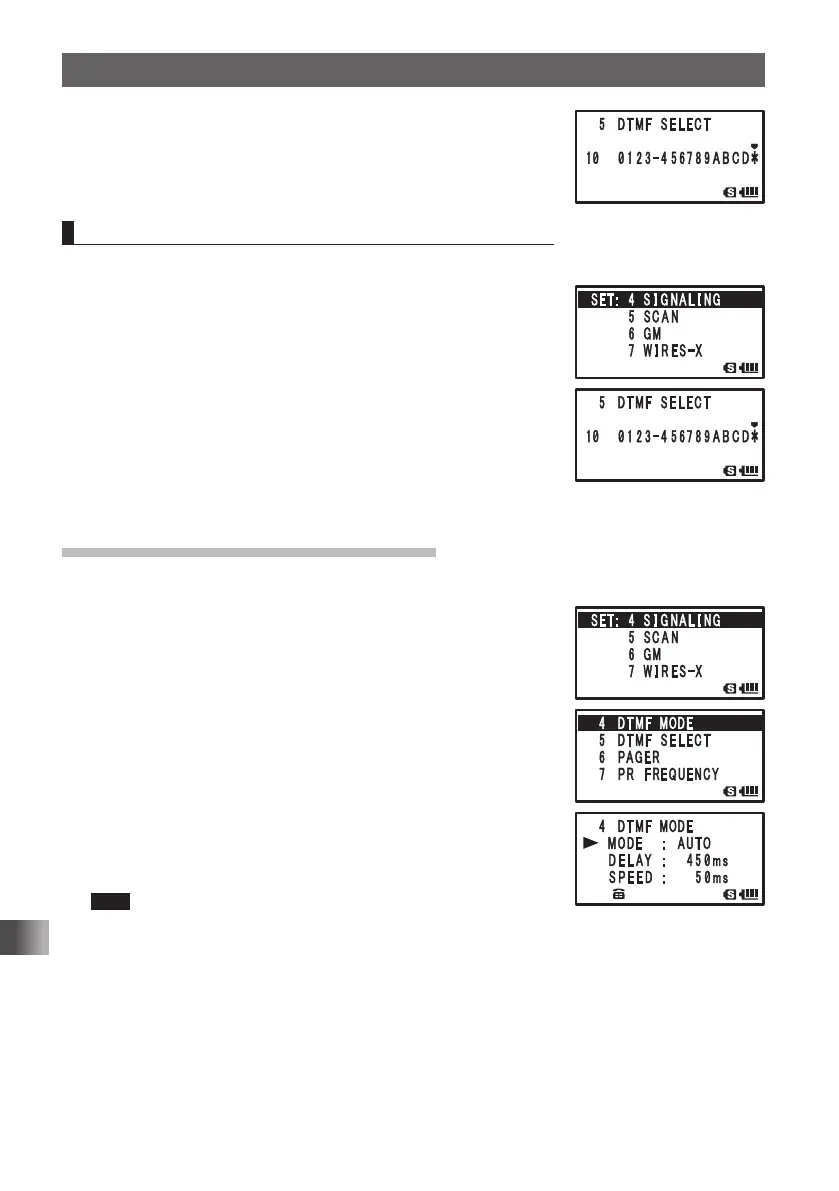
Press p to set the DTMF code and exit from the Set
mode.
Confirming the entered DTMF code by the sound
1 Press and hold M for over 1 second to enter the Set mode.
2 Turn O to select [4 APRS].
3 Press H.
4 Turn O to select [5 SCAN].
5 Press H.
6 Turn O to select the memory channel to which the DTMF
code was registered.
7 Press F to confirm the registered DTMF code by the
audio tones.
8 Press p to exit from the Set mode.
Sending the Registered DTMF Code
1
Press and hold M over 1 second to enter the Set mode.
2 Turn O to select [4 SIGNALING].
3 Press H.
4 Turn O to select [4 DTMF MODE].
5 Press H.
6 Turn O to select [MODE].
7 Press H.
8 Turn O to select [AUTO].
9 Press M.
10
Press p to set the auto dialer.
11
While pressing p key, press 1 to 0 to select the
DTMF memory channel to transmit with the numeric keys.
Tips • The registered DTMF code is transmitted.
• The transmitted DTMF tone can be heard from the speaker.
12
Release p.
Even if p is released, the DTMF tone signal will continue to be transmitted until
transmission of the signal is complete.
FT1DRDEEng.indb80FT1DRDEEng.indb80 13/06/2815:1613/06/2815:16



 To Next Page