87
Communicating with a Specific Remote Station
Using the Tone Squelch Function
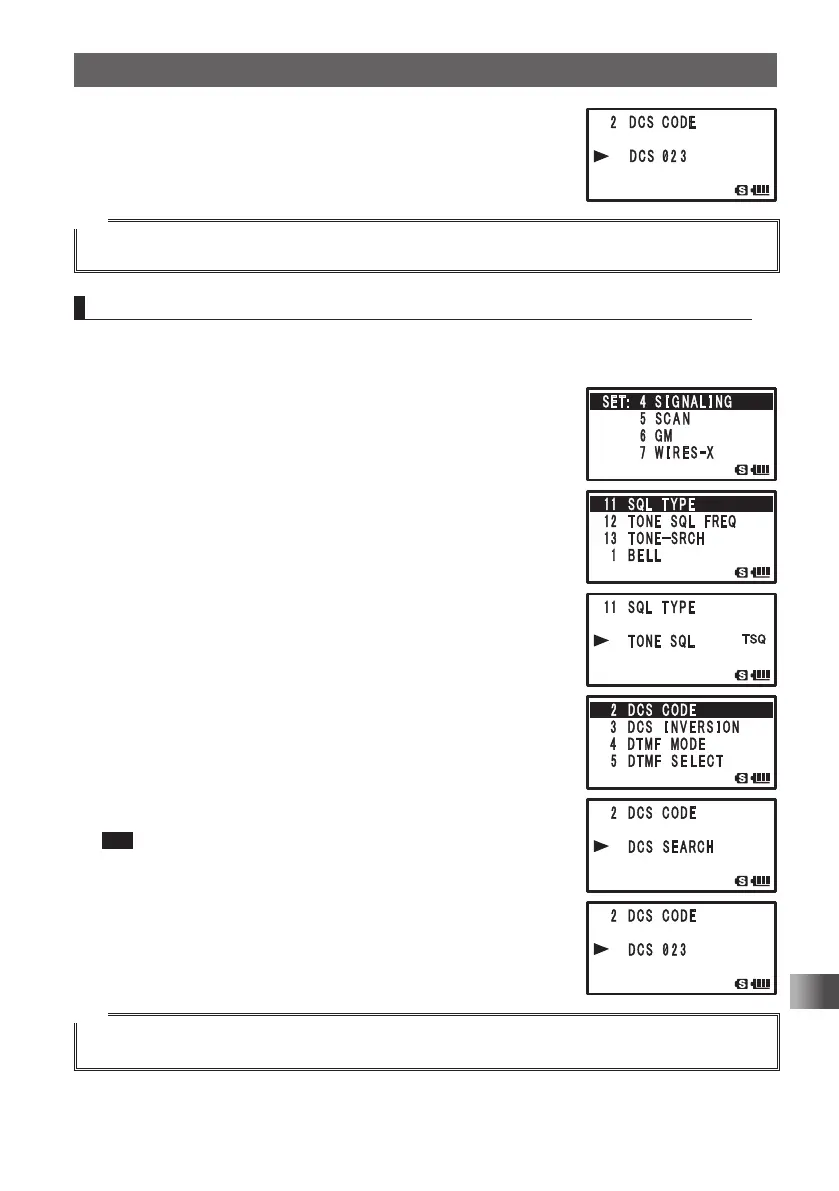
7 Turn O to select a DCS code.
8 Quickly press M 3 times to set the DCS code and exit
from the Set mode.
Tip
By default, the DCS code is set to [023].
Searching for the Frequency of the DCS Used by the Remote Station
The DCS code used by the remote station can be searched for and displayed.
Enter the Set mode:
1 Press and hold M over 1 second.
2 Turn O to select [4 SIGNALING].
3 Press H.
4 Turn O to select [11 SQL TYPE].
5 Press H.
6 Turn O to select [DCS].
Sets the DCS.
7 Press M.
8 Turn O to select [2 DCS CODE].
9 Press H.
10
Receive the signal from the remote station.
11
Press and hold B over 1 second.
[DCS SEARCH] appears.
12
Release B.
Searching for the DCS code begins. When a corresponding
DCS code is heard, a beep is emitted and search stops
temporarily. The found DCS code blinks.
Tip To set the searched DCS code:
Press B a beep is emitted. Quickly press M 3 times
to set the DCS code and exit from the Set mode.
Tip
To perform the operation when scan stops, refer to “Selecting a Reception Method When Scanning
Stops” on page 59.
FT1DRDEEng.indb87FT1DRDEEng.indb87 13/06/2815:1613/06/2815:16



 To Next Page