84
Communicating with a Specific Remote Station
Communicating with a Specific Remote Station
Using the Tone Squelch Function
The tone squelch opens the squelch only when a signal containing the specified
frequency tone is received. Use of the digital code squelch (DCS) opens the squelch
only when a signal containing the specified DCS code is received. The tone squelch
function mutes monitoring the communications between other stations, even when
listening for a call by a specific station for a long time.
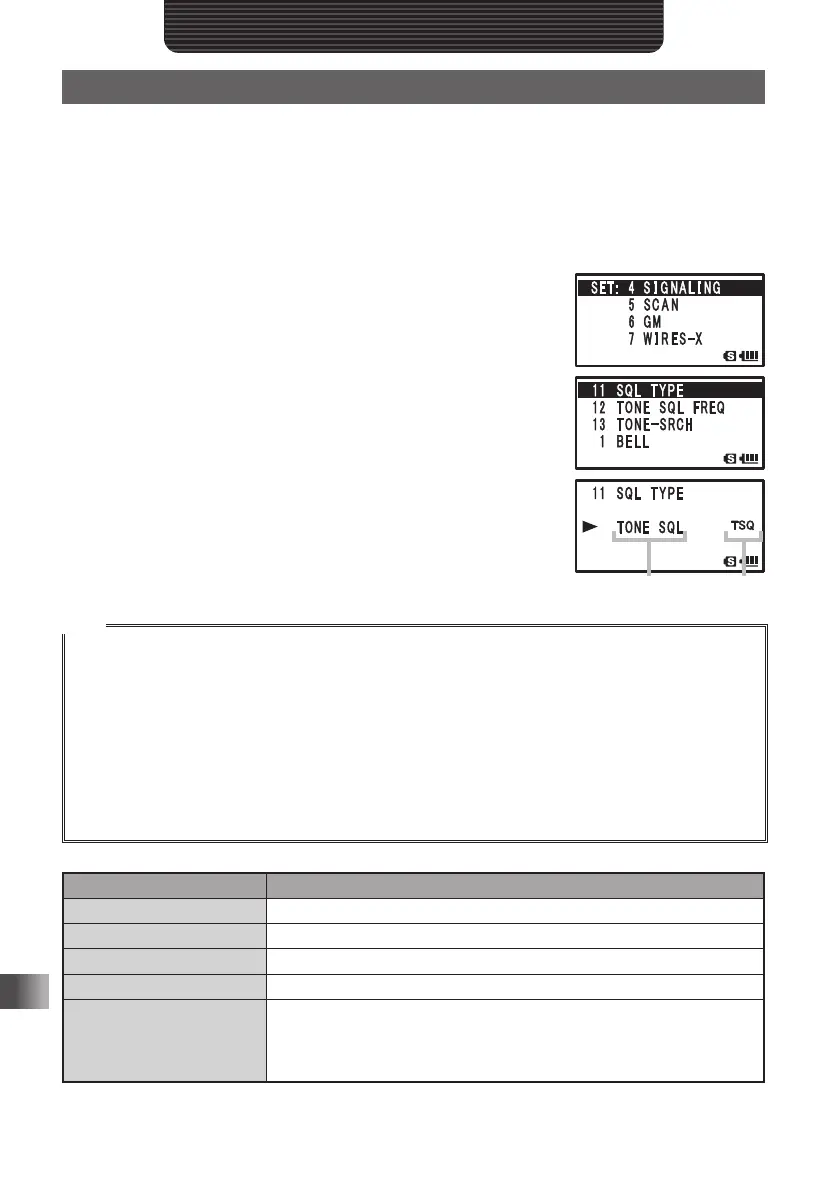
1 Press and hold M over 1 second.
2 Turn O to select [4 SIGNALING].
3 Press H.
4 Turn O to select [11 SQL TYPE].
5 Press H.
The Set mode option [11 SQL TYPE] is selected.
6 Turn O to select a squelch type.
Select a squelch type with reference to the table shown
below.
7 Press p to set the squelch type and exit the Set mode.
Tips
• The tone squelch and DCS setting are also active during scanning. If scanning is performed with
the tone squelch or the DCS function turned on, it stops only when a signal containing a tone of the
specified frequency or a signal containing the specified DCS code is received.
• Pressing the Monitor switch allows you to hear signals that do not contain a tone or DCS code, and
signals with different tones or DCS code.
• Pressing and holding M for 1 second, and then changing the Set mode option allows you to use
this function more conveniently.
[4 SIGNALING] [3 DCS INVERSION]: Allows you to receive the DCS code of the inverted phase.
[4 SIGNALING] [10 SQL EXPANTION]: Allows you to specify different squelch types for
transmission and reception respectively.
Display Operation
OFF Turns off the tone sending function, tone squelch function, etc.
TONE Just sends tones ([TN] appears).
TONE SQL Turns on the tone squelch function ([TSQ] appears).
DCS Turns on the digital code squelch ([DCS] appears).
REV TONE
Turns on the reverse tone ([RTN] appears). Used to monitor
communications based on the squelch control system in which a tone
signal is contained when communication is not performed and the tone
signal disappears when communication starts.
Displays squelch
type
Displays
logo
FT1DRDEEng.indb84FT1DRDEEng.indb84 13/06/2815:1613/06/2815:16


 To Next Page