129
Functions Used As Needed
Set Mode
Tips
• Data saved to the microSD memory card is saved in xxx.LOG format.
• Saved data can be viewed with PC applications*.
* PC applications are not supported by our company.
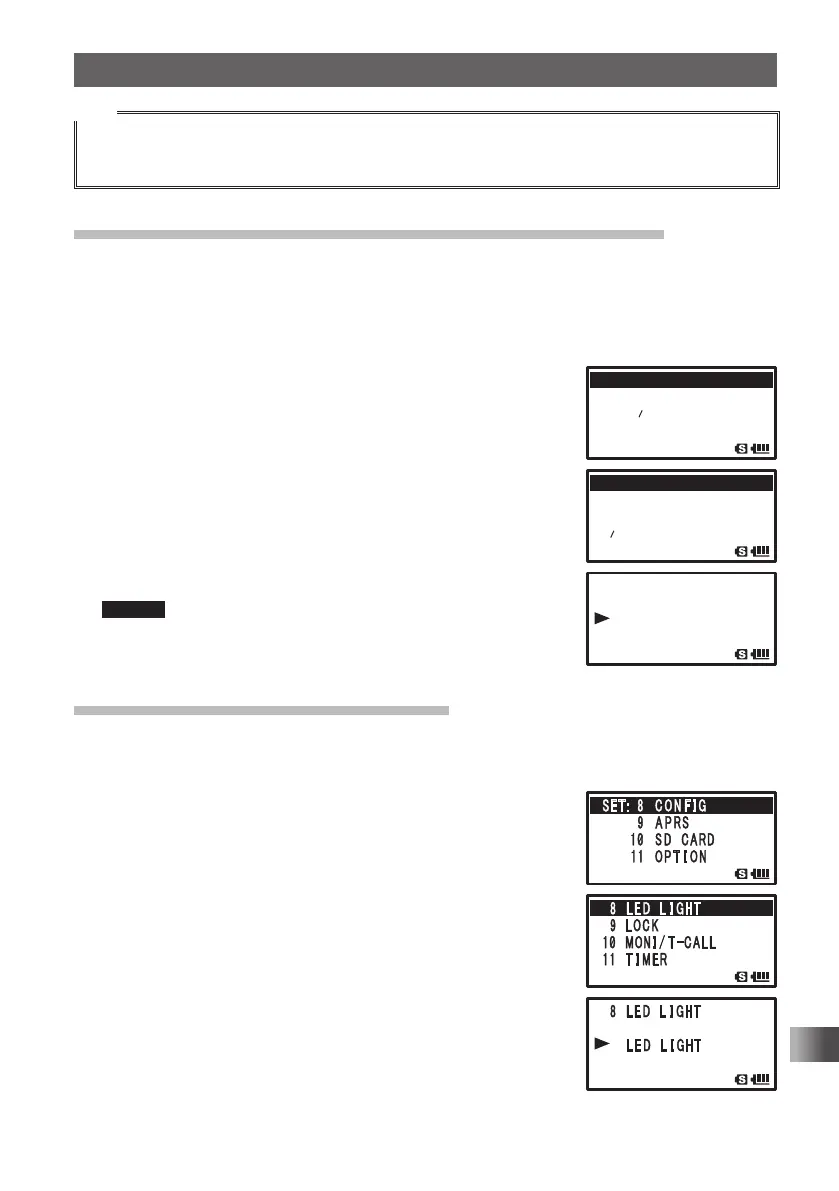
Permitting Transfer of Home Channel Frequency to VFO
You can use the set operation to transfer home channel frequency information to the
VFO.
Enter the Set mode:
1 Press and hold M for over 1 second.
2 Turn O to select [8 CONFIG].
3 Press H.
4 Turn O to select [7 HOME VFO].
5 Press H.
6 Turn O to select Unlock or Lock.
ENABLE: Turning O in home channel transfers the home
channel frequency to VFO.
DISABLE: The home channel frequency cannot be
transferred.
Remark Default: ENABLE
7 Press p to save the frequency transfer ENABLE/
DISABLE/Unlock setting, and exit the Set mode.
Using the White LED as a Flashlight
The white LED may be used as a flashlight.
Enter the Set mode:
1 Press and hold M for over 1 second.
2 Turn O to select [8 CONFIG].
3 Press H.
4 Turn O to select [8 LED LIGT].
5 Press H.
The white LED lights as a flashlight.
6 Press M.
The LED goes out.
7 Press p to exit from the Set mode.
䎃 䎚䎃䎚䎃䎃䎫䎲䎰䎨䎫䎲䎰䎨䎃䎃䎹䎩䎲䎹䎩䎲
䎃
䎛䎃䎛䎃䎃䎯 䎨 䎧 䎃䎃䎯 䎬 䎪䎫䎷䎪䎫䎷
䎃 䎜 䫹 䎯 䎲䎦 䎮
䎔䎓
䎦䎤䎯䎯䎦䎤䎯䎯
䎃 䎚䎃䎃䎫䎲䎰䎨䎫䎲䎰䎨䎃䎃䎹䎩䎲䎹䎩䎲
䎃 䎃䎃
䎃 䎃䎃 䎃
䎨䎱䎤䎥䎯䎨䎨䎱䎤䎥䎯䎨
䎃䎃䎃
䎶䎨䎷䎝䎃䎶䎨䎷䎝䎃䎃䎛 䫹 䎦 䎲 䎱 䎩 䎬 䎪
䎃䎃䎃䎃䎃䎃䎃䎃䎜 䫹 䎤 䎳 䎵䎶
䎃䎃䎃䎃䎃䎃䫹
䎔䎓䎔䎓䫹 䎶 䎧䎃䎃䎦䎤䎵䎧䎦䎤䎵䎧
䎃䎃䎃䎃䎃䎃
䎔䎔䎔䎔䫹 䎲 䎳 䎷 䎬 䎲 䎱
FT1DRDEEng.indb129FT1DRDEEng.indb129 13/06/2815:1713/06/2815:17


 To Next Page