92
Communicating with a Specific Remote Station
Using the Tone Squelch Function
Calling a Specific Station
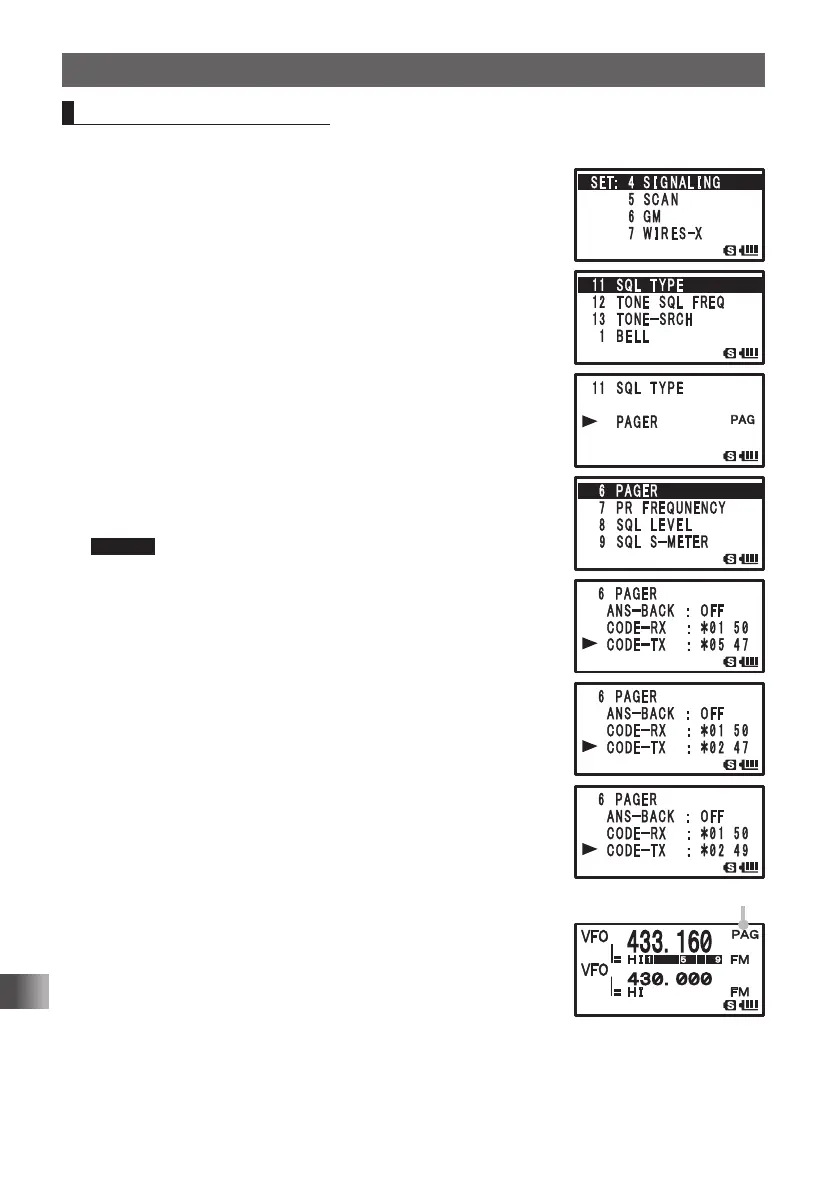
Enter the Set mode:
1 Press and hold M over 1 second.
2 Turn O to select [4 SIGNALING].
3 Press H.
4 Turn O to select [11 SQL TYPE].
5 Press H.
6 Turn O to select [PAGER].
Set the new pager function:
7 Press M.
8 Turn O to select [6 PAGER].
9 Press H.
10
Turn O to select [CODE-TX].
11
Press H.
12
Turn O to select the code of the remote station.
Select the first code of the remote station.
Caution Register the pager code of the remote station in advance.
13
Press H.
The cursor [¼] moves.
14
Turn O to select the code of the remote station.
Select the second code of the remote station.
15
Press p to set the code of the remote station and exit
from the Set mode.
16
Press p to call the remote station.
PAG appears.
FT1DRDEEng.indb92FT1DRDEEng.indb92 13/06/2815:1613/06/2815:16


 To Next Page