85
Communicating with a Specific Remote Station
Using the Tone Squelch Function
Display Operation
PR FREQ
Turns on the no-communication squelch function for radios ([PR]
appears.). You can specify no-communication signal tone frequencies
within the range from 300 Hz to 3000 Hz in steps of 100 Hz.
PAGER (See page 90)
Turns on a new pager function ([PAG] appears). When using transceivers
with your friends, specifying personal codes (each code is composed of
two tones) allows only a specific station to be called.
D CD* Sends a DCS code only in case of transmission ([DC] appears).
TONE-DCS*
Sends a tone signal in case of transmission, and waits for a DCS code in
case of reception ([T-D] appears).
D CD-TONE SQL*
Sends a DCS code in case of transmission, and waits for a tone signal in
case of reception ([D-T] appears).
* Pressing and holding M over 1 second and selecting [4 SIGNALING] [10 SQL EXPANTION] and
then [ON] will add the setting items of D CD, ONE-DCS, and D CD TONESQ to [10 SQL TYPE] of the
Set mode option [4 SIGNALING], allowing you to select different types of squelches for transmission and
reception.
Selecting a Tone Frequency
You can select a tone frequency from among 50 frequencies (67.0 Hz to 254.1 Hz).
1 Specify the operating frequency.
2 Press and hold M over 1 second.
Enters the Set mode.
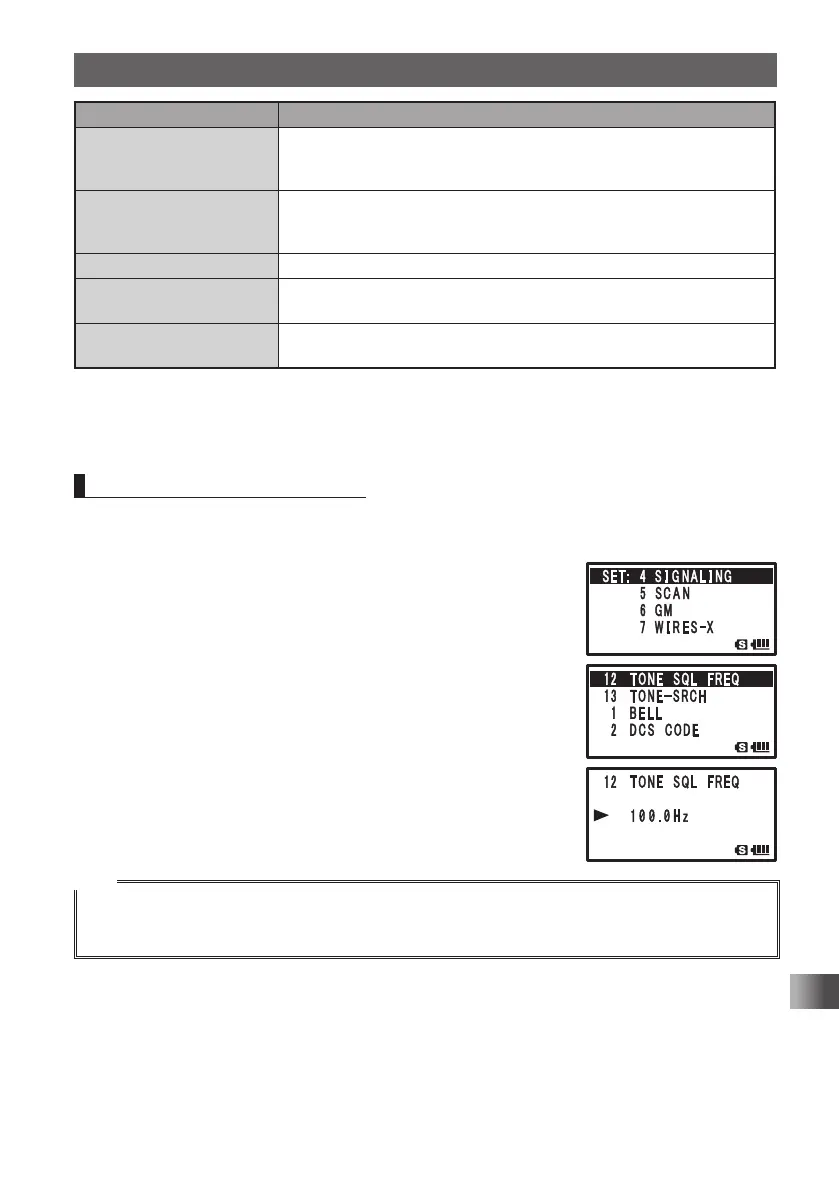
3 Turn O to select [4 SIGNALING].
4 Press H.
5 Turn O to select [12 TONE SQL FREQ].
6 Press H.
7 Turn O to select a tone frequency.
8 Quickly press M 3 times to save the tone frequency
setting and exit the Set mode.
Tips
• The tone frequency selected using the above-described procedure is also effective when only the
tone is sent out.
• By default, the tone frequency is set to 88.5 Hz.
FT1DRDEEng.indb85FT1DRDEEng.indb85 13/06/2815:1613/06/2815:16



 To Next Page