34
Basic Operation
Miscellaneous Settings
Setting clock time
This transceiver is equipped with an internal clock. The clock is used to display the time,
and also to turn the transceiver on or off at a specified time (timer function). Set the
clock before using the transceiver for the first time.
Enter the Set mode:
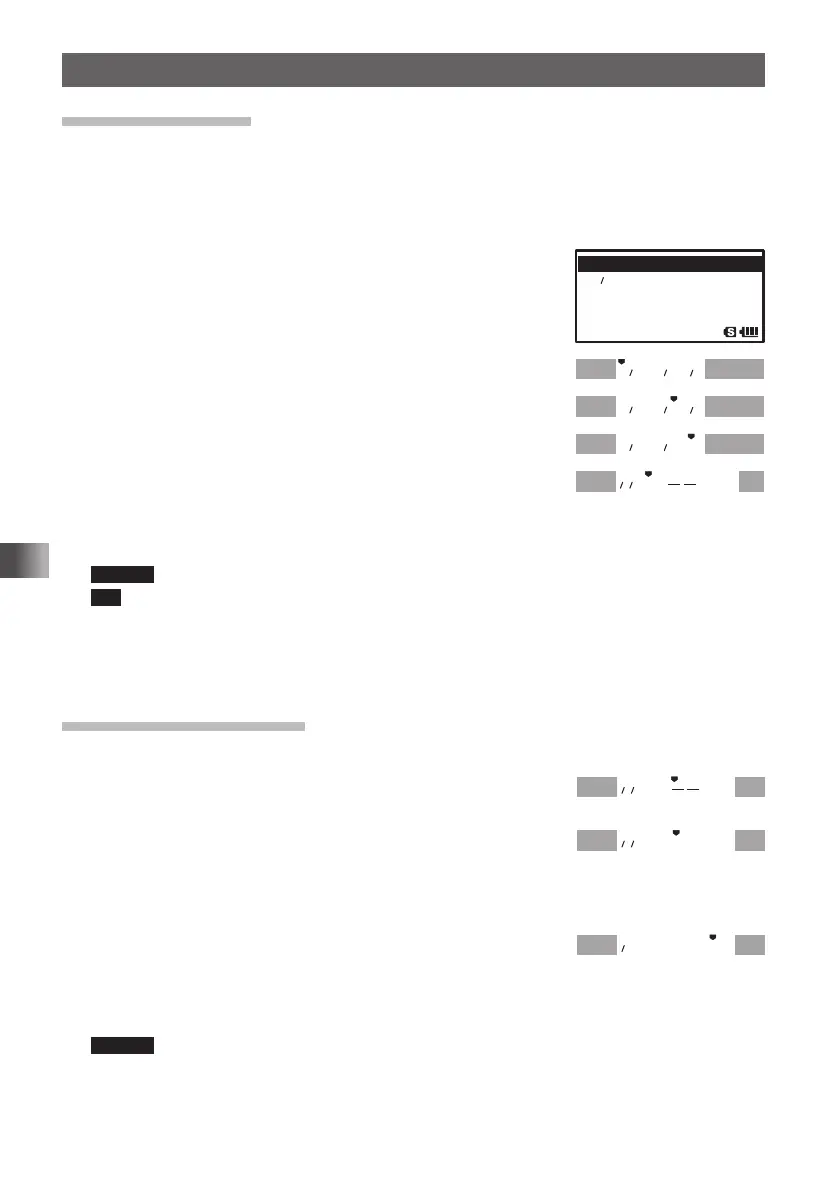
1 Press and hold M for over 1 second.
2 Turn O to select [8 CONFIG].
3 Press H.
4 Turn O to select [19 DATE & TIME ADJ].
5 Press H.
6 Turn O to set [YEAR].
7 Press H.
The cursor moves to [MONTH].
8 Turn O to set [MONTH].
9 Repeat steps 5 and 6.
Set [DAY], [HOUR], and [MINUTE]
Pressing F moves the cursor to the setting item shown on the left.
Remark The hour appears in the 24-hour clock format.
Tip If GPS information is received, the clock will be set automatically.
Next, set the time signal alarm.
If you do not want to set the time signal alarm, proceed to step 3 described in “Setting
the Time Signal”.
Setting the Time Signal
Set the time signal so that a tone is emitted at 00 minute of each hour.
1 Press B.
The cursor moves to [– –].
2 Turn O to select “SIG”.
If you select [TIME SIGNAL] you will hear a time signal
tone (beep) at 00 minute of each hour.
If you do not want to hear the time signal tone, leave “– –” as it is.
3 Press H.
The cursor moves to [SET].
4 Press H to save the [TIME SIGNAL] setting.
5 Press p to exit from the Set mode.
Remark When “MONOBAND RECEPTION” is selected, the current time appears on the LCD.
䎔䎜䎃䎔䎜䎃䎃 䎧 䎤 䎷 䎨 䎃 䎃䎉䎃䎉䎃䎃䎷 䎬 䎰䎨䎃䎃䎤䎧䎭䎰䎨䎃䎃䎤䎧䎭
䎕䎓䎕䎓䫹 䎷 䎲 䎷
䎕䎔䎕䎔䫹 䎹 䎩 䎲 䎃 䎰 䎲 䎧䎨
䎕䎕䎃䎕䎕䎃䎃 䎹 䎬 䎥 䎵 䎤䎷䎲䎵䎤䎷䎲䎵
䎕 䎓 䎔 䎖 䎑 䎓 䎔 䎑 䎓 䎔
䎕 䎓 䎔 䎖 䎑 䎓 䎙 䎑 䎓 䎔
䎕 䎓 䎔 䎖 䎑 䎓 䎙 䎑 䎔 䎚
䎚䎃䎃䎃䎃䎃䎃䎃䎃䎃䎃
䎶䎨䎷䎃
䎚䎃䎃䎃䎃䎃䎃䎃䎃䎃
䎶䎨䎷䎃
䎚䎃䎃
䎪䎃
䎶䎨䎷
䎙䎃䎃
䎪䎃
䎶䎨䎷䎃
FT1DRDEEng.indb34FT1DRDEEng.indb34 13/06/2815:1613/06/2815:16


 To Next Page