124
Functions Used As Needed
Set Mode
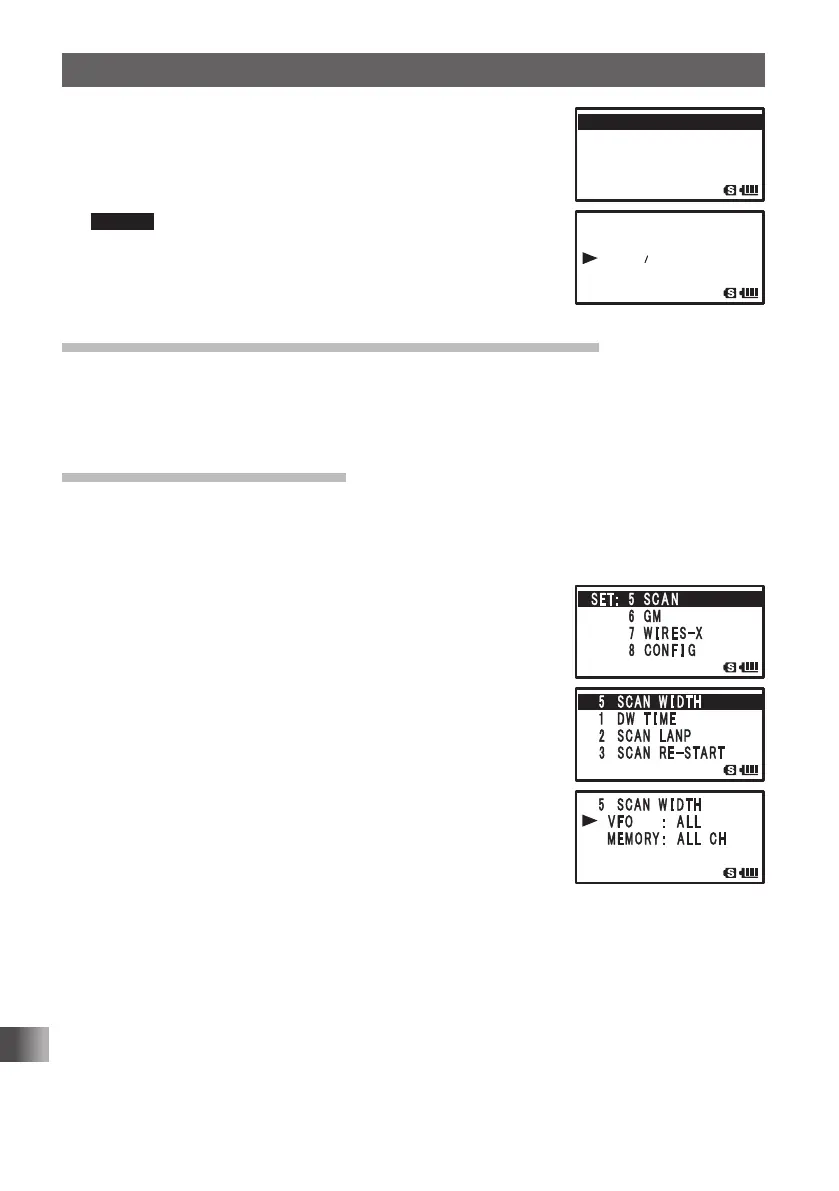
4 Turn O to select [3 SCAN RE-START].
5 Press H.
6 Turn O to select the time to resume scanning.
Select from 0.1 SEC to 10 SEC.
Remark Default: 2 seconds
7 Press p to set the resume scanning time, and exit the Set
mode.
Selecting a reception method when scanning stops
Set the reception method for when scanning stops.
For more details, see “Selecting a Reception Method When Scanning Stops” on page
P. 59.
Setting the range for SCAN
You can set the frequency range for scanning with the SCAN Function.
Enter the Set mode:
1 Press and hold M for over 1 second.
2 Turn O to select [5 SCAN].
3 Press H.
4 Turn O to select [5 SCAN WIDTH].
5 Press H.
6 Turn O to select [VFO].
7 Press H.
8 Turn O to select the range for scanning.
Specify the scanning range with reference to the next list.
9 Press M.
10
Turn O to select [MEMORY].
11 Press H.
䎃䎖 䎃 䎶䎦䎤䎱䎃
䎃䎃䎃 䎃 䎘 䎑 䎓
䏖䏈䏆䏖䏈䏆
䎃
䎖 䎃 䎶䎦䎤䎱䎃䎶䎦䎤䎱䎃䎃䎵 䎨
䙵
䎶䎷 䎤 䎵 䎷
䎗 䎃
䎶䎦䎤䎱䎃䎶䎦䎤䎱䎃䎃䎵 䎨䎶䎸䎰䎨
䎶䎦䎤䎱䎃䎶䎦䎤䎱䎃䎃䎺 䎬 䎧䎷䎫䎧䎷䎫
䎃 䎔 䎃
䎧䎺䎃䎧䎺䎃䎃䎷 䎬 䎰䎨
䎶䎨䎷䎝䎃䎃䎘䎃 䎶 䎦 䎤 䎱
䎃䎃䎃䎃䎃䎃䎃䎃䎙 䎃 䎪䎰
䎃䎃䎃䎃䎃䎃
䫹䎚 䎃 䎺 䎬 䎵 䎨 䎶
䙵
䎻
䎃䎃䎃䎃䎃䎃䎃
䎃䎛䎃 䎦䎲䎱 䎩 䎬 䎪
FT1DRDEEng.indb124FT1DRDEEng.indb124 13/06/2815:1713/06/2815:17


 To Next Page