74
Using the GPS Function
Smart Navigation Function
O Backtrack Function
By registering a point of departure beforehand, the distance and direction to the
registered position from your current position can be displayed in real-time.
O Registering your current position (point of departure) (up to 3 positions can be
registered)
1 Press M to open the Backtrack screen.
2 Turn O to select [MY].
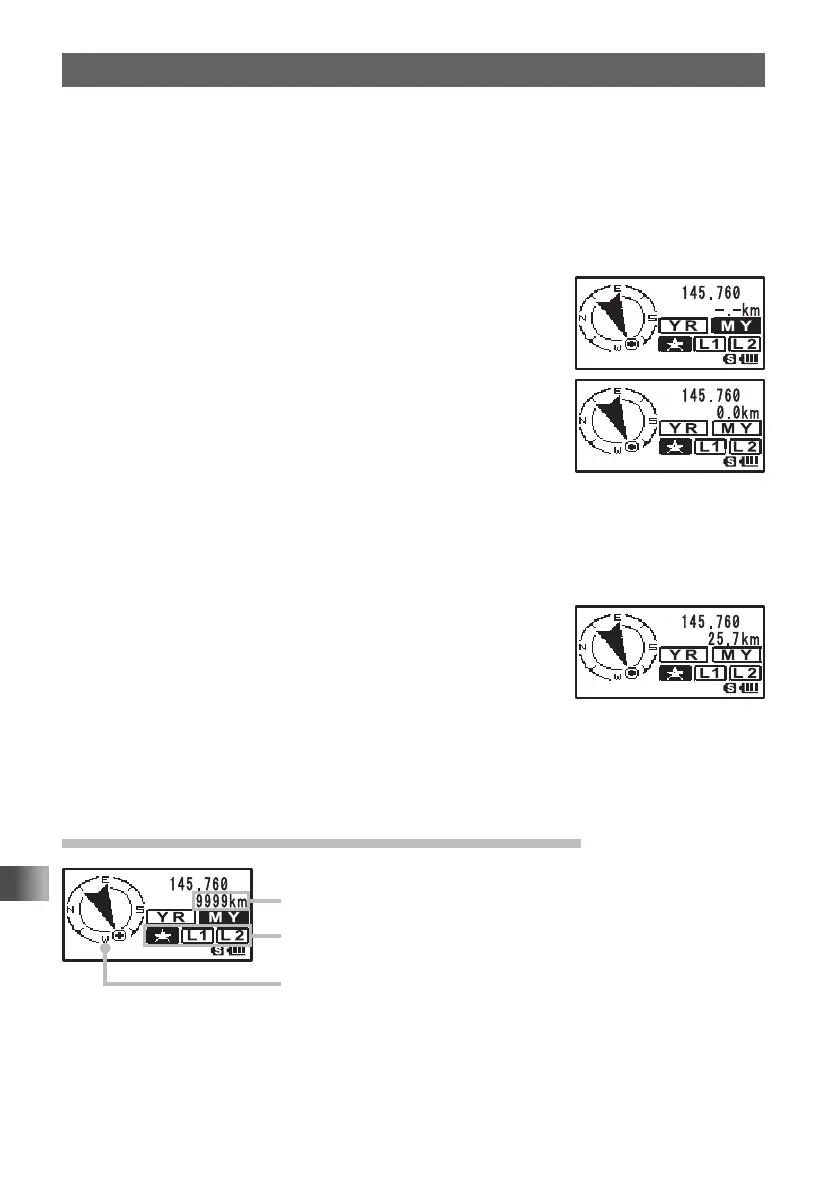
3 Press H to display the position information of your
station.
4 Turn O to select a mark to register from [], [L1], and
[L1].
5 Press H to register the position information to the
selected mark and return to the BACK TRACK function
screen.
6 Press M to return from the backtrack screen to the
normal frequency display.
O Using the Backtrack Function
1 Press M to open the Backtrack screen.
2 Turn O to select [], [L1] or [L2].
Select the mark with the registered position you would like
to backtrack.
The registered position (departure point) is in the direction
of the arrow within the circle. Walk forward so that the
arrow stays pointing up on the screen.
3 Press M to return from the backtrack screen to the normal frequency display.
To verify the position again, press [DISP] to open the backtrack screen.
Description of the BACK TRACK Function Screen
Distance to the registered position
Registered position mark
Direction to the registered position
FT1DRDEEng.indb74FT1DRDEEng.indb74 13/06/2815:1613/06/2815:16



 To Next Page