50
Using the Memory
Using Memory Bank
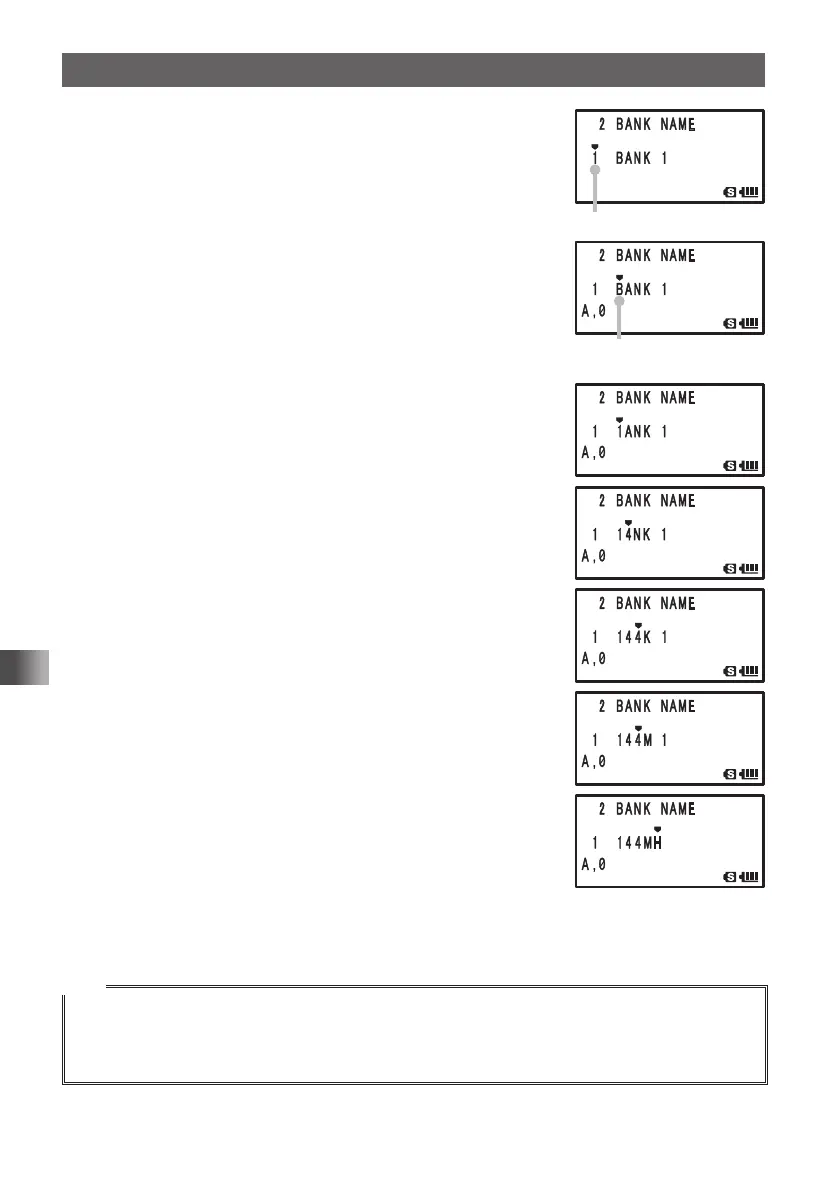
4 Turn O to select [2 BANK NAME].
5 Press H.
6 Turn O to select a memory bank.
Select the number of the memory bank to which you want
to assign a name.
7 Press H to move the cursor to the first character of the
bank name.
8 Press 1 to select the numeric character [1].
9 Press H to move the cursor to the next character
position.
10
Press 4 7 times to select the numeric character [4].
Pressing 4 allows you to select the following characters
sequentially:
G H I g h i 4 G
11
Press H to move the cursor to the next character
position.
12
Press the 4 key 7 times to select the numeric character
[4].
Pressing the 4 key allows you to select the following
characters sequentially:
G H I g h i 4 G
13
Press H to move the cursor to the next character
position.
14
Press 6 to select [M].
Pressing 6 allows you to select the following characters
sequentially:
M N O m n o 6 M
15
Press H to move the cursor to the next character
position.
16
Select [H].
17
Press [9] 8 times.
Select [z].
18
Press p to save the name of memory bank and exit the Set mode.
Tips
• To delete a character, press F. A character is deleted and the cursor moves to left.
• Pressing
0
while entering alphanumeric characters (A,0) allows you to select 0, (space), –, /, ?,
!, ., : and #
• When entering the same type of characters repeatedly, press H to move the cursor.
Bank number
Change the bank name.
Enter a name (First digit)
FT1DRDEEng.indb50FT1DRDEEng.indb50 13/06/2815:1613/06/2815:16



 To Next Page