MULTI-FUNCTION DISPLAY
1-24
EAM20150
MULTI-FUNCTION DISPLAY
EWA19000
Be sure to stop the machine before making
any setting changes to the multi-function
display.
The multi-function display is equipped with the
following:
BASIC MODE:
• Speedometer (which shows current speed)
• Clock
• Two tripmeters (which shows the distance that
has been traveled since it was last set to zero)
• Tire diameter (which shows the difference from
initial setting in percentage)
RACE MODE:
• Timer (which shows the time that has been ac-
cumulated since the start of timer measure-
ment)
• Tripmeter (which shows the accumulated trav-
el distance in timer measurement)
• Average speed (which shows the average of
the speeds that have been made since the
start of timer measurement)
• Change tripmeter digits (capable of change to
any given ones)
• Tire diameter correction (which shows the tire
diametrical difference in percentage as the trip-
meter travel distance is corrected)
EAM30326
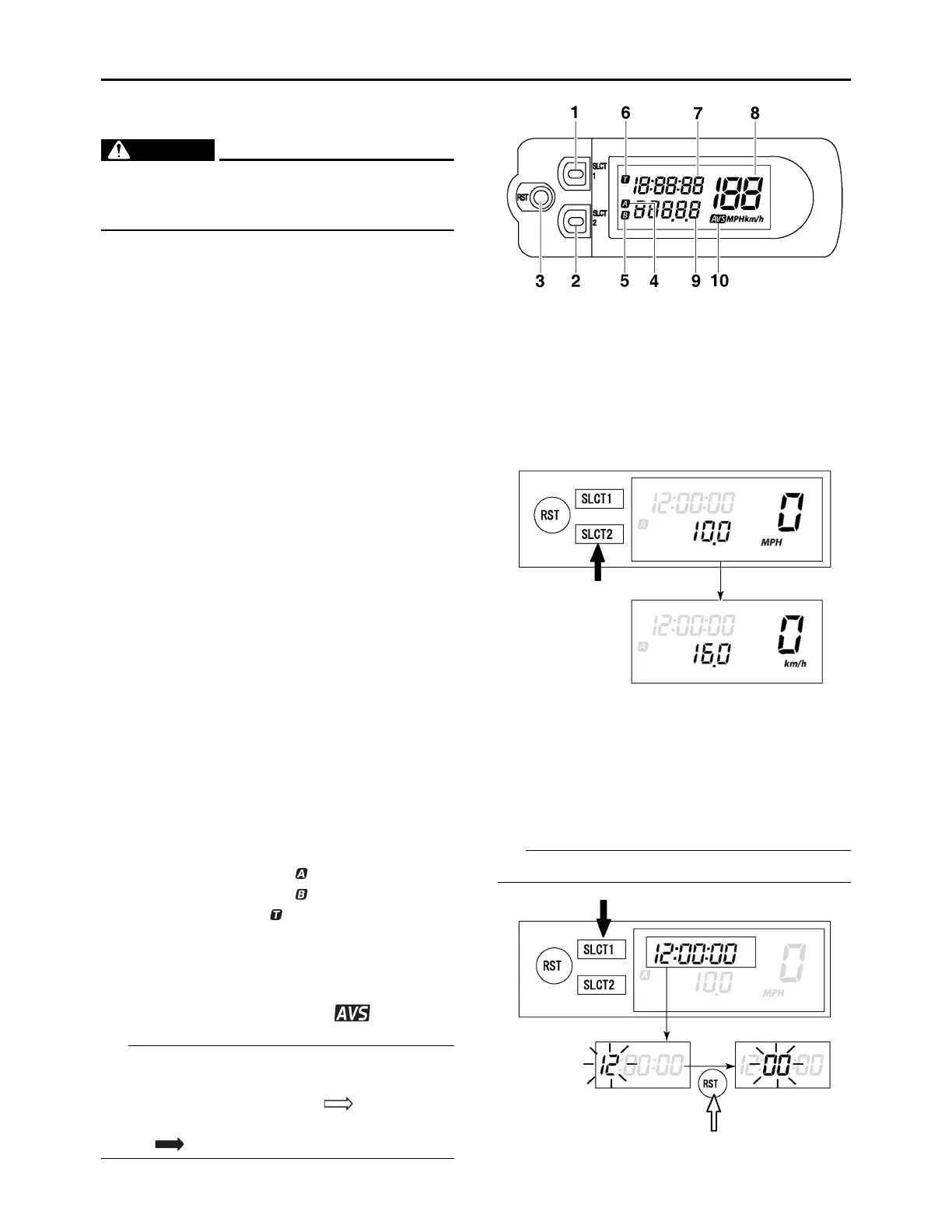
DESCRIPTION
Operation buttons:
Screen display:
The operation buttons can be pushed in the fol-
lowing two manners:
Short push: Push the button. ( )
Long push: Push the button for 2 seconds or
more. ( )
EAM30327
BASIC MODE
Changing speedometer display
1. Push the “SLCT2” button for 2 seconds or
more to change the speedometer units. The
speedometer display will change in the fol-
lowing order:
MPH km/h MPH.
Setting the time
1. Push the “SLCT1” button for 2 seconds or
more to enter the time setting mode.
2. Push the “RST” button to change the display
for time indication. The display will change in
the following order:
Hour Minute Second Hour.
The digits capable of setting go on flashing.
3. Push the “SLCT1” button (plus) or “SLCT2”
1. Select button “SLCT 1”
2. Select button “SLCT 2”
3. Reset button “RST”
4.
Tripmeter indicator “ ”
5.
Tripmeter indicator “ ”
6.
Timer indicator “ ”
7. Clock/Timer
8. Speedometer (Current speed/Average
speed)
9. Tripmeter
10.
Average speed indicator “ ”



 To Next Page