Step Display/Result
4.
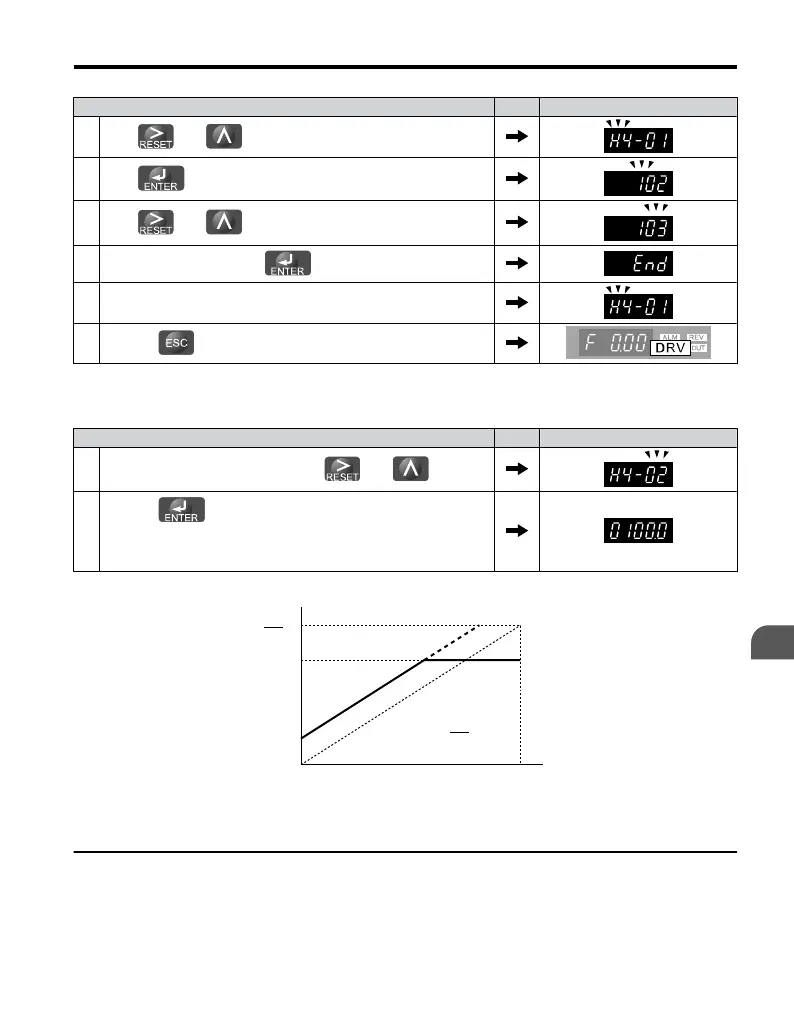
Press and to select H4-01.
5.
Press to display the value currently set to H4-01.
6.
Press and to set the output current (103).
7.
Save the setting by pressing .
8. The display automatically returns to the parameter setting menu.
9.
Press the key until back at the Top Screen.
Adjusting the Analog Output Terminal Voltage with H4-02 and H4-03
Note: This example continues from Step 3 in the previous example.
Step Display/Result
1.
Select H4-02 or H4-03 by pressing the and keys.
2.
Press the key while the drive is stopped and the following
voltage is output for adjustment:
Output voltage = (10 V x Output
Gain (H4-02) + Output Bias (H4-03).
Using this output, adjust output gain (H4-02) and output bias (H4-03).
Output Voltage
10
Gain ×
V
10 V
100%0%
0 V
Monitor
Contents
100
(%)
10
Bias ×
V
100
(%)
Figure 4.18 Analog Output Gain/Bias Setting
u
Motor Protection: L1-01 and L1-02
This section explains how to set motor overload protection.
4.5 Basic Operation
YASKAWA ELECTRIC TOEP C710606 25B YASKAWA AC Drive J1000 Installation & Start-Up Manual
105
4
Start-Up Programming
& Operation
2/6/2008-14:44


 To Next Page
 Loading...