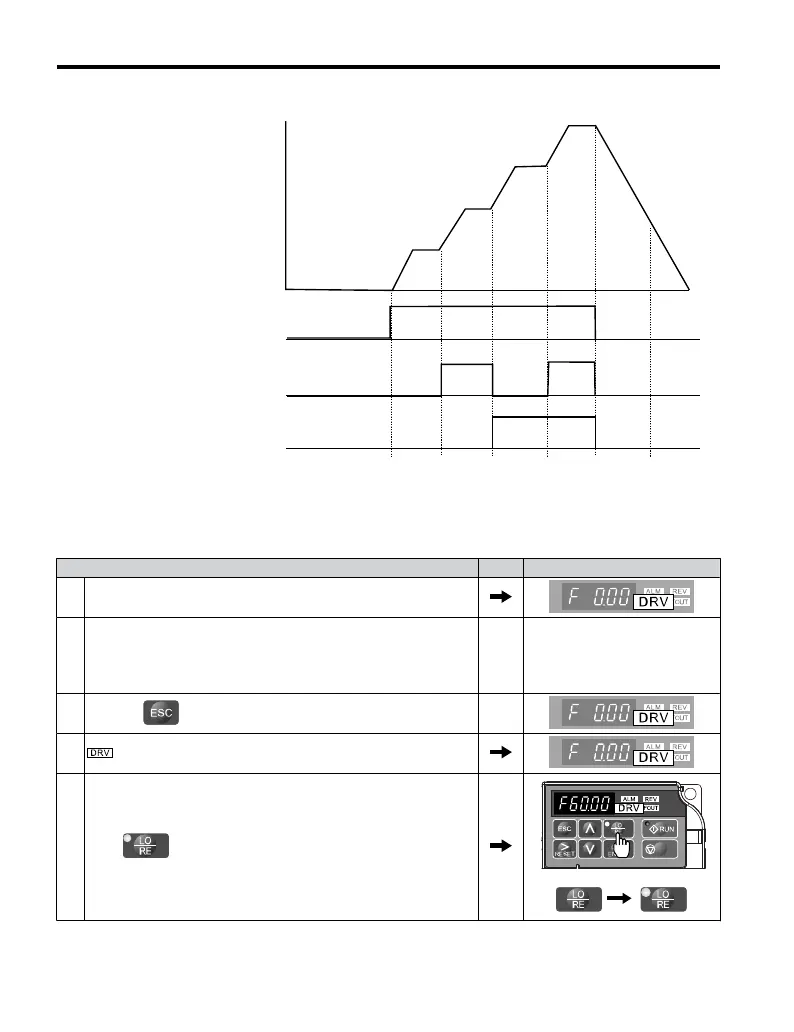
Freq Ref 3
Freq Ref 1
Forward/Reverse Run/Stop
Multi-Step Speed 1
Multi-Step Speed 2
Frequency
Reference
Freq Ref 4
Freq Ref 2
ON
ON
ON
OFF
OFF
ON
Figure 4.15 4-Step Speed Time Chart
n
Setting Procedure
Step Display/Result
1. Turn on the power to the drive. The initial display appears.
2.
Set the frequencies listed below to the specified parameters:
1. d1-01 = 5 Hz: Step 1
<1>
2. d1-02 = 20 Hz: Step 2
3. d1-03 = 50 Hz: Step 3
4. d1-04 = 60 Hz: Step 4
3.
Press the key until the initial display appears.
4. turns on.
5.
Press to select LOCAL. The LO/RE light will turn on.
STOP
4.5 Basic Operation
98
YASKAWA ELECTRIC TOEP C710606 25B YASKAWA AC Drive J1000 Installation & Start-Up Manual
2/6/2008-14:44


 To Next Page
 Loading...