START-UP
Carl Zeiss Mounting the Camera Cell Observer SD
42 423638-7044-001 M60-2-0021 e 01/2009
3.5 Mounting the Camera
The following cameras may be connected to the spinning disc unit:
1.0x camera adapter for: 1.2x camera adapter for:
− AxioCam MRm,
− AxioCam HRM,
− AxioCam HSm
− Photometrics QuantEM
or other EMCCD camera from Photometrics or
Hamamatsu
The procedure for installation is identical for both camera adapter types.
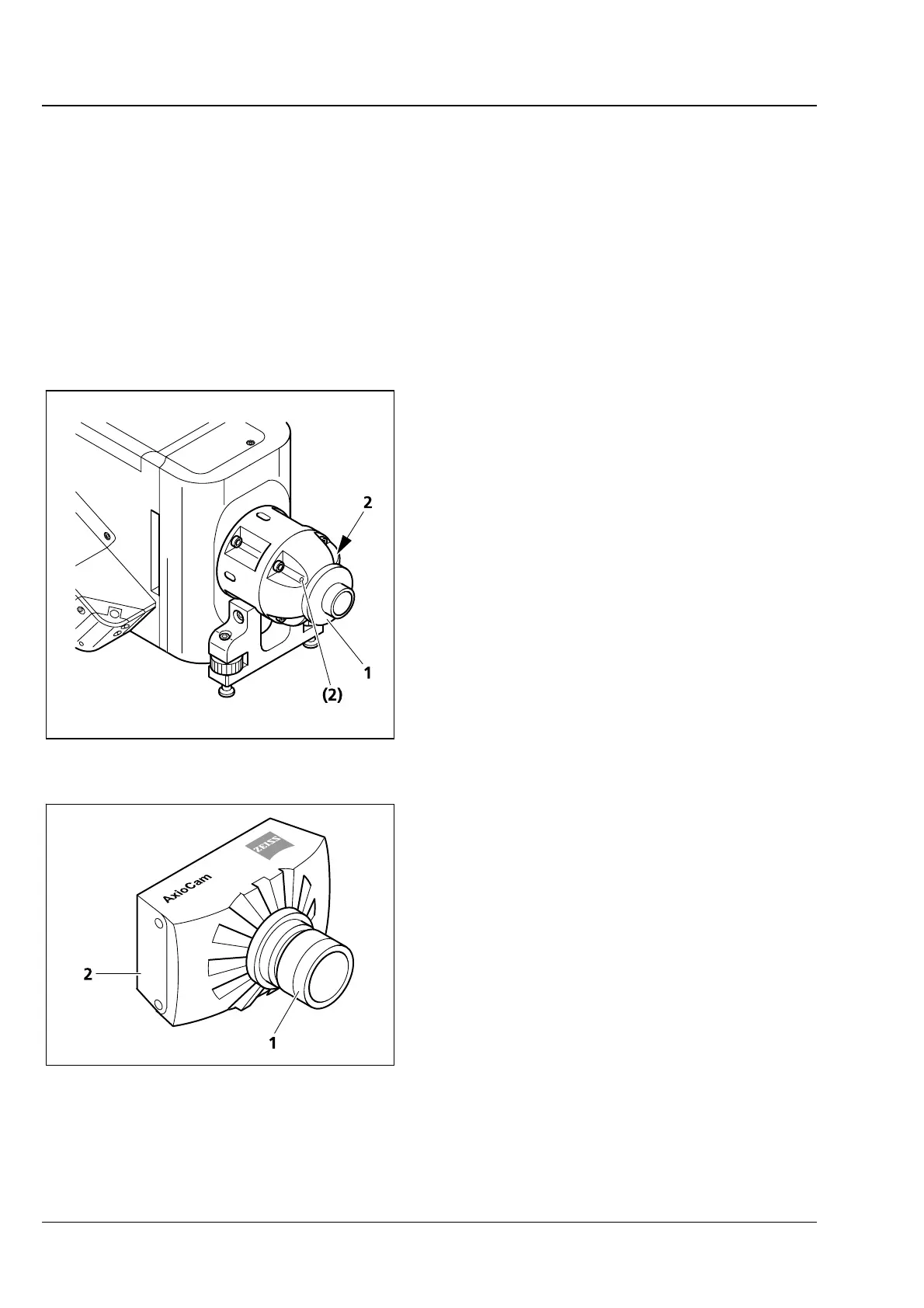
• Release the two fixing screws (Fig. 3-4/2) at the
camera adapter then take the adapter piece
(
Fig. 3-4/1) out.
• Remove anti-dust caps from adapter end piece
and camera.
• Screw the adapter piece (
Fig. 3-5/1) onto the
camera (
Fig. 3-5/2).
• Restore the adapter end piece to the camera
adapter. Make sure that the camera is correctly
oriented as you do this (horizontally, with
inscription at the top).
• Tighten the two screws (
Fig. 3-4/2) at the
camera adapter.
Fig. 3-4 Removal of adapter piece
Fig. 3-5 Screwing the adapter piece to the
camera







 To Next Page