START-UP
Carl Zeiss Connecting the CSU-X1 Control Box Cell Observer SD
44 423638-7044-001 M60-2-0021 e 01/2009
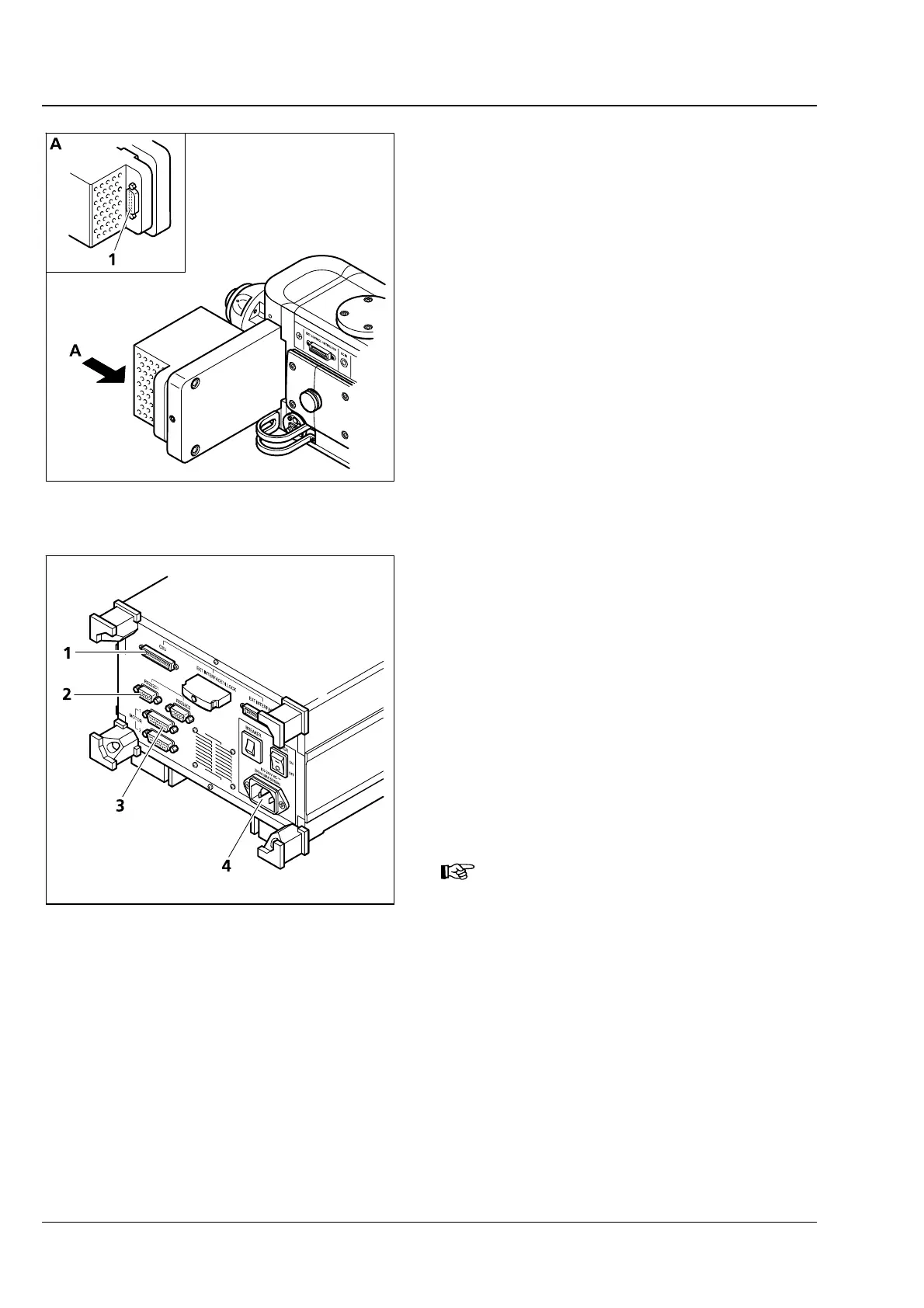
3.6.3 Connecting the Filter Wheel
For operation with a filter wheel, the wheel must
also be connected:
• Connect control cable with filter wheel
(
Fig. 3-7/1). Secure connector with two screws.
• Connect control cable to CSU-X1 control box
(refer to section
3.7).
3.7 Connecting the CSU-X1 Control Box
• Connect terminal RS232C1 (
Fig. 3-8/2) of the
CSU-X1 control box to the computer.
• Plug the control cable of the CSU-X1 spinning
disc unit into terminal CSU (
Fig. 3-8/1) of the
CSU-X1 control box.
• Connect the control cable of the filter wheel (if
installed) to terminal Motor 1 (
Fig. 3-8/3).
• Connect the line power cable to the CSU-X1
control box (
Fig. 3-8/4) and a suitable line
power socket.
Do not use terminal jacks of any type
other than specified herein. Disregar-
ding this advice may cause malfunction
of the spinning disc unit.
Fig. 3-7 Filter wheel connection
Fig. 3-8 CSU-X1 control box connection
points







 To Next Page