CARE, MAINTENANCE, TROUBLESHOOTING AND SERVICE
Cell Observer SD Troubleshooting Carl Zeiss
M60-2-0021 e 01/2009 423638-7044-001 61
5.3 Troubleshooting
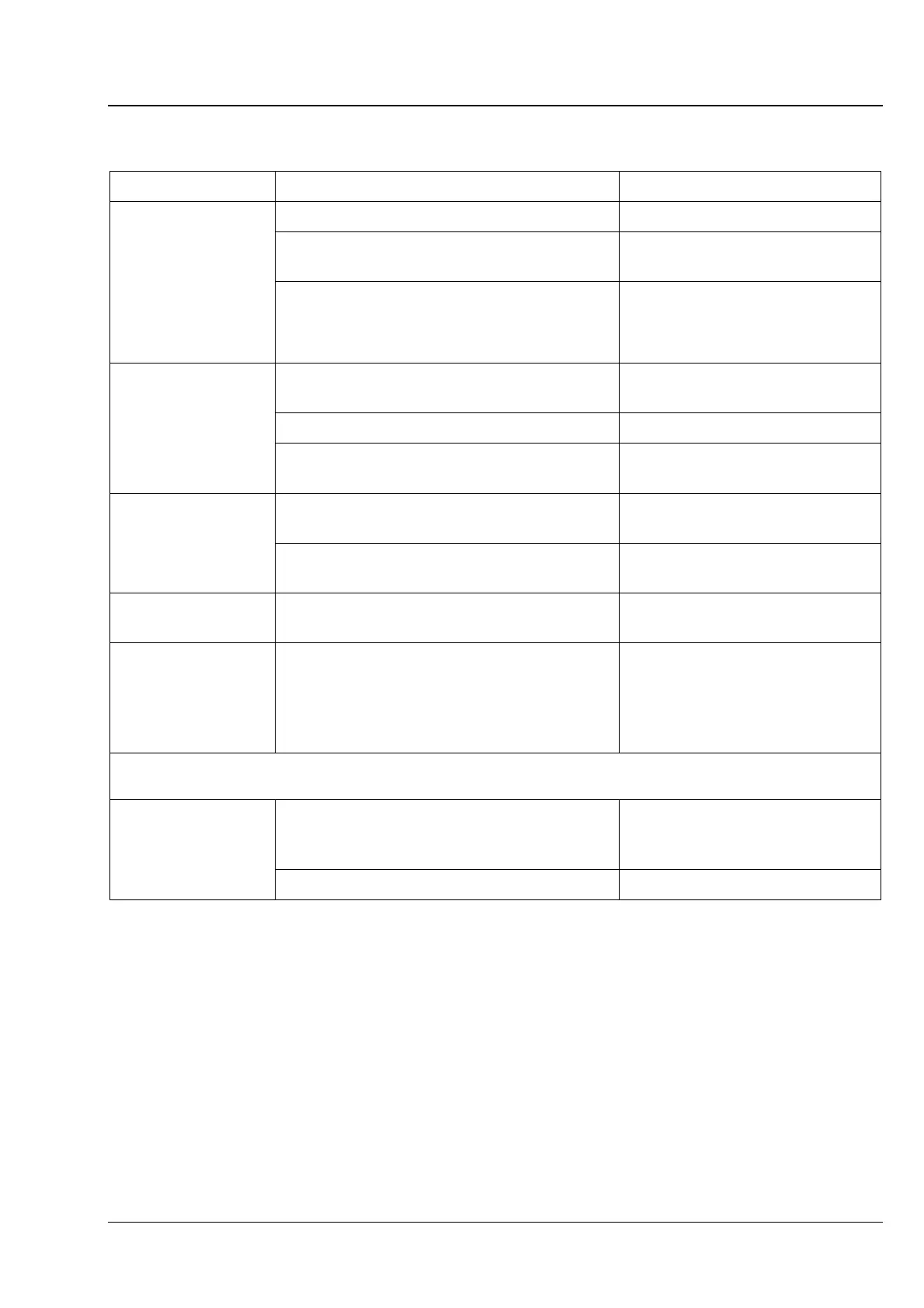
Fault Cause Fault removal
Power supply unit disconnected Connect power supply unit
Turnkey switch not in ON position
Rotate turnkey switch into
position ON
Spinning disc unit
does not function
Terminals at spinning disc unit / CSU-X1
control box unplugged or make loose contact
Inspect terminal connections
(refer to sections
3.6 and 3.7)
Transmitted-light arm tilted back Tilt transmitted-light arm into
vertical position
Reflector turret unlocked or fully extracted Lock or push reflector turret in
No laser light on
sample / safety
shutter closed
Shutter at Cell Observer SD closed Open shutter by pressing the
Shutter button (
Fig. 4-1/1)
CSU-X1 control box not ON
Turn CSU-X1 control box on (refer
to section
4.2.1)
Rotation speed of
spinning disc unit
cannot be set
CSU-X1 not connected to CSU-X1 control
box
Connect CSU-X1 (refer to section
3.6.3)
CSU-X1 control box
cannot be turned on
Fuse of CSU-X1 control box was triggered Turn safety switch (refer to
page
51, Fig. 4-2/2) on again
Switch buttons of
laser lines in
AxioVision software
are inactive
AOTF detection failure / faulty AOTF
connection
Press AOTF Reset button (refer
to page
51, Fig. 4-3/4) at the
multi laser module and launch
new AxioVision software session
CSU-X1M 5000, CSU-X1M 5000 Dual Cam, CSU-X1A 5000 spinning disc unit:
Fuse of CSU-X1 control box was triggered Turn automatic circuit breaker at
the back of the CSU-X1 control
box on again
Spinning disc unit is
On, control LED
lights, but no
function available
Shutter closed Open the shutter







 To Next Page