OPERATION
Cell Observer SD Exchange of Camera Adapter Carl Zeiss
M60-2-0021 e 01/2009 423638-7044-001 57
4.7 Exchange of Camera Adapter
For operation with a Photometrics QuantEM
camera, a special EMCCD camera adapter
(423638-9260-000) is required.
• Use the key switch to turn the spinning disc unit
off (
Fig. 4-1/2).
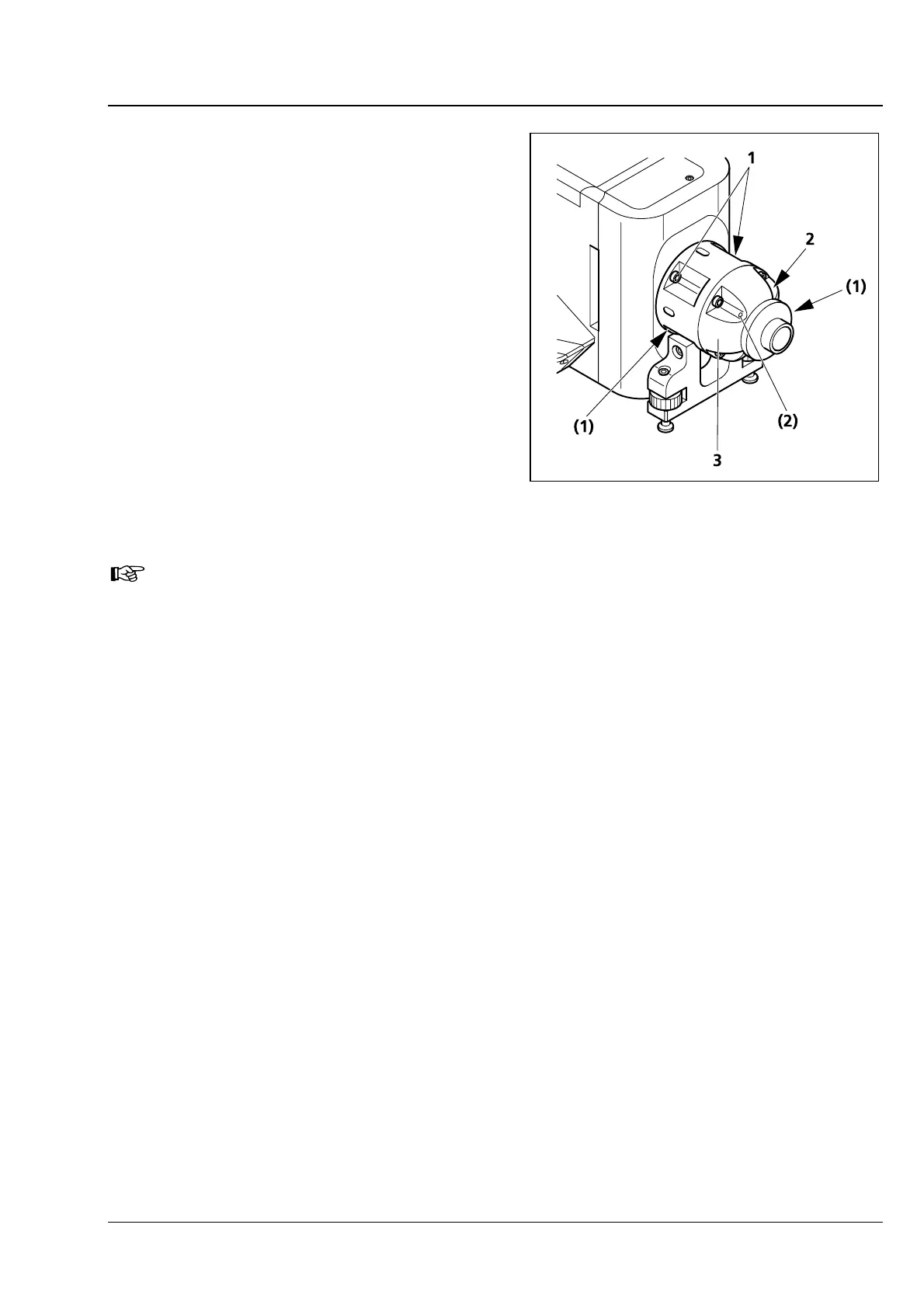
• Hold the camera (
Fig. 4-10/3) adapter in a
stable position.
• Loosen the four fixing screws (
Fig. 4-10/1) of
the camera adapter.
• Take the camera adapter (
Fig. 4-10/3) off.
• Insert the EMCCD camera adapter into the spin-
ning disc unit in such a position that the two
screws (
Fig. 4-10/2) point to the top.
• Tighten the four fixing screws.
Make sure that the camera adapter is correctly oriented before you mount it!
The fixing screws (
Fig. 4-10/2) of the adapter end piece must face towards the top. Otherwise,
there may be malfunction.
Fig. 4-10 Exchange of camera adapter







 To Next Page