Device Overview & Architecture
906-0731-04-01 Rev. C ZOLL Ventilator Service Manual 2–5
Controls and Indicators
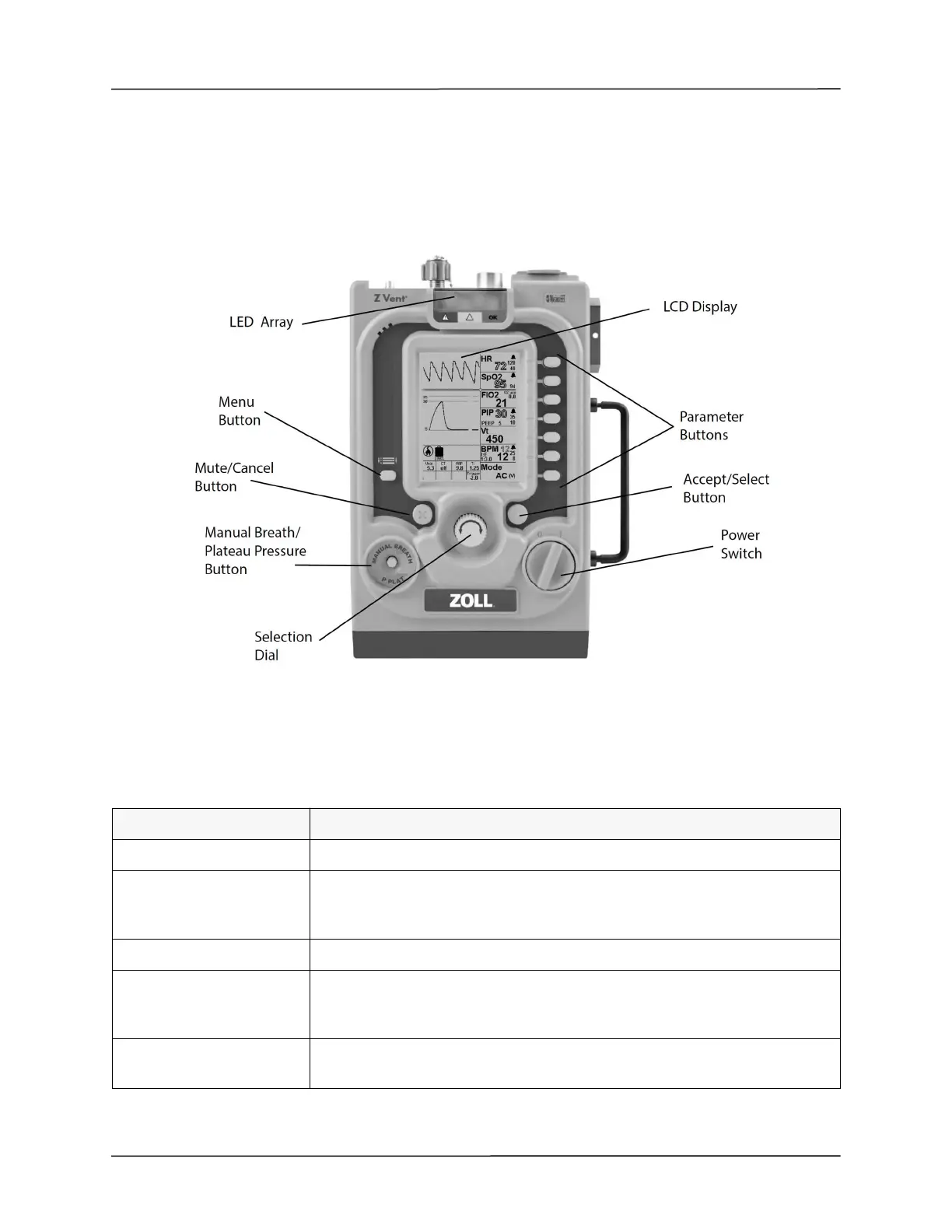
The ventilator controls and indicators (shown in Figure 2-2) facilitate ease of use and visibility in all operating
environments.
Figure 2-2 Controls and Indicators
Controls
The ventilator’s controls consist of the following:
Control Function
Power Switch Provides the user to turn the ventilator ON and OFF.
Parameter Buttons
Provides the user to access primary parameters, secondary parameters and context
menus associated with a primary parameter (if applicable), and then modify
settings using the Selection Dial).
Menu Button Provides the user to access the Menu.
Selection Dial
Allows the user to set values for a chosen (highlighted) Primary Parameter,
Secondary Parameter, Context Menu item, and Menu item. Values accelerate with
speed of turning.
Mute/Cancel button
The Mute/Cancel button mutes the audible alarm allowing the user time to change
parameters. It can also be used to cancel parameter entries.



 To Next Page