Service Kit Installation Procedures
4–28 www.zoll.com 906-0731-04-01 Rev. C
RTC Battery Replacement Instructions
Step Procedure
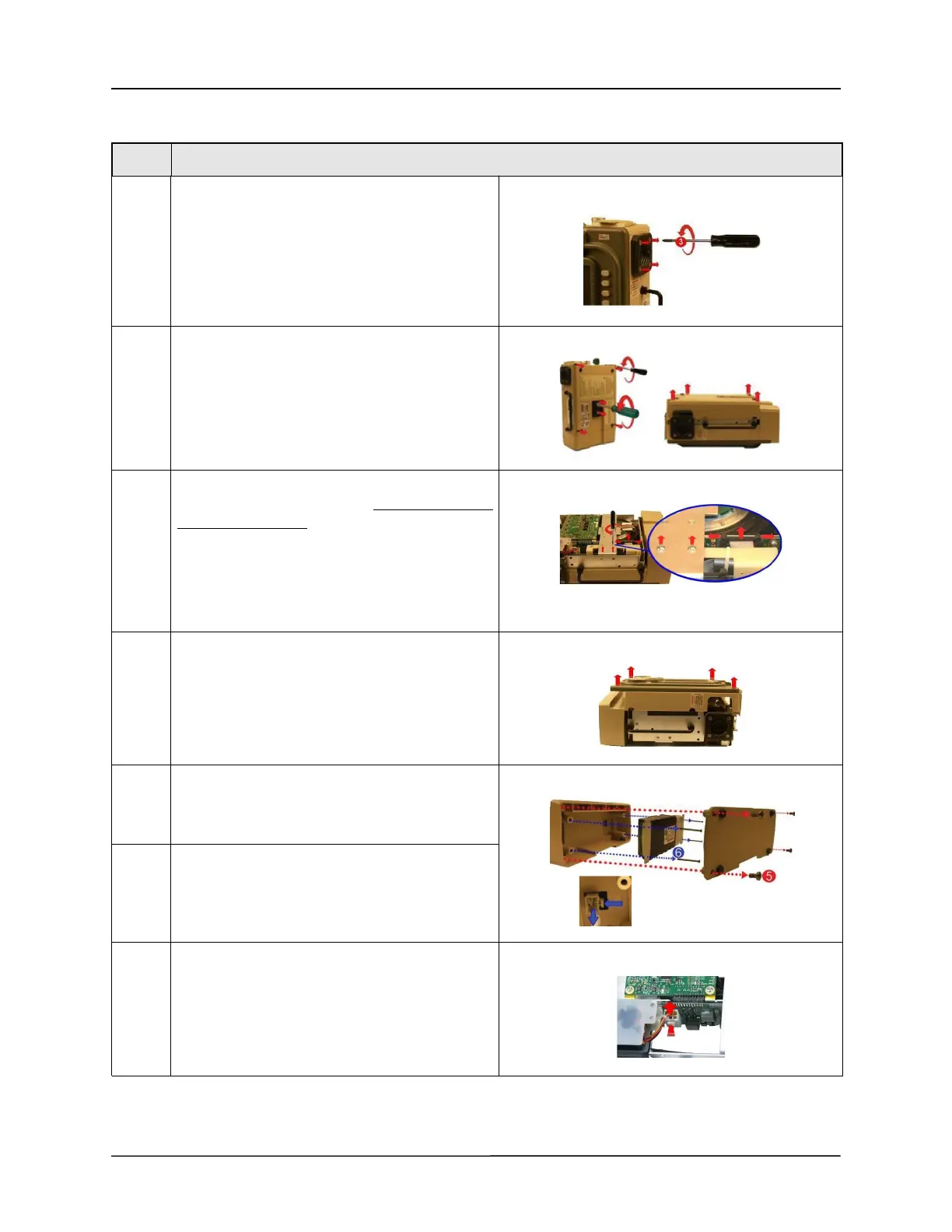
1 Loosen by 1 full turn and do not remove the four
8-32 x 3 screws on the outer air intake. (Additional
loosening may cause the filter disk to slip out of
place)
2 Loosen and remove the two 1032 Keps nuts and
the four 6-32 x 2 screws.
Save these screws and Keps nuts.
Remove the back case by lifting it from the
ventilator.
3 Remove the two pan head 4-40 x 1/4 screws on
the dovetail mounting bracket, do not remove the
two flat head screws.
Save these screws.
Disconnect the ribbon cable on the PIM board by
simultaneously applying pressure on the two
ejector latches.
4 Flip the ventilator over and remove the front case
assembly by lifting it straight up and away from
the ventilator module.
5 Remove the battery compartment cover by
unscrewing the four 6-32 x 5/16 screws.
Save these screws.
6 Remove the battery by unscrewing the four 6-32 x
2 1/4 screws and detaching the plug from its
locking latch.
Save these screws.
7 Disconnect the Power Input Cable from the PIM
board by pressing on the locking latch and pulling
the cable straight up from the connector.



 To Next Page