Output settings
Setting signals sent to headphones (Headphone Routing)
109
F8n Multi Track Field Recorder
Setting the routing
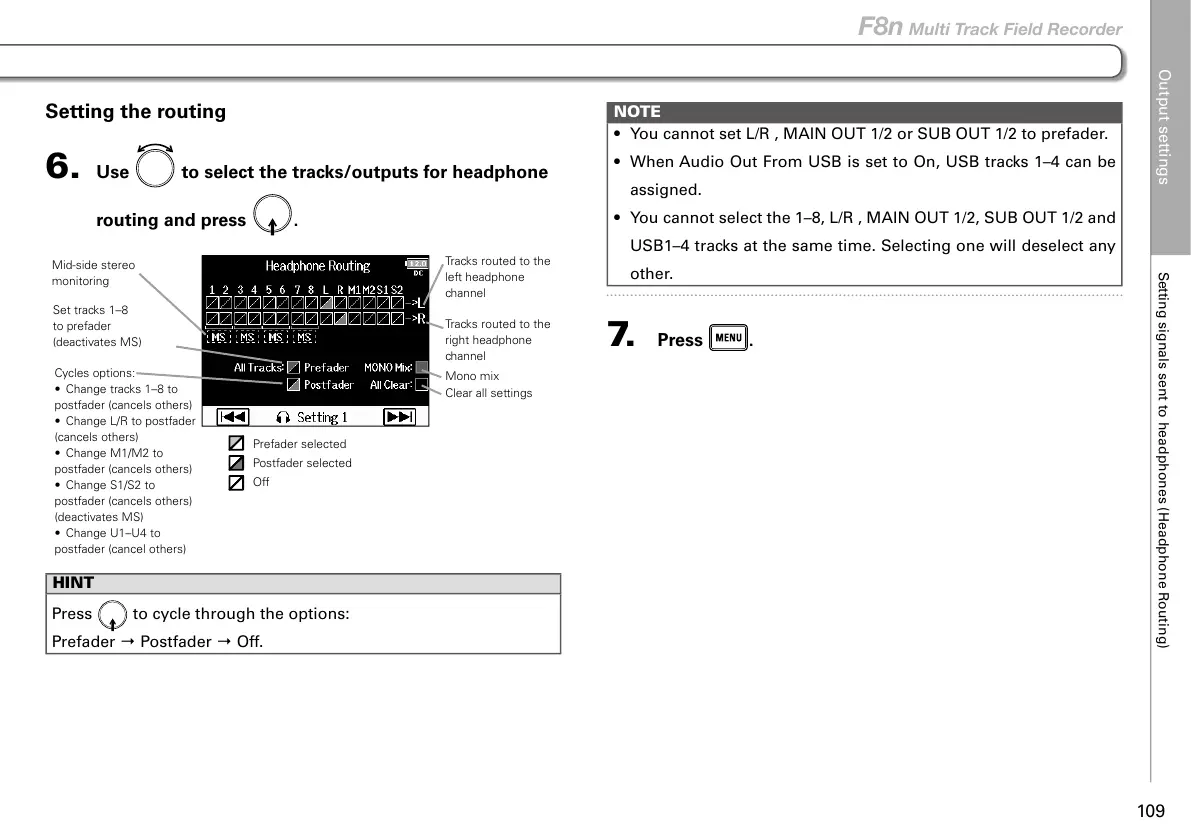
6. Use to select the tracks/outputs for headphone
routing and press
.
Clear all settings
Mono mix
Tracks routed to the
left headphone
channel
Tracks routed to the
right headphone
channel
Set tracks 1–8
to prefader
(deactivates MS)
Mid-side stereo
monitoring
Cycles options:
• Change tracks 1–8 to
postfader (cancels others)
• Change L/R to postfader
(cancels others)
• Change M1/M2 to
postfader (cancels others)
• Change S1/S2 to
postfader (cancels others)
(deactivates MS)
• Change U1–U4 to
postfader (cancel others)
Prefader selected
Postfader selected
Off
HINT
Press
to cycle through the options:
Prefader → Postfader → Off.
NOTE
• You cannot set L/R , MAIN OUT 1/2 or SUB OUT 1/2 to prefader.
• When Audio Out From USB is set to On, USB tracks 1–4 can be
assigned.
• You cannot select the 1–8, L/R , MAIN OUT 1/2, SUB OUT 1/2 and
USB1–4 tracks at the same time. Selecting one will deselect any
other.
7. Press .



 To Next Page