56
Description of 2N
®
Helios IP Network Scanner
The purpose of this application is to find the dynamic IP address of 2N
®
Helios IP in
the local IP network. The application is available on the installation CD, which is part
of the 2N
®
Helios IP package. Microsoft NET Framework 2.0 is required for installation.
1. Run the 2N
®
Helios IP Toolkit installer.
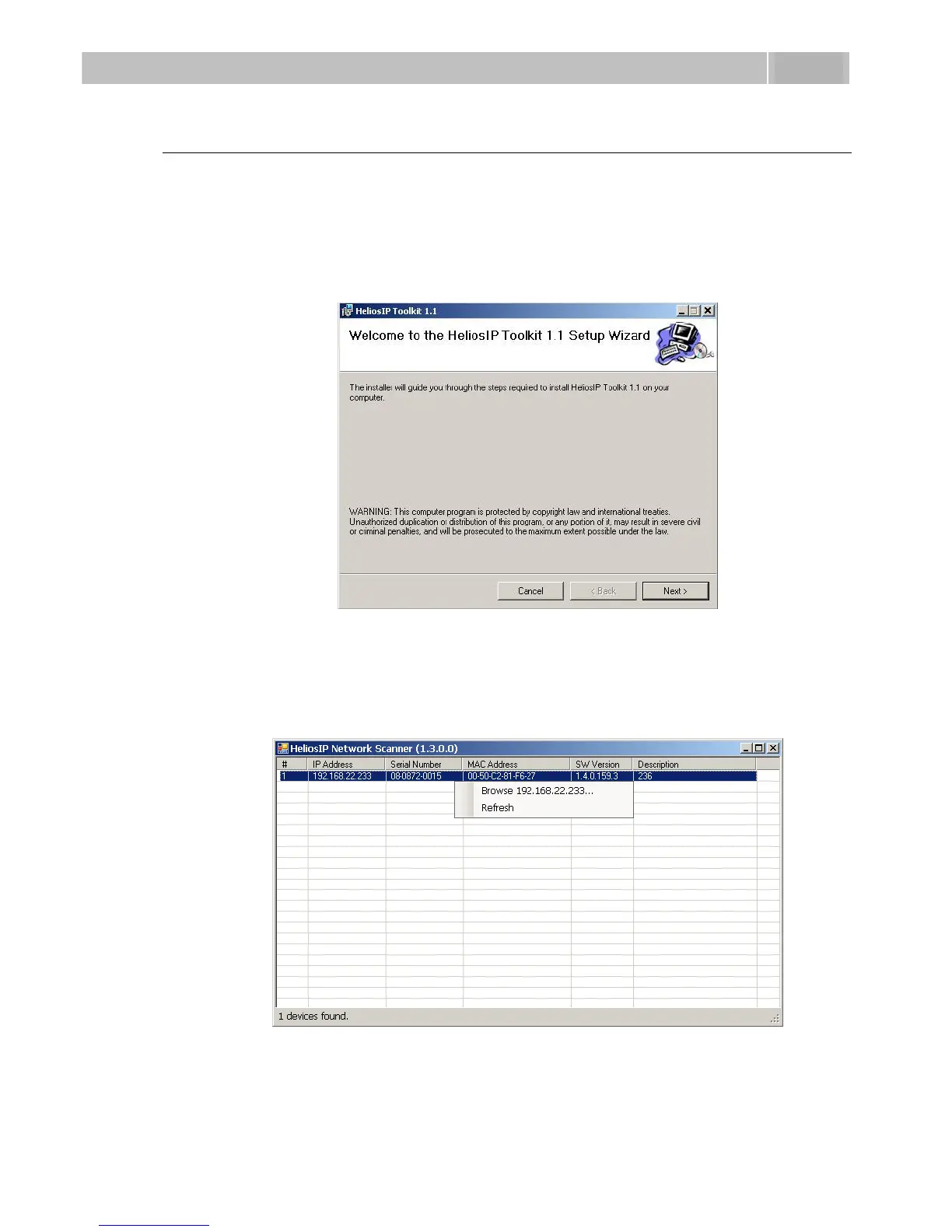
2. The installation wizard will guide you through the installation.
Figure 3.11 2N
®
Helios IP Network Scanner Installation Wizard
3. After installing the 2N
®
Helios IP Network Scanner application, run the
application using the Start menu of the Microsoft Windows operating system.
4. Upon launch, the application starts searching the LAN automatically for all
2N
®
Helios IP communicators with an assigned or statically set IP address.
The communicators are then listed in a table.
Figure 3.12 2N
®
Helios IP Network Scanner Window
5. Select the 2N
®
Helios IP communicator to be configured. Click on it with the
right-hand mouse button and select Browse... to open the web browser
window, log in to 2N
®
Helios IP and start configuring as described in the Login
subsection below.



 To Next Page