ScreenMaster RVG200
Paperless recorder 7 Configuration
60 OI/RVG200-EN
7.3 Configuration level access
To configure the recorder when Configuration security is set to the factory default setting of Password
protected:
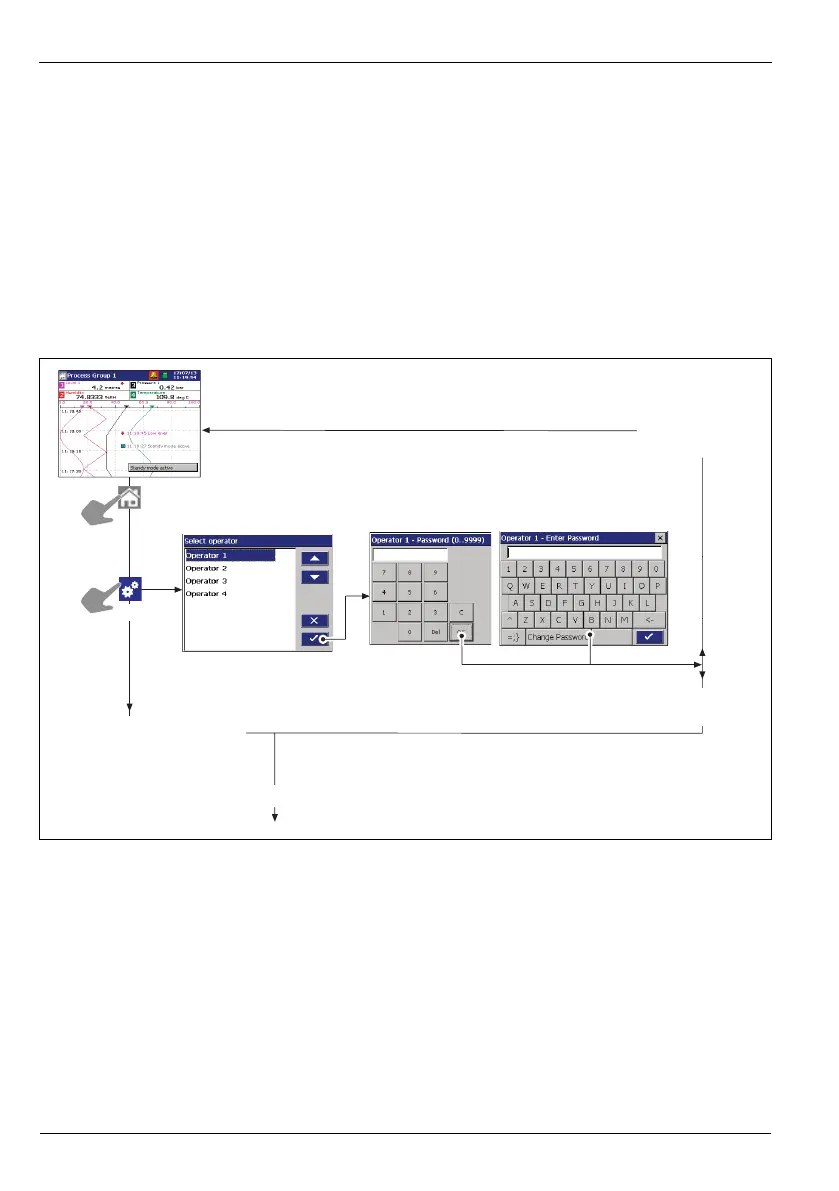
1. Access the Configuration level – see Figs. 7.1 and 7.2, pages 60 and 61 respectively.
2. Make changes to parameters as detailed in Figs 7.5 and 7.6 (pages 64 and 65 respectively).
To configure the recorder when Configuration security is set to Internal switch protected:
1. Set the internal security switch to the 'Configuration level not protected' position – see Fig. 7.3,
page 62.
2. Access the Configuration level – see Figs. 7.1 and 7.2, pages 60 and 61 respectively.
3. Make changes to parameters as detailed in Figs 7.5 and 7.6 (pages 64 and 65 respectively).
Fig. 7.1 Accessing the configuration level
Configuration level
protected
(see Section 7.2, page 59)
Configuration level
unprotected
(see Section 7.2, page 59)
Continued in Fig. 7.2 on next page
Displayed only if
Security system is set to
Basic – see
Section 7.7.5, page 74
Displayed only if
Security system is set to
Advanced – see
Section 7.7.5, page 74
Invalid password
entered
Valid password
entered














 To Next Page