9-4
Questions? Refer to Page 11-22 For Technical Support Instructions.
What You See on the Display What You Do Comments
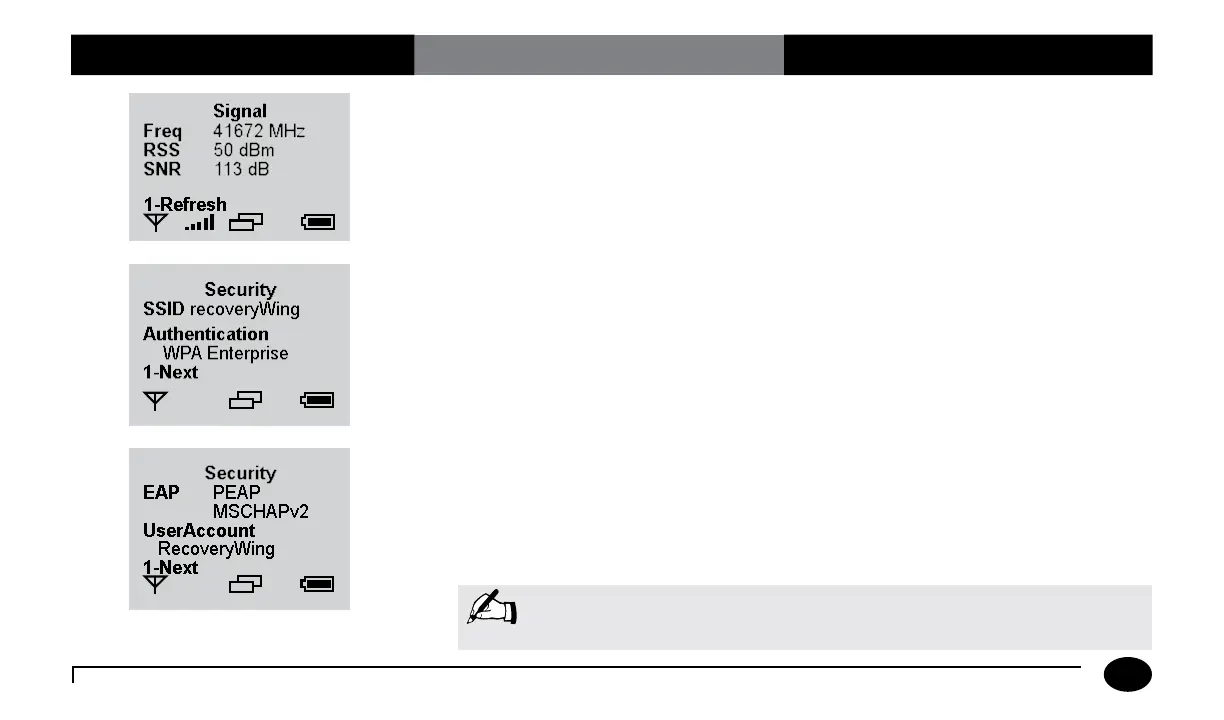
4. Signal status screen.
Screen displays the wireless band frequency
(Freq), the received signal strength (RSS)
and the signal noise ratio (SNR) at the time
of the last wireless transmission. Press 1
to refresh the screen for the current signal
status.
5. Security settings screen.
Screen displays the security settings
configured through the Wireless Set-Up
Utility CD. If there are additional security
settings, press 1 to go to the next screen.
6. Press 1-Next to continue to the
Wireless Menu screen.
Note: For information on wireless data transfer see the Wireless Transfer
section in the Data Upload chapter.
Chapter 9: Review Setup for Wireless Communication (Optional)












 To Next Page