4 System functions and displays 12
fabian Therapy evolution | SW V5.1.x
Ref: 121003.EN / Date: 26Jan2021
4 System functions and displays
Control panel options
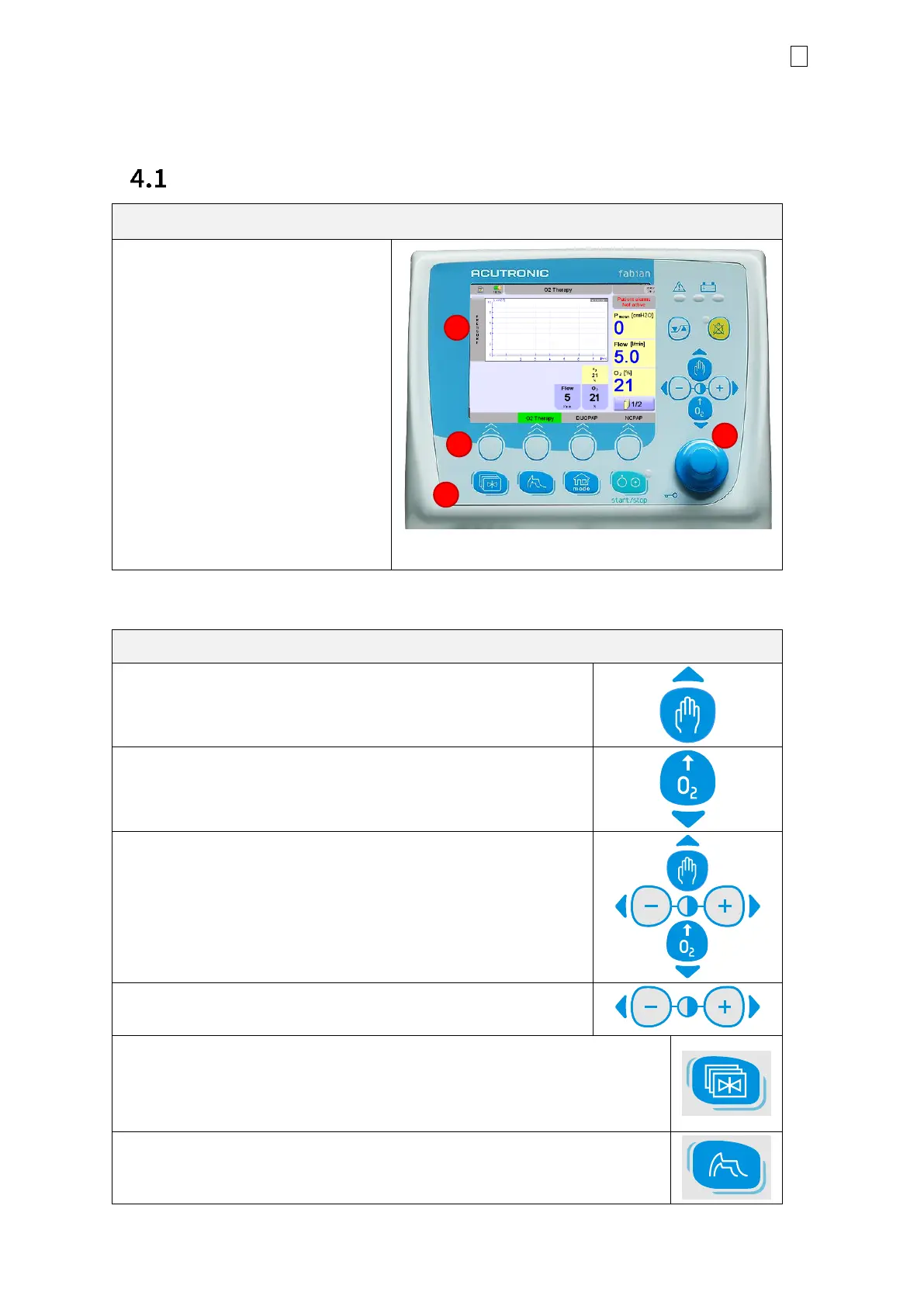
The Control Panel features two key elements:
The display Touch Screen (1) allows
the direct control of the ventilator
parameters by tapping defined
buttons on the graphic user
interface.
Fields in the lower section (2) of the
touch screen are operated with the
buttons underneath.
The Button / Control panel (3)
incremental knob (
combined with a
push button and selection dial
).
The keypad features two rows of buttons with various functions.
Manual breathing
Used to apply a manual breath. Available in all the ventilation
modes.
O
2
Flush
Used to start O
2
flush. Flush concentration and time can be
preset.
Cursor buttons
These buttons serve as control in several menus.
Screen Contrast setting
Used to adjust the brightness of the screen.
Menu/Calibration
Used to access the Configurations and Calibration menus. Pressing once
will open the calibration menu; pressing again will open the configuration
menu.
Waves
Switches to Waves display and values are shown in big letters



 To Next Page
 Loading...

