Chapter 11: Monitoring Your Storage Space ● 120
Broadcasting Event Alerts to Users
You can set the Adaptec Storage Manager agent to send event alerts
about a specific system to all users who are logged into your storage
space. You might want to do this if your storage space isn’t managed by
a dedicated person, or if that particular system is off-site or not
connected to a monitor. Event alerts signal everyone working on the
storage space that a system requires technical assistance.
When you set Adaptec Storage Manager to broadcast event alerts, all
logged-in users receive messages about all types of events. In Windows,
these alerts appear as pop-up messages; in all other operating systems,
these alerts appear as console messages.
When enabled, event alerts occur independent of event notifications
(see page 103) and email notifications (see page 111).
To enable event alerts:
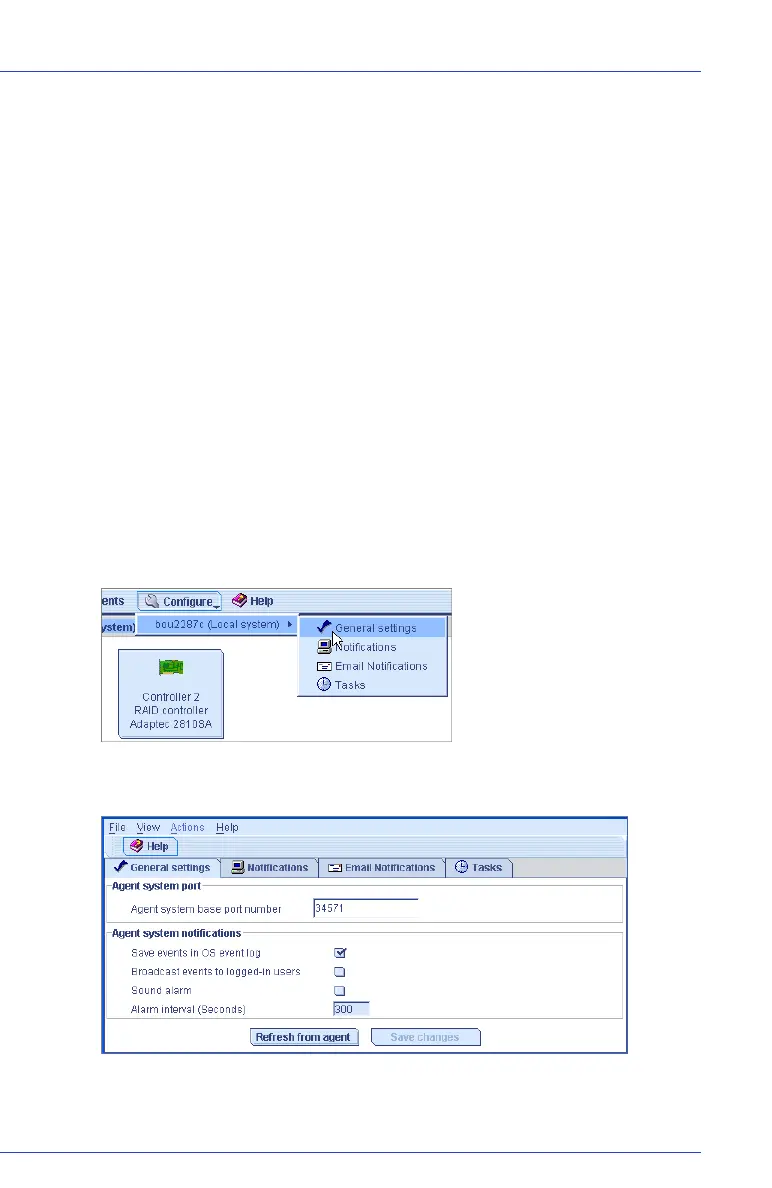
1 On the tool bar, click the Configure button, select the system you
want, then click General Settings.
The Adaptec Storage Manager Agent General Settings window opens
for that system.
2 Select Broadcast events to logged-in users, then click Save changes.
3 Restart Adaptec Storage Manager to apply the change.



 To Next Page