Appendix D: Understanding RAID ● 164
Understanding Drive Segments
A drive segment is a disk drive or portion of a disk drive that is used to
create a logical device. A disk drive can include both RAID segments
(segments that are part of a logical drive) and available segments. Each
segment can be part of only one logical device at a time. If a disk drive is
not part of any logical device, the entire disk is an available segment.
RAID 0 (Non-RAID Logical Drives)
A logical drive with RAID 0 includes two or more disk drives
(maximum twelve) and provides data striping, where data is distributed
evenly across the disk drives in equal-sized sections.
RAID 0 logical drives do not maintain redundant data, so they offer no
data protection. However, compared to an equal-sized group of
independent disks, a RAID 0 logical drive provides improved I/O
performance.
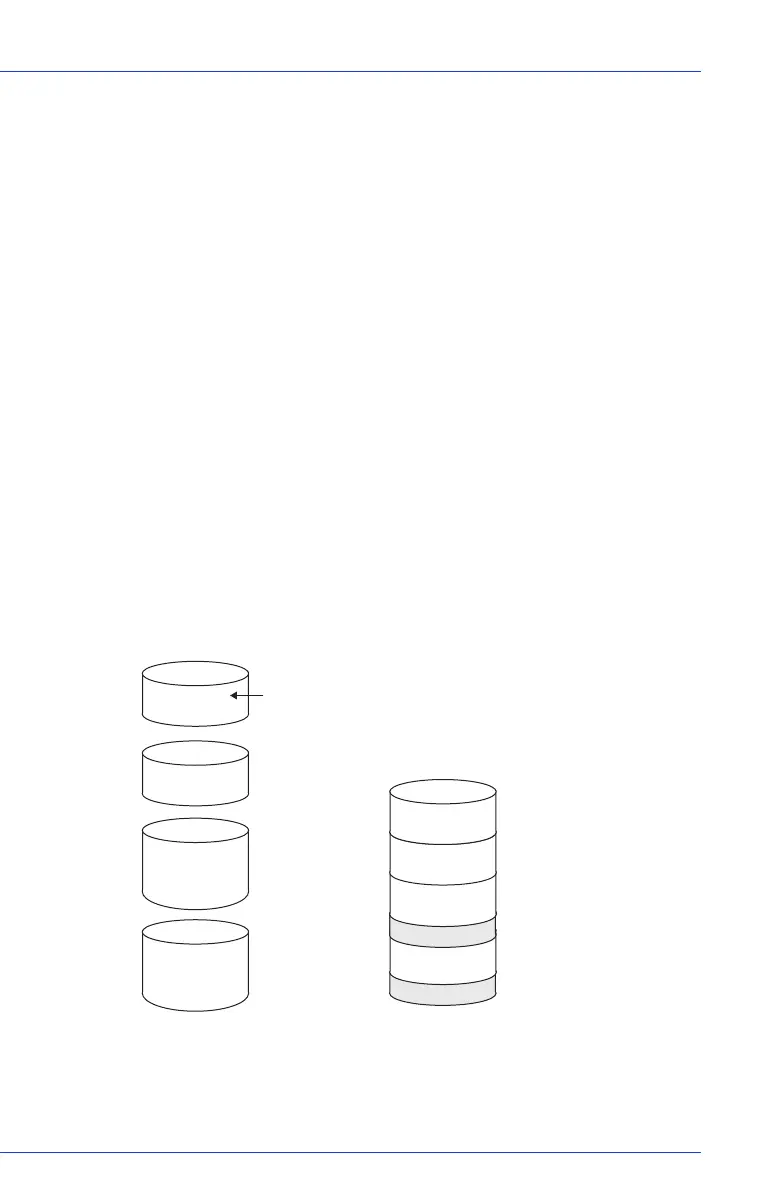
Drive segment size is limited to the size of the smallest disk drive in the
logical drive. For instance, a logical drive with two 250 GB disk drives
and two 400 GB disk drives can create a RAID 0 drive segment of 250
GB, for a total of 1000 GB for the volume, as shown below.
isk Drive 1
isk Drive 2
isk Drive 3
isk Drive 4
250 GB
250 GB
400 GB
400 GB
Disk Drives in Logical Drive
Disk Drive 1
Disk Drive 2
Disk Drive 3
Disk Drive 4
RAID 0 Logical Drive = 1000 GB
1
2
3
4
Not Used
Not Used
5
6
7
8
1000
999
998
997
...
...
...
...
Unused Space: 150 G
Unused Space: 150 G
Drive Segment Size (Smallest Disk Drive)



 To Next Page