Chapter 16: Solving Problems ● 147
Identifying a Failed or Failing Component
When your are notified of a Warning- or Error-level event, use Adaptec
Storage Manager’s rapid fault isolation feature to quickly identify the
source of the problem.
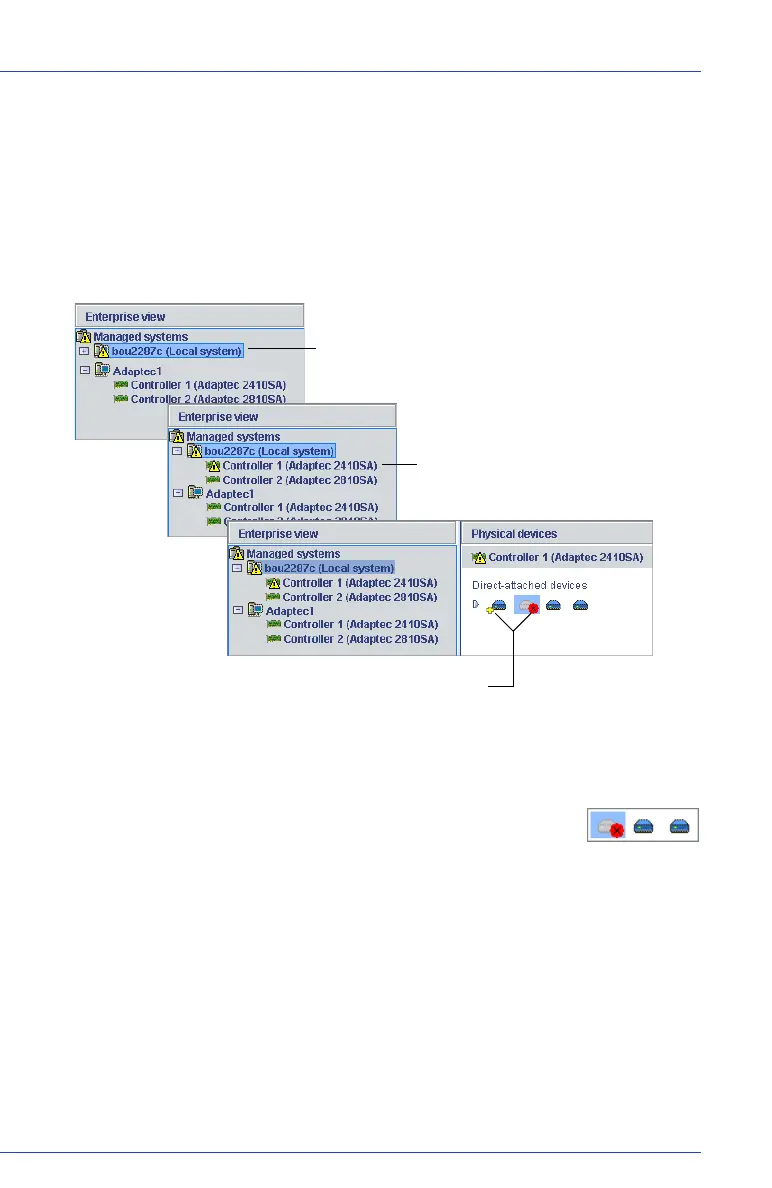
For instance, in the example below a disk drive has failed. To find the
failed disk drive, follow the yellow Error icons:
Recovering from a Disk Drive Failure
When a disk drive fails for any reason, it is represented in
Adaptec Storage Manager with a red X, as shown at right.
This section explains how to recover when a disk drive fails:
● If the logical drive was protected by a hot spare (see page 148).
● If the logical drive was not protected by a hot spare (see page 149).
● If there is a disk drive failure in more than one logical drive
simultaneously (see page 149).
● If it is a RAID 0 logical drive (see page 149).
●
If multiple disk drives fail within the same logical drive (see page 150).
Error is on the local system...
...on Controller 1...
...and both the failed disk drive (marked with red X)
and hot spare (with yellow +) are affected.



 To Next Page