Configuration
Advantech-DLoG DLT-V83 Series Manual V1.31 Page 47 of 178
6.4. Wi-Fi (optional)
Depending on the optional equipment and intended use of the DLT-V83, the settings
and access data for Wi-Fi networks must be defined.
The Wi-Fi option is available for all DLT-V83 devices.
DLT-V83 with Linux (optional)
The settings for wireless networks under Linux are described in a separate ADLoG
Linux manual.
The ADLoG Linux manual is available on the Internet at www.advantech-
dlog.com (Download menu, login required).
6.4.1. Wireless performance
CAUTION
Radiation emissions from Wi-Fi
Observe the applicable regulations for the respective country with regard to
frequencies and maximum permitted transmitting power.
Responsibility for this lies with the operator of the DLT-V83.
The regulatory authorities for the respective country can provide information on
this.
Please keep in mind the configuration for the transmitting power:
− Wireless card (set transmission power).
− Connecting cables.
− Antenna gain.
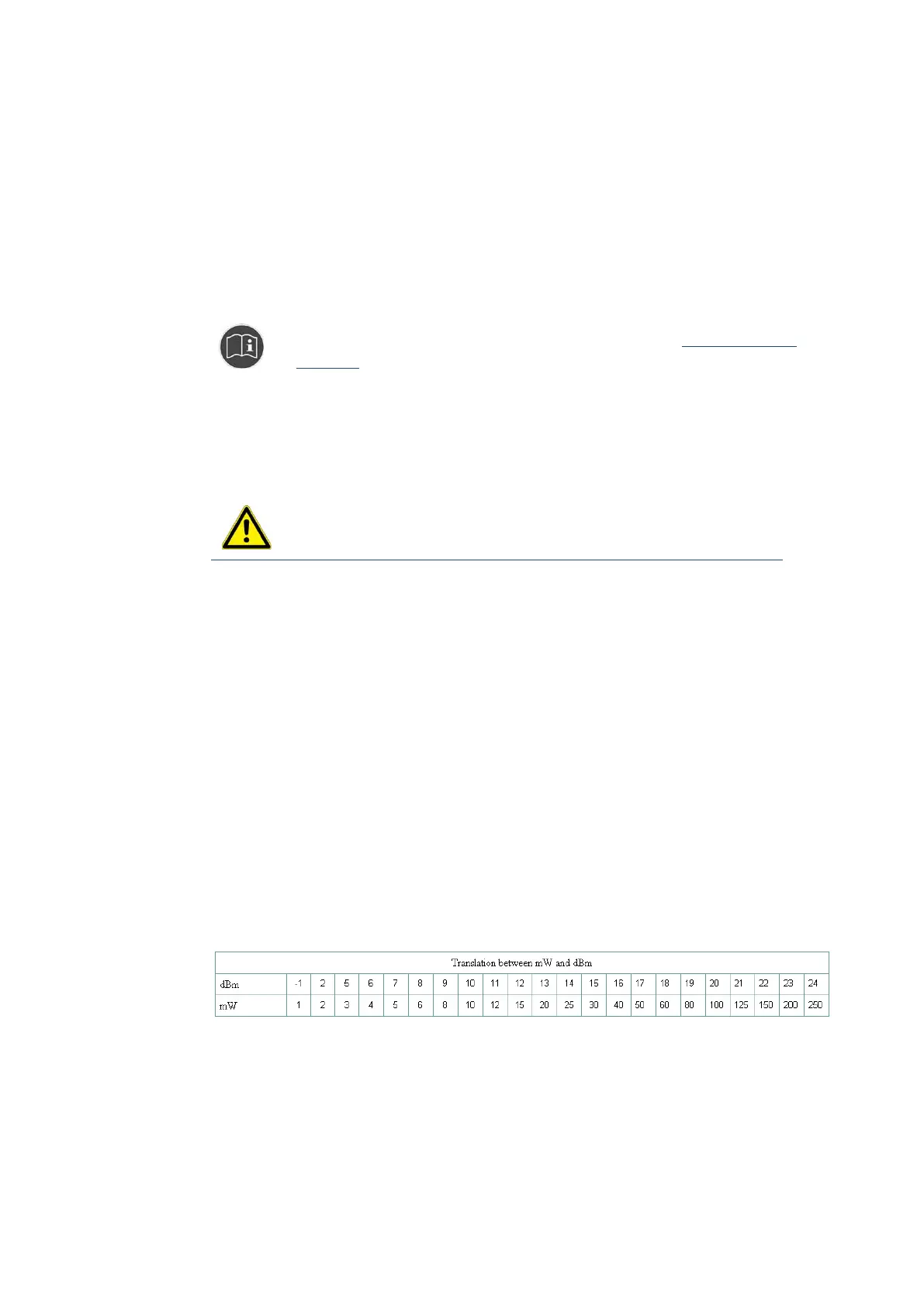
Help table for the correct setting:



 To Next Page