18
GB
4598010_00
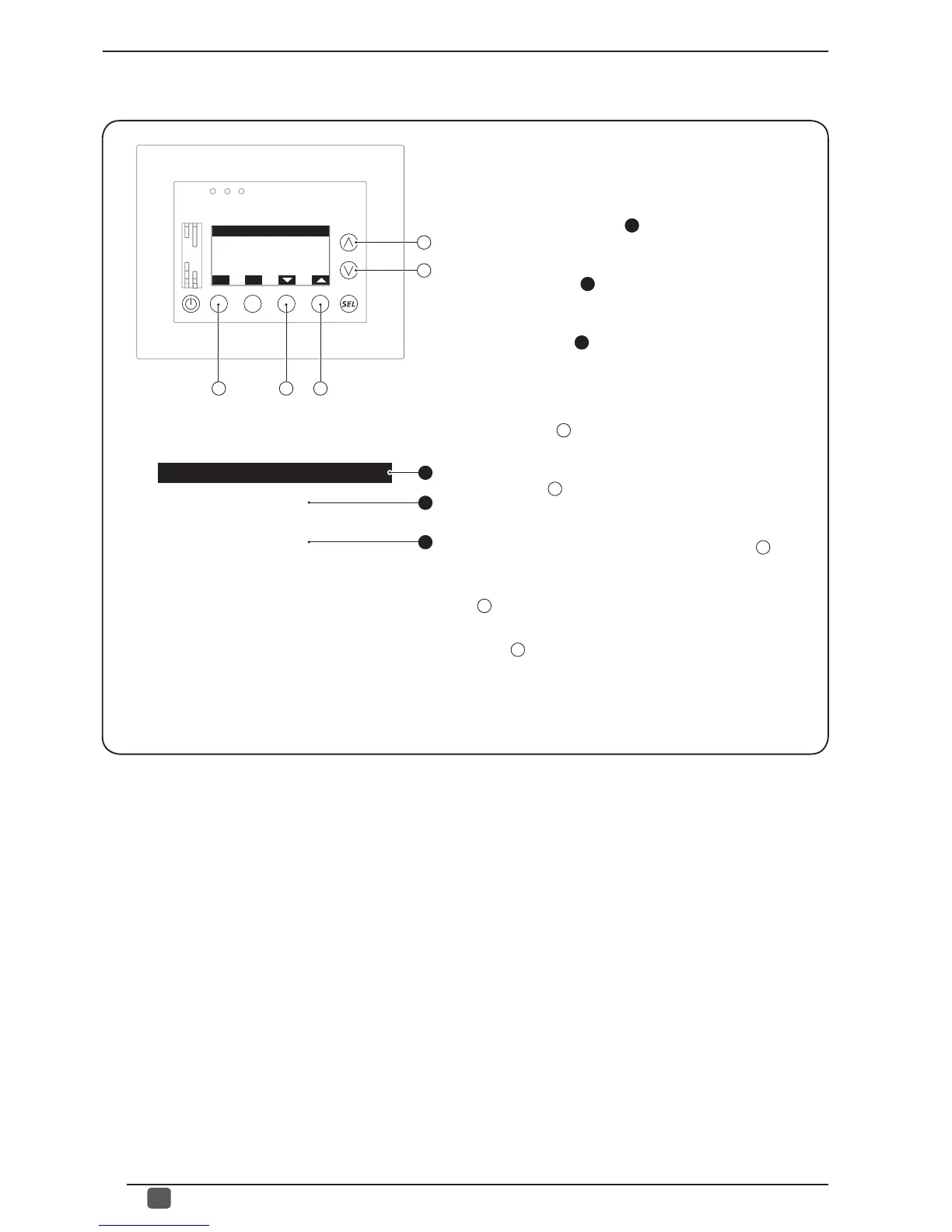
The second window of the UNIT SYNOPTIC menu allows the
user to read the values of the main operating parameters
of the selected chiller; this window displays the following
information:
- Chiller currently selected (
1
): indicates which chiller the
displayed data refers to (1
st
, 2
nd
, 3
rd
or 4
th
chiller); this choice
can ONLY be modifi ed on the page prior to this menu.
- Parameter label (
2
): indicates which parameter the
displayed value refers to; the table on the next page matches
the parameter labels and their descriptions.
- Parameter value (
3
): indicates the current value of the
displayed parameter.
From this window it is possible to:
(1) Pass on to the next parameter:
pressing the key
C
displays the next parameter, identifi ed
by a new label and relative value.
(2) Go back to the previous parameter:
pressing the key
D
displays the previous parameter, identifi ed
by a new label and relative value.
(3) Pass on to the next window:
to go to the next window of this menu, press the key
B
.
(4) Go back to the previous window:
to go back to the previous window of this menu, press the
key
A
.
(5) Exit this window:
press the
E
key to return to the selection of the menus.
• Reading of characteristic parameters of chillers:
A
B
E
ESC
Unit parameters
N:1
ANL
Unit parameters
N:1
TYPE
1
2
3
D
TYPE
C
ANL


 To Next Page