57
4598010_00
GB
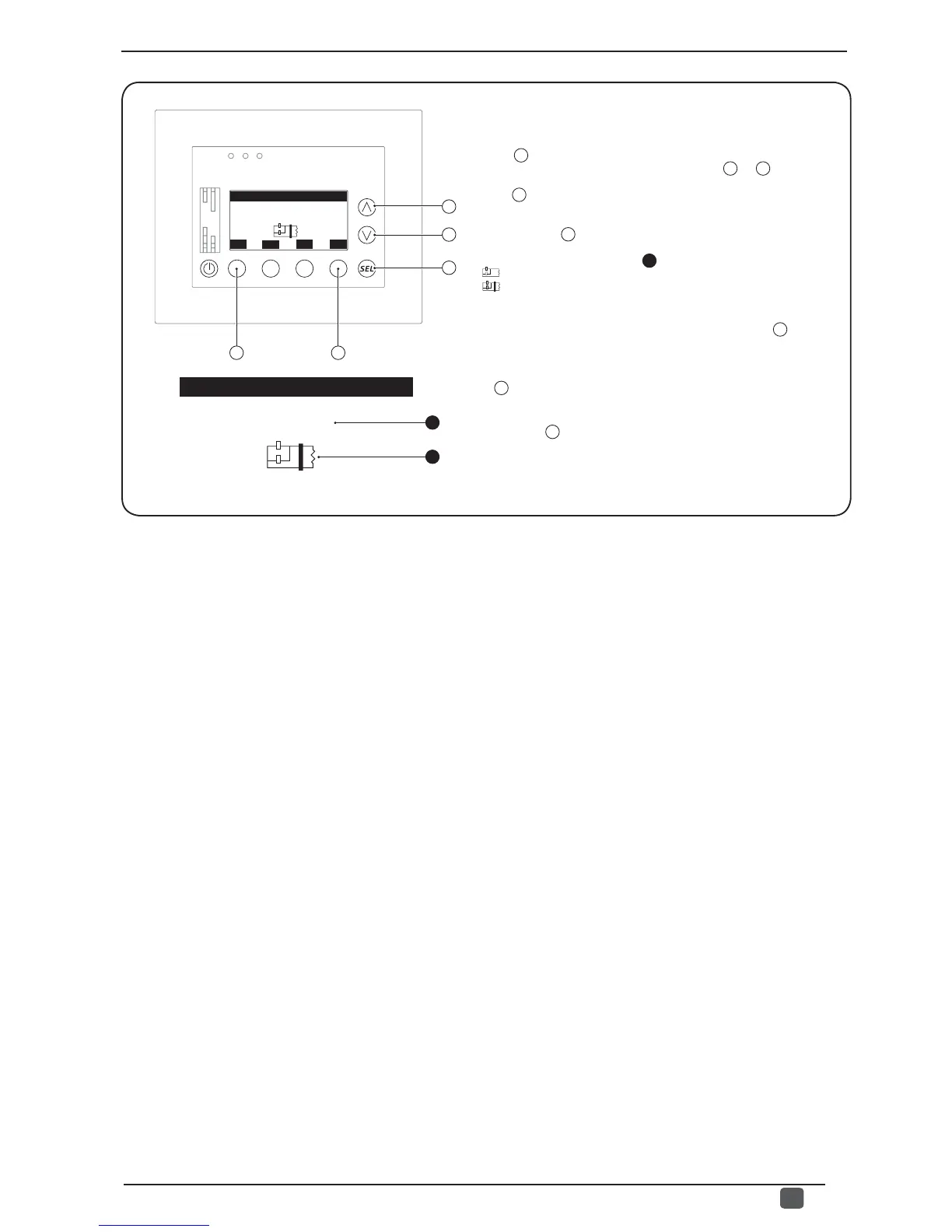
From this window it is possible to:
(1) Select the type of control to be applied to the plant: pressing
the key
C
will allow you to enter the modifi cation mode and the
value will be highlighted; by pressing the keys
A
or
B
it will be
possible to modify the value currently displayed, while pressing
the key
C
will confi rm this choice.
(2) Select the type of hydraulic system for DELTA T control:
pressing the key
D
will allow you to enter to pass from single ring
system to double ring system; the setting is visible (if the type of logic
set is for DELTA T) through the icon
2
; this icon can be:
- ( ) Single water ring.
- ( ) Double water ring.
(3) Pass on to the next window:
to go to the next window of this menu, press the key
B
.
(4) Go back to the previous window:
to go back to the previous window of this menu, press the
key
A
.
(5) Exit this window:
press the key
E
to return to the selection of the USER menus.
A
B
C
ESC
E
Regulation type
DELTA T
1
TYP
D
Regulation type
DELTA T
2


 To Next Page