EasyManua.ls Logo

Agilent Technologies PlateLoc - User Manual

Agilent Technologies PlateLoc
144 pages
Print Icon
To Next Page IconTo Next Page
Loading...
Agilent Technologies
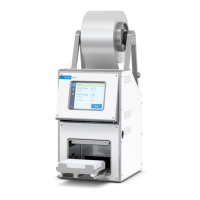
PlateLoc Thermal
Microplate Sealer
User Guide

Table of Contents

Other manuals for Agilent Technologies PlateLoc

Questions and Answers

  • D
    Deborah BarberAug 19, 2025
    Why is my Agilent Technologies Laboratory Equipment PlateLoc displaying 'Actuator Time Out'?
    • J
      jasmine60Aug 19, 2025
      The 'Actuator Time Out' error on your Agilent Technologies Laboratory Equipment PlateLoc may be due to a sensor or actuator failure, or because the air pressure inside the PlateLoc has dropped below 80 psi. First, ensure the seal material is properly loaded and try sealing a spare plate to check if the PlateLoc is working correctly. Also, check that the air pressure at the source (house, cylinder, or pump) is 0.62–0.69 MPa (90– 100 psi). For Gas-Purging PlateLoc, verify that the argon is not connected to the AIR IN fitting. Check the air connection for leaks.
  • J
    joan70Aug 21, 2025
    What to do if Agilent Technologies Laboratory Equipment shows 'Insufficient Air Pressure'?
    • M
      marypayneAug 21, 2025
      If your Agilent Technologies Laboratory Equipment displays an 'Insufficient Air Pressure' error, it means the air pressure inside the PlateLoc is below 80 psi. Ensure the air pressure at the source (house, cylinder, or pump) is 0.62–0.69 MPa (90– 100 psi). If the source pressure is adequate, inspect the air connections for leaks. For Gas-Purging PlateLocs, confirm that argon is not connected to the AIR IN fitting.
  • C
    Crystal GravesAug 23, 2025
    What to do if the Agilent Technologies Laboratory Equipment seal cannot be pulled out?
    • V
      vvaldezAug 23, 2025
      If the seal is stuck inside your Agilent Technologies Laboratory Equipment PlateLoc, turn off the air and power to the PlateLoc. Push down the red button on the back to open the seal gripper. Then, pull the seal out of the seal-entry slot. Cut off any tattered or folded edges before re-inserting the seal.
  • J
    John SmithAug 26, 2025
    What to do if the Agilent Technologies PlateLoc touch screen does not display text?
    • C
      Caroline DixonAug 26, 2025
      If the touch screen on your Agilent Technologies Laboratory Equipment PlateLoc isn't displaying text, first ensure the PlateLoc is connected to the power source and turned on. If it is on, the touch screen contrast might be set too low. To adjust it, turn the device off and on to reset the screen to the Main Menu. Press once in the lower left corner of the touch screen (where the Setup button is located) until you hear a beep to display the Set Parameters Menu. Then, press slightly to the right from the center at the bottom of the touch screen to increase the contrast.
  • D
    Derek SilvaAug 28, 2025
    How to fix PlateLoc Agilent Technologies Laboratory Equipment if the door doesn't close?
    • J
      james47Aug 28, 2025
      If the door of your Agilent Technologies Laboratory Equipment PlateLoc is unable to close, check for any obstructions that may be preventing it, such as items under the door hinge. If the door was opened during the seal cycle, remove the plate and restart the cycle.
  • W
    wandersonAug 30, 2025
    What to do if Agilent Technologies PlateLoc Laboratory Equipment plate is stuck?
    • K
      Kevin BakerAug 30, 2025
      If the plate is stuck to the heated metal plate inside the sealing chamber of your Agilent Technologies Laboratory Equipment, it may be due to excess seal material stuck to the hot plate. Clean the hot plate.
  • R
    rfordSep 1, 2025
    Why is there oil in the sealing chamber of my Agilent Technologies PlateLoc?
    • D
      dwarrenSep 1, 2025
      The presence of oil in the sealing chamber of your Agilent Technologies Laboratory Equipment indicates that the compressed air is not from an oil-free compressor and oil has leaked into the PlateLoc.
  • J
    James WarrenSep 4, 2025
    Why won't my Agilent Technologies Laboratory Equipment PlateLoc turn on?
    • E
      Emily ReevesSep 4, 2025
      If your Agilent Technologies Laboratory Equipment PlateLoc does not turn on, first ensure that your lab meets the necessary electrical requirements and that the PlateLoc is properly connected to the power source.
  • D
    Dwayne RamseySep 6, 2025
    Why is my Agilent Technologies PlateLoc making a hissing sound?
    • B
      brobinsonSep 6, 2025
      A hissing sound from your Agilent Technologies Laboratory Equipment indicates a leak in the air or argon connections. Check the air connections at both the PlateLoc and the source (house, cylinder, or pump). Also, check the argon connections at the PlateLoc and the source (house or cylinder).
  • C
    carolinejonesSep 8, 2025
    What causes 'Gripper Plate Vacuum' error on Agilent Technologies PlateLoc Laboratory Equipment?
    • B
      bakerbrandonSep 9, 2025
      The 'Gripper Plate Vacuum' error on your Agilent Technologies Laboratory Equipment PlateLoc means the gripper inside the PlateLoc couldn't hold the seal material, possibly due to a jam. Turn off the air and power to the PlateLoc. Push down the red button on the back to open the seal gripper inside the device. Pull the seal out of the seal-entry slot, cut off any tattered or folded edges, and re-insert the seal.

Summary

Chapter 1: PlateLoc Introduction

Hardware overview

Provides an overview of the PlateLoc's front and rear hardware features and components.

Plate requirements

Outlines the material, design, and format requirements for plates used with the PlateLoc.

Lab automation system software

Describes software used to control the PlateLoc in Velocity11 and third-party lab automation systems.

PlateLoc workflows

Presents basic steps for operating the PlateLoc as a standalone device or within a lab automation system.

Safety information

Provides essential safety precautions, standards, and labels for operating the PlateLoc.

Chapter 2: Unpacking and Installation

Meeting Lab requirements

Details essential lab space, electrical, and environmental requirements for installation.

Chapter 3: Getting Started

Chapter 4: Sealing Plates

Setting the sealing parameters

Explains how to configure seal time and temperature for optimal sealing results.

Starting the seal cycle

Describes the procedure to initiate the plate sealing process via the touch screen or software.

Chapter 5: Optimizing Seal Quality

Adjusting the sealing parameters

Details how to check seal quality and adjust parameters like temperature or duration.

Chapter 6: Routine Maintenance

Cleaning the hot plate

Provides instructions for cleaning the hot plate to remove residual material and maintain seal quality.

Chapter 7: Troubleshooting

Hardware problems

Lists common hardware issues, their causes, and suggested solutions for the PlateLoc.

Error messages

Details error messages displayed on the touch screen, their causes, and resolution steps.

Diagnostic tools

Explains how to use built-in tools like PlateLoc Diagnostics for diagnosing problems.

Agilent Technologies PlateLoc Specifications

General IconGeneral
Power Requirements100-240 VAC, 50/60 Hz
Sealing ForceAdjustable
Seal CompatibilityCompatible with a wide range of seals including films and foils
Weight25 kg (55 lbs)
InterfaceRS-232
Heating TimeNot applicable
Cooling TimeNot applicable
Temperature UniformityNot applicable
Temperature AccuracyNot applicable

Related product manuals