ANAFI Ai
48
INTRODUCING FREEFLIGHT 7
The HUD (head-up display) interface of FreeFlight 7 is the companion to ANAFI Ai. It
enables you to access all the features of ANAFI Ai, from the screen of your device, at
the touch of your thumbs.
This section explores FreeFlight 7 functions, starting with a presentation of HUD
information.
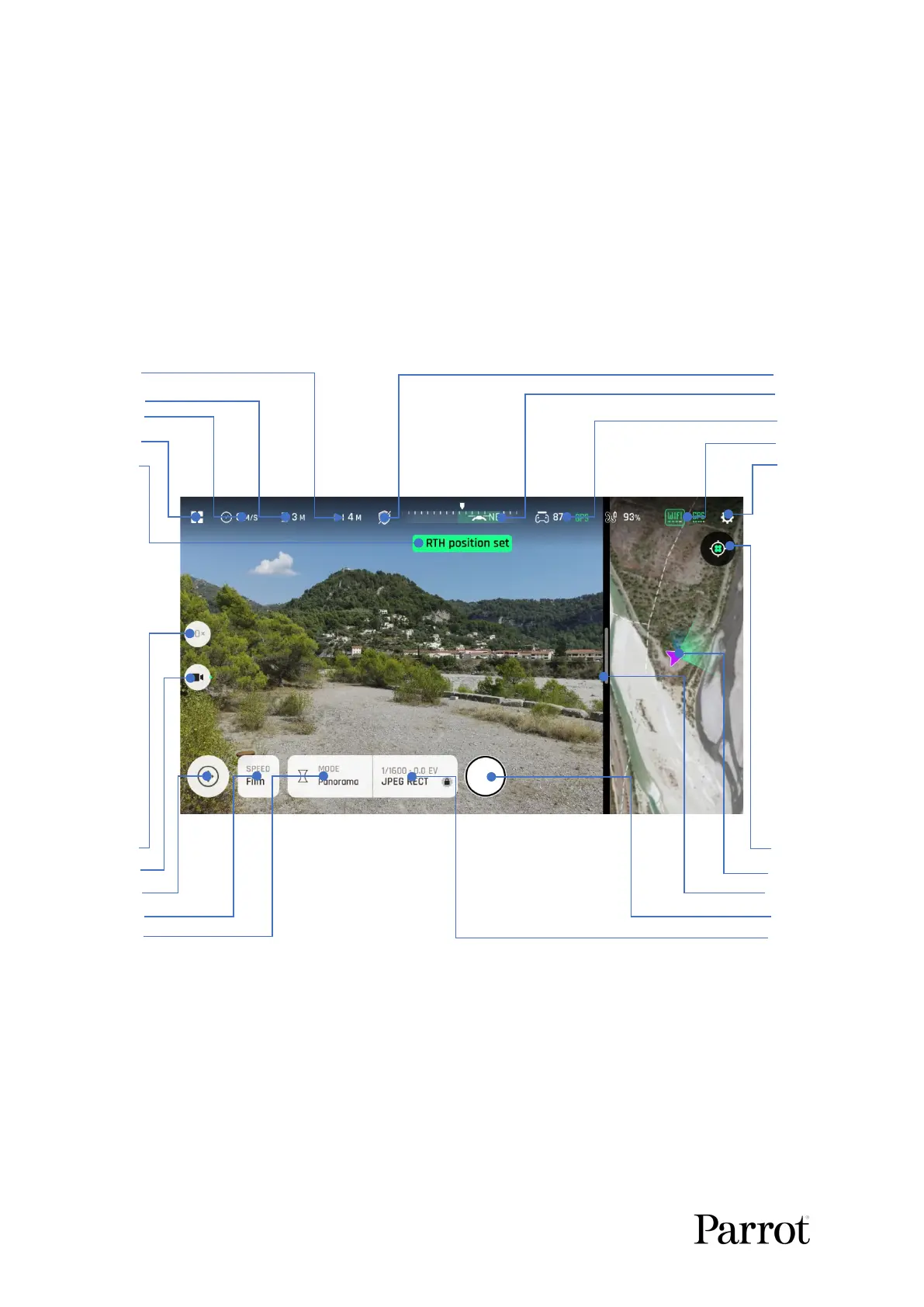
Presentation of the HUD
1. 6.
2. 7.
3. 8.
4. 9.
5. 10.
11. 16.
12. 17.
13. 18.
14. 19.
15. 20.
1. Drone horizontal distance relative to pilot
2. Drone height relative to take-off point
13. Piloting modes/Missions
14. Drone speed mode (Film/Sport)
5. Notifications & alerts zone
15. Imaging modes (Video/Photo/Pano)
6. Obstacle avoidance (shield) icon
16. Center (drone/controller) toggle
7. Compass and drone direction to pilot
8. Controller battery & device GPS statuses
9. Drone: battery/4G/Wi-Fi/GPS statuses
19. Shutter (Record/Stop: video mode)



 To Next Page