To abort a measurement press the Back icon on the Analyzing screen and
press Stop/Drop on the Measurement screen.
Comment can be also added during the countdown time.
After approximately 60 seconds the pad results will be displayed on the screen
and the test strip tray is automatically moved out of the analyzer.
The buttons remain inactive until the tray is fully moved out.
If Autostart is ON: The result screen will be displayed until you remove the test
strip from the tray. Once the strip is removed, the display automatically returns
to the Measurement screen.
If Autostart is OFF: The result screen will be displayed for approximately 5
seconds –while displaying a circle animation–, than the display will return to the
Measurement screen (if no error occurred during the readout). If you touch the
display while the circle animation is displayed, the system will not automatically
return back.
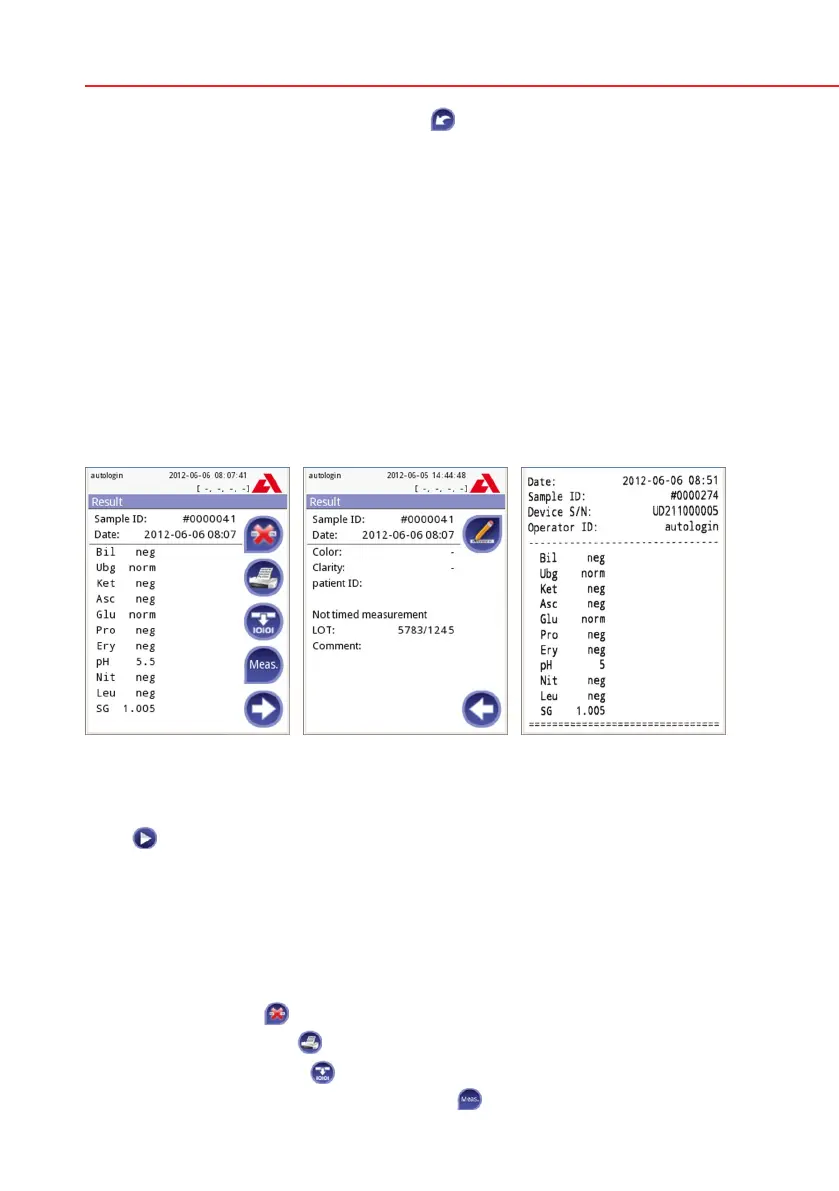
Result Page 1/2 Result Page 2/2
Picture 10: Printed result
The pad results are displayed on the first page. Positive findings are clearly
marked with red text on the display. To view the remaining test results, touch the
Right
icon on the screen.
The printout is light-sensitive and may turn yellow when exposed to light during
storage. Test results which diverge from negative or normal values are flagged
with an asterisk before the parameter concerned. The printout can be fully cus-
tomized, see
11.3 Printout for more details. For archiving purposes the print-
outs should be kept in a dark place (patient file) or as a photocopy.
Functions on the result screen
• BypressingDelete
button the result can be dropped.
• BypressingthePrinter
button the result can be printed.
• BypressingtheTransfer
button the result can be transferred.
• TogobacktotheMeasurement, press the
Meas. button.


 To Next Page