PAGE 36
SET FAIL LEVEL Mode (off, 4 mA or 20 mA)
When a “WARNING CHECK STATUS” message appears, indicating that a system problem may
exist, the analog output can be set to respond in one of three ways:
• OFF: Output remains active.
• 4mA: Output automatically goes to and remains at 4 mA.
• 20mA: Output automatically goes to and remains at 20 mA.
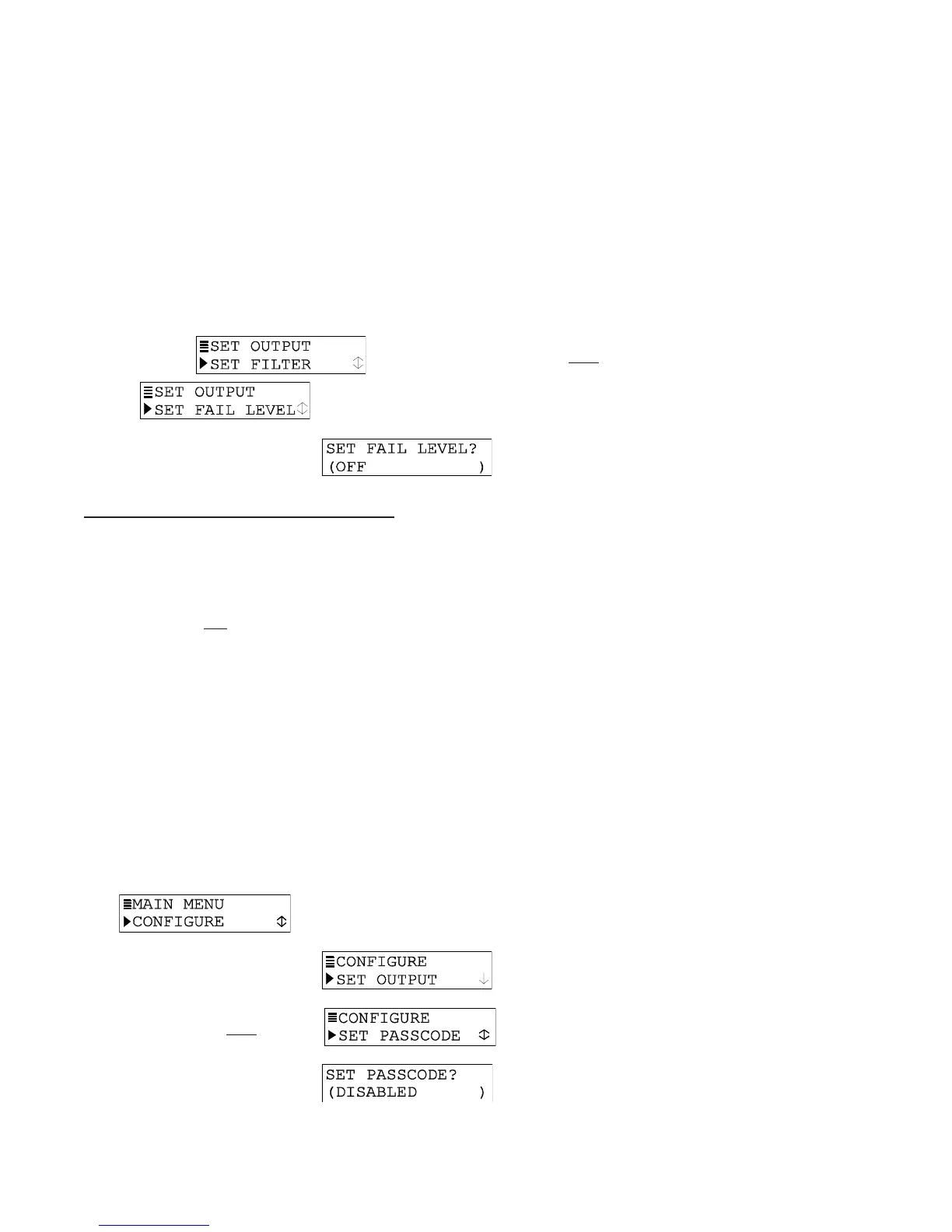
To SET FAIL LEVEL mode to suit your application:
1. With the
screen displayed, press
ØØ
ØØ
Ø
key once to display
.
2. Press ENTER key to display
. Use
ØØ
ØØ
Ø and
××
××
× keys to
select a response mode (OFF, 4mA or 20mA), and press ENTER key to enter it.
7.5 SET 7.5 SET
7.5 SET 7.5 SET
7.5 SET
PASSCODE PASSCODE
PASSCODE PASSCODE
PASSCODE
(feature(feature
(feature(feature
(feature
enabled or disabled)enabled or disabled)
enabled or disabled)enabled or disabled)
enabled or disabled)
The transmitter has a passcode feature to restrict access to configuration settings and
calibration to only authorized personnel.
• DISABLED: With the passcode feature disabled, all configuration settings can be
displayed
and changed, and the transmitter can be calibrated.
• ENABLED: With the passcode feature enabled, all configuration settings can be
displayed — but they cannot be changed — and the CALIBRATE and TEST/MAINT
menus cannot be accessed without the passcode. When you attempt to change a
setting in the CONFIGURE menu by pressing the ENTER key, a displayed notification
requests passcode entry. A valid passcode entry saves the changed setting and
returns the display to the “MAIN MENU” branch selection screen. An incorrect
passcode entry causes the display to momentarily show an error notification before
returning to the “MAIN MENU” branch selection screen. There is no limit on attempts to
enter a valid passcode.
The passcode is factory set to “3 4 5 6.” It cannot be changed.
To enable or disable the passcode feature:
1. Press MENU key to display a “MAIN MENU” screen.
If the
screen is not showing, use
ØØ
ØØ
Ø and
××
××
× key to display it.
2. Press ENTER key to display
.
3. Press
ØØ
ØØ
Ø key once to display .
4. Press ENTER key to display
. Use
ØØ
ØØ
Ø and
××
××
× keys to
select the desired passcode mode (DISABLED or ENABLED), and press ENTER key
to enter it.


 To Next Page