9
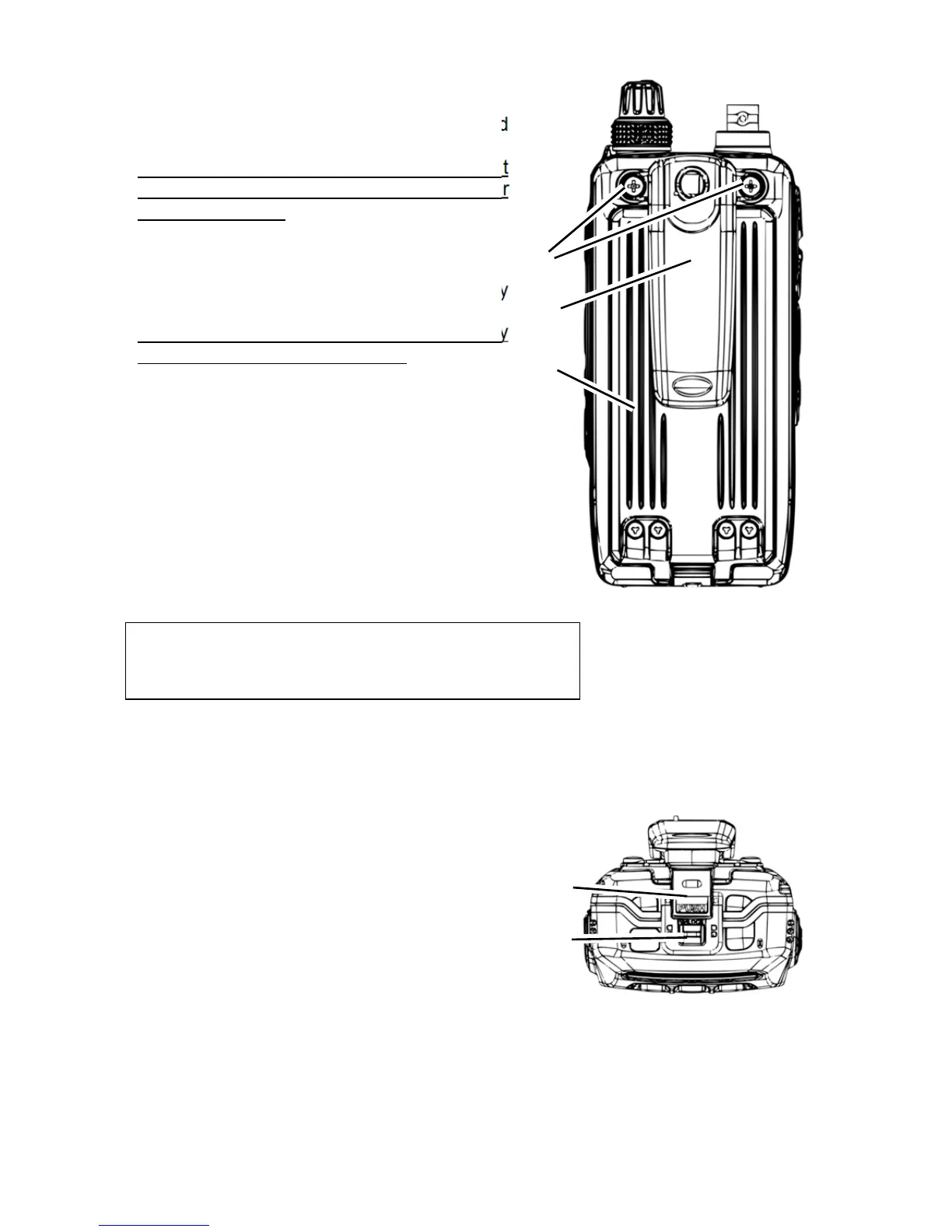
2.5. REAR PANEL
(20) Belt clip screw holes
Mount here the belt clip with the 2 supplied
screws.
When the belt clip is not used, it is important
to fix the screws to the body to prevent water
filling these holes.
(21) Belt clip
(22) Battery pack
Only use the supplied lithium-ion battery
pack.
Be sure that the rubber gasket on the battery
pack is not loose when inserting.
All rubber covers must be closed and
the battery pack installed for
the receiver to be waterproof (IPX5).
2.6. BOTTOM PANEL
(23) Battery pack latch
(24) Locking plate (grey color)
To install the battery pack:
Insert the battery in the battery compartment,
press the end of the battery latch on the bottom of
the receiver, then lock the pack by sliding the
locking plate beside the latch until the entire
“LOCK” appears.
To remove the battery pack:
Turn the receiver off, slide the locking plate until
the “UNLOCK” appears entirely, lift up the end of
the battery by pressing the battery latch, then pull
out the battery from the receiver.
(20)
(21)
(22)
(23)
(24)



 To Next Page