31
7.3. SCAN PASS
The scan pass function does mark a memory channel to be ignored during scan. This is
useful to temporarily disable memory channels, without having to erase them.
Let’s say you are scanning a memory bank and scan has stopped on an active signal, but
you want to bypass this frequency for future scans. While scan is stopped on that frequency
(memory channel), proceed as follows:
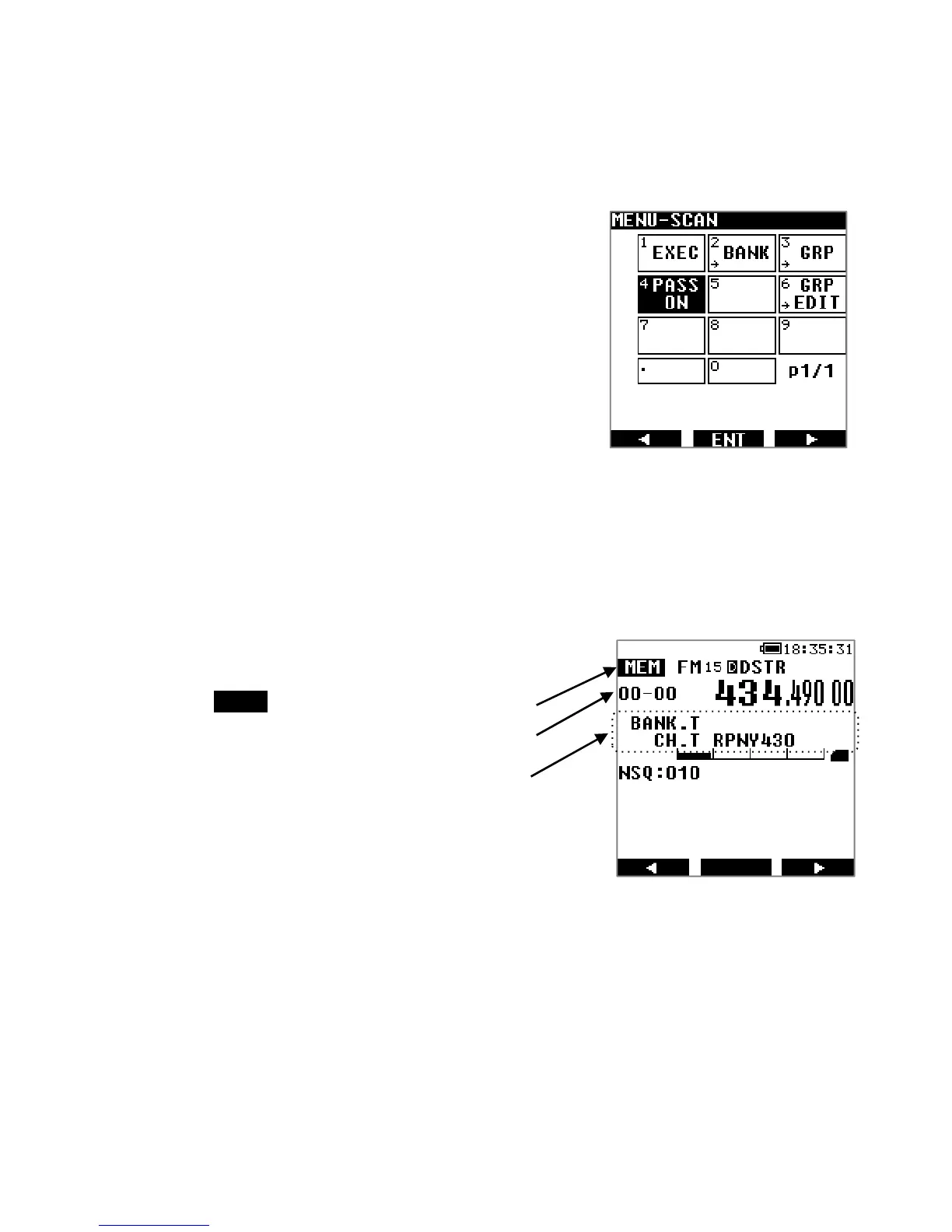
Press [MENU] followed by [ENT].
Use the [▶] button to select [PASS ON] and press [ENT].
If you want to reintegrate a frequency into your scans, you
can do that in its properties menu (See chapter 7.5 “EDIT A
MEMORY CHANNEL”).
7.4. BROWSE MEMORY BANKS/CHANNELS
Memory channels which already contain saved frequencies can be manually browsed and
received as follows:
Press [MENU], use the [▶] button to go to [MEM] and press [ENT] twice.
There are 2 ways to browse through memory channels:
Rotating the dial selector knob. Each increment tunes to the next registered
memory channel.
Direct input of the bank and channel numbers using the keypad. You can also just
enter the desired bank number followed by [ENT]. It will start with the lowest
registered memory channel in that bank.
[MEM] Memory channel browser mode
Memory band and memory channel numbers
Memory bank title
Memory channel title



 To Next Page