30
To scan a memory bank:
1. Go to [MENU],use the [▶] button to select [SCAN] and press [ENT].
2. Use the [▶] button to select [BANK] and press [ENT].
3. Enter the bank number you wish to scan with the keypad. Scan will start immediately.
If scan stops on a non-active frequency, it means that the squelch level needs to
be increased, as follows:
Press the SQL/MONI switch and turn the dial selector knob clockwise until
sound mutes and scan resumes. Press SQL/MONI again to keep that squelch
value.
You can change the scan direction with the [◀] and [▶] keys.
To force scan to resume (even though it stopped on an active frequency), turn
the dial selector knob by one increment, clockwise or counter-clockwise,
depending on the scan direction.
If you change the demodulation mode while scan stopped on an active
frequency, the new mode will be saved into that memory channel.
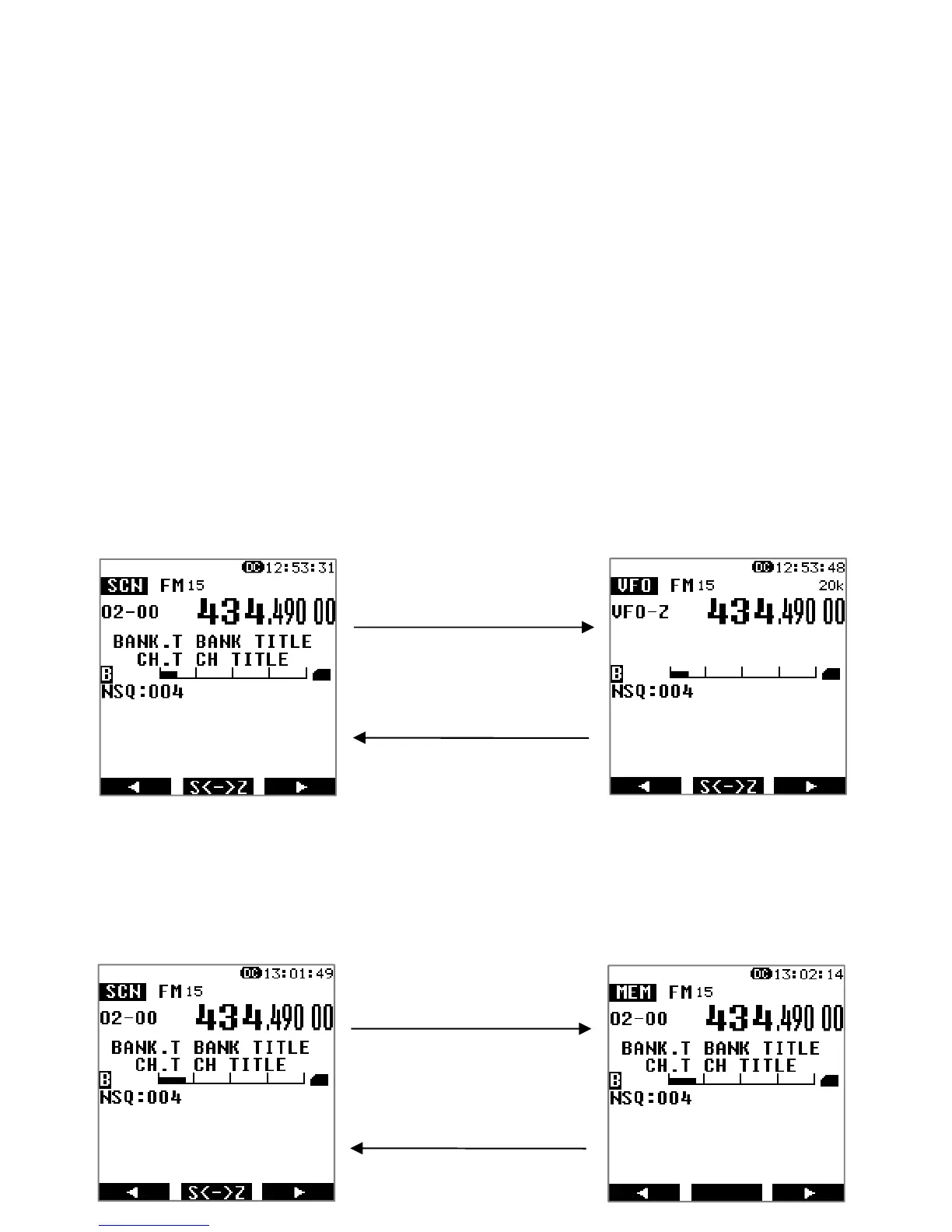
To copy a scanned channel to VFO:
When scan has stopped on an active frequency of interest, this frequency channel,
along with all its VFO settings, can be copied to and received on VFO-Z.
To switch to memory channel browser during scan:
When scan has stopped on an active frequency of interest, you can temporarily
switch to memory channel browser mode.
Press [ENT] to copy
to VFO-Z
Press [ENT] to return
to scan
Press [MENU], go to [SCAN]
and press [ENT].
Press [MENU], go to [MEM]
and press [ENT].



 To Next Page