RemovetheBatteryModules
Note:Twopeopleareneededtoliftthebatterymodules.
Note:TheXRBatteryEnclosuresshipwithtwobatterymodules.Allbatterymodulesin
theUPSandtheXRBatteryEnclosure(s)mustberemovedbeforeinterconnectingthese
enclosures.
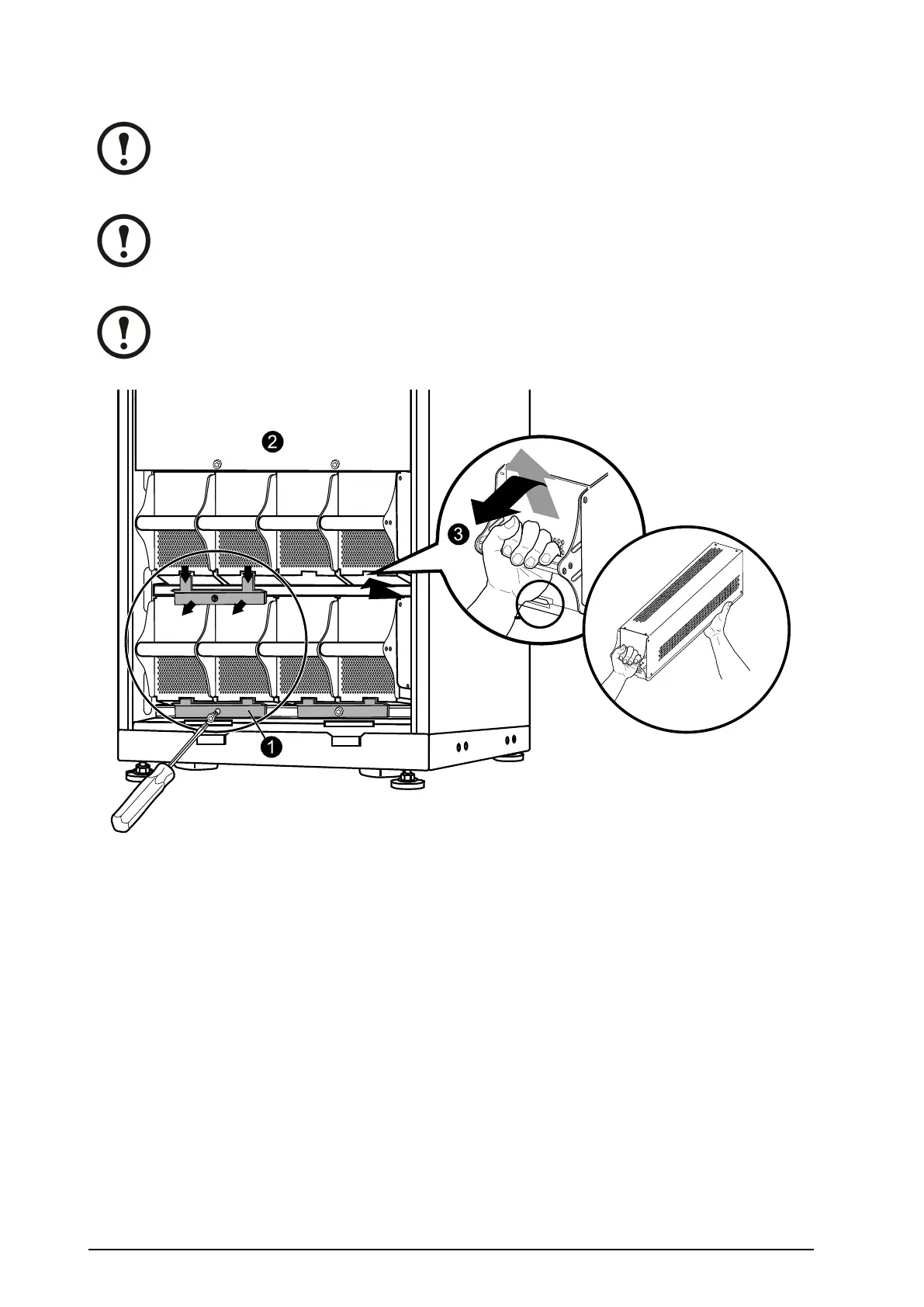
Note:Whenyouremovebatterymodules,startfromthehighestrowandworkyourway
down.
1.Removeallbatterysecuringbrackets(usedtosecurethebatteriesduringtransport)byremoving
theM6Torxscrews.
2.Removetheblindplate.
3.Toreleasethebatteryfromitslockmechanism,gentlypushthebatteryupwardsandthenpullit
outwhilesupportingthebatterywithyourotherhand.
12
Smart-UPS™VT10–30kV A208/220VSingleandParallelInstallation
990–1598E-001


 To Next Page
 Loading...


