EasyManua.ls Logo

Associated Research 620L - System Parameter Editing Commands and Companion Queries84

Associated Research 620L
223 pages
Print Icon
To Next Page IconTo Next Page
To Previous Page IconTo Previous Page
Loading...
84
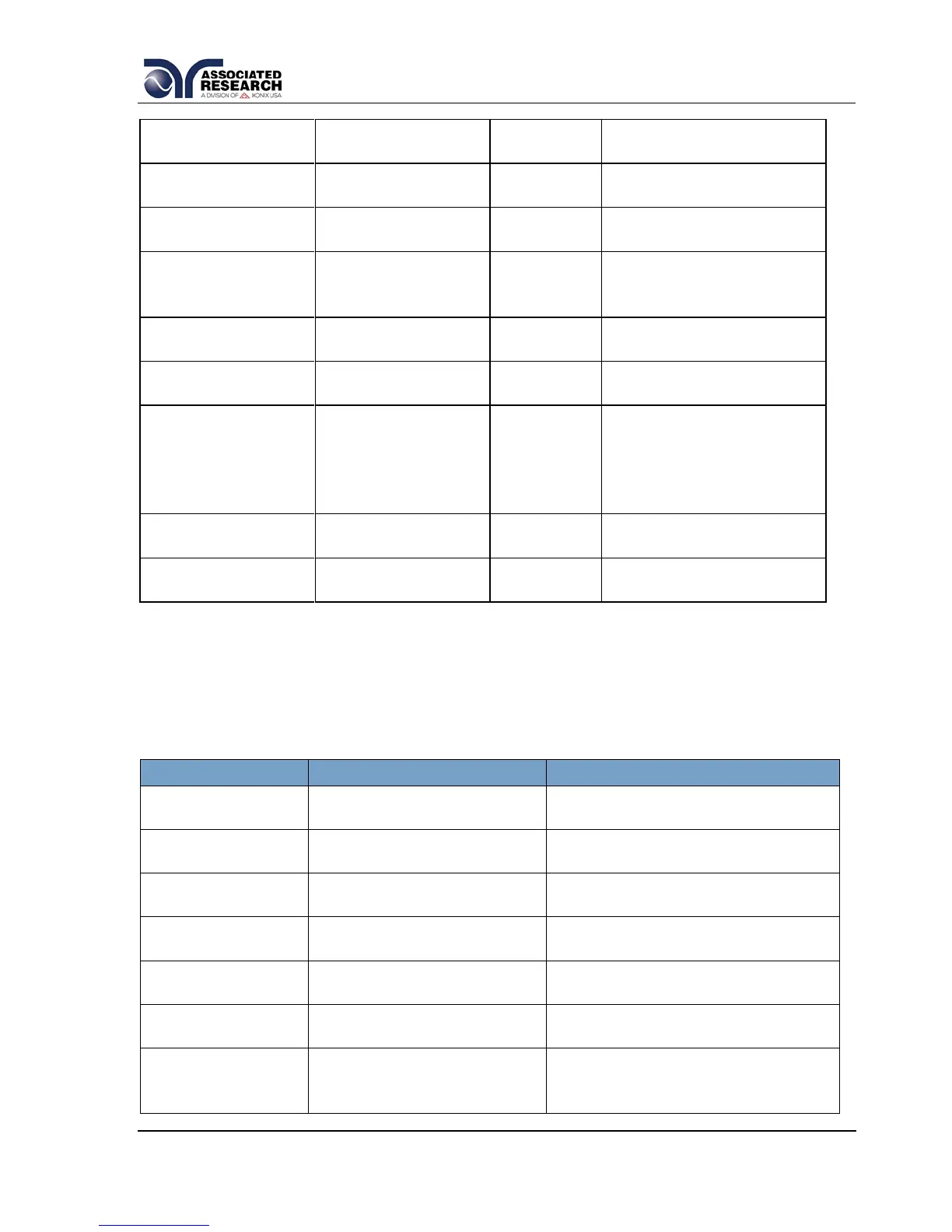
EPFL < value >
EPFL?
Edit PF-LO
RUN
0.000 - 1.000
EPOH < value >
EPOH?
Edit Power-HI
RUN
0 - 4200W
EPOL < value >
EPOL?
Edit Power-LO
RUN
0 - 4200W
EP {0|1|2}
EP?
Edit Probe
LLT
0=Ground to Line
1=Probe-HI to Line
2=Probe-HI to Probe-LO
ER {1|0}
ER?
Edit Reverse
LLT
1= On, 0=Off
ERM {1|0}
ERM?
Edit Ranging
Mode
LLT
0=Manual
1=Auto
ES <scanner
string>
ES?
Edit Scanner High
Voltage Multi-port
LLT
RUN
scanner string = 1-16
element ASCII string
consisting of H, L, or O.
H=HV, L=RETURN,
O=OPEN
EVH < value >
EVH?
Edit Voltage-Hi
RUN
LLT
0.0 - 277.0V
EVL < value >
EVL?
Edit Voltage-Lo
RUN
LLT
0.0 - 277.0V
7.4.5. System Parameter Editing Commands and Companion Queries
These commands are used to modify the system parameters for the instrument.
These commands require a parameter value to be included with the command. The
companion query command will read the parameter using the same value that is used
for setting the parameter.
COMMAND
NAME
VALUE
SA < value >
SA?
Alert Date
mm,dd,yy or yy,mm,dd or
dd,mm,yy ; same as SDF setting
SAL < value >
SAL?
Alarm Volume
0-9
SC < value >
SC?
Contrast
1-9
SCA {1|0}
SCA?
Cal Alert
1= On, 0=Off
SCDA < value >
SCDA?
Cal Date
mm,dd,yy or yy,mm,dd or
dd,mm,yy ; same as SDF setting
SCDU < value >
SCDU?
Cal Due
mm,dd,yy or yy,mm,dd or
dd,mm,yy ; same as SDF setting
SDAY
{6|5|4|3|2|1|0}
SDAY?
Day of the week
0,1,2,3,4,5,6=
Sun,M,T,W,T,F,Sat

Table of Contents

Related product manuals