EasyManua.ls Logo

Associated Research 620L - Query Commands

Associated Research 620L
223 pages
Print Icon
To Next Page IconTo Next Page
To Previous Page IconTo Previous Page
Loading...
85
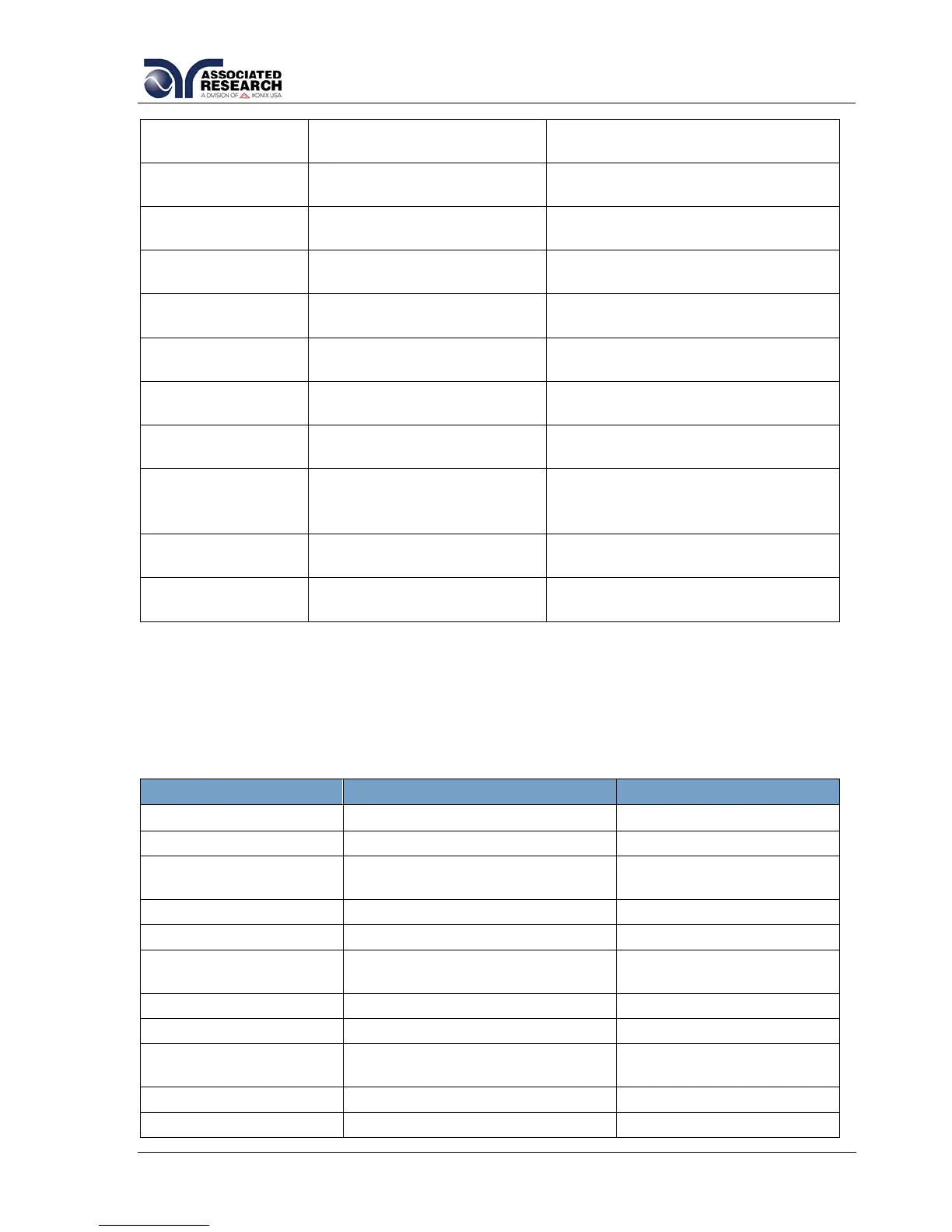
SDF < value >
SDF?
Date Format
0=yy,mm,dd, 1=mm,dd,yy
2=dd,mm,yy
SDT < value >
SDT?
Date
mm,dd,yy or yy,mm,dd or
dd,mm,yy ; same as SDF setting
SL {1|0}
SL?
Lock
1= On, 0=Off
SML {1|0}
SML?
Memory Lock
1= On, 0=Off
SMM {1|0}
SMM?
Main Menu page
1= On, 0=Off
SOI {1|0}
SOI?
620L Info page
1= Pause, 0=Continue
SPR {1|0}
SPR?
PLC Remote
1= On, 0=Off
SSI {1|0}
SSI?
Single Step
1= On, 0=Off
STM < value >
STM?
Time
hh,mm (24hr)
hh,mm,AM or hh,mm,PM (12hr)
according to STF setting
STF {1|0}
STF?
Time Format
0=12hr, 1=24hr
SV{1|0}
SV?
Verification page
1= On, 0=Off
7.4.6. Query Commands
These query commands will retrieve data from the instrument. The GPIB bus
application requires an IEEE-488 read command to be sent after the query command.
These commands include functions for retrieving test data, test results and remote
hardware status as well as setup file information.
COMMAND
NAME
VALUE
TD?
List Testing Data
Test In Process
RD <step number>?
List Results Data
step number = 1-30
RD <file number>,
<step number>?
List Results Data with
Memory Link active
file number = 1-50
step number = 1-30
RR?
Read Remote Reset
1=Open, 0=Closed
RI?
Read Remote Interlock
1=Open, 0=Closed
RS?
Read Scanner Status
0 = None, 1 = Internal
2 = External, 3 = Both
LF?
List File Name
Active selected memory
LFN?
List Memory (File) Number
Active selected memory
LF <memory
number>?
List File Name by memory
number
memory number = 1-50
LP?
List Prompt
Active selected Step
LP <step number>?
List Prompt by step number
step number = 1-30

Table of Contents

Related product manuals