User's Manual 6. Configuration Using the Web Interface
Version 6.6 109 MediaPack Series
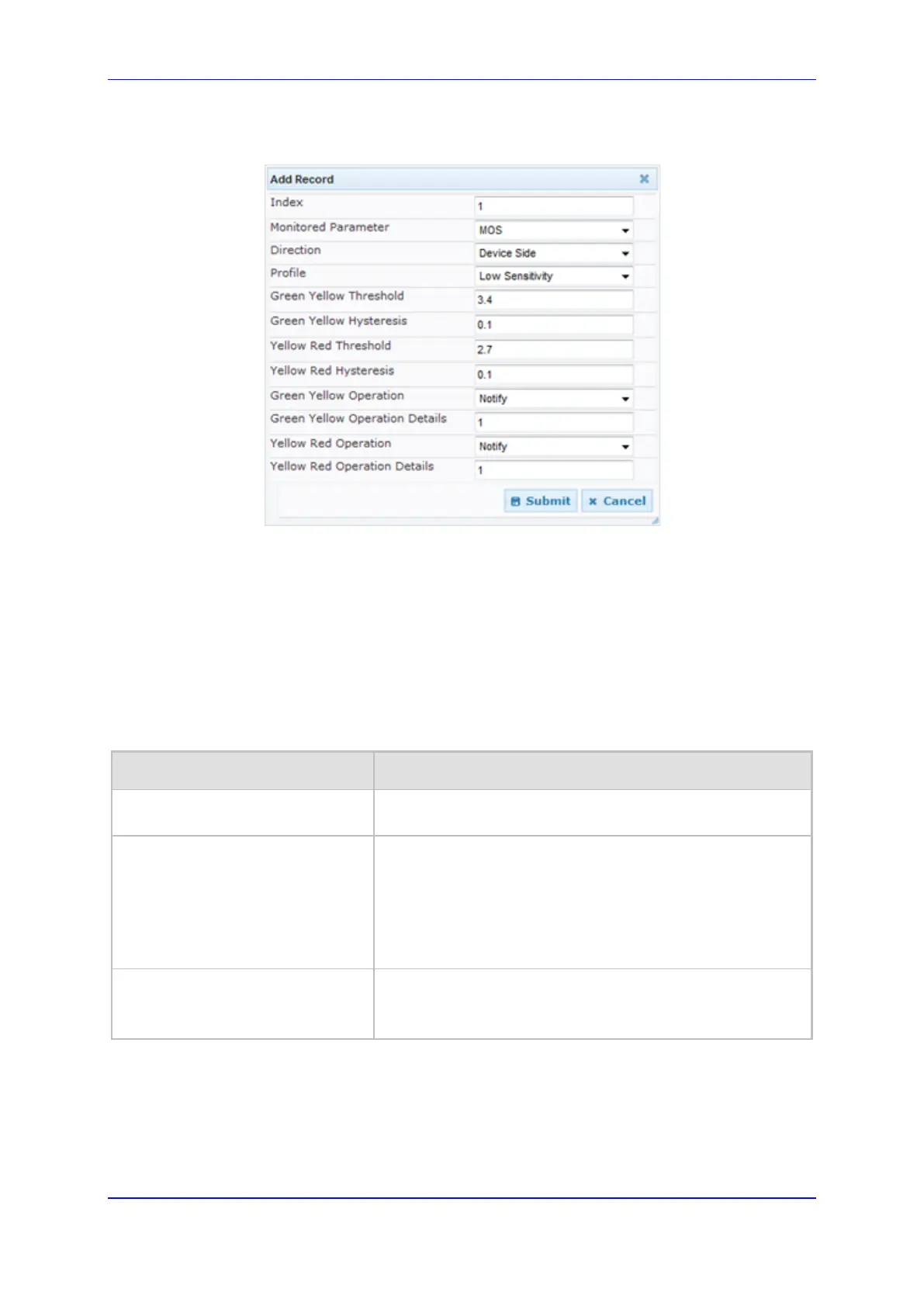
3. Click the Add button; the following dialog box appears:
Figure 69: Quality of Experience Page - Add Record Dialog Box
The figure above shows value thresholds for the MOS parameter, which are assigned
using pre-configured values of the Low Sensitivity profile. In this example setting, if the
MOS value changes by 0.1 (hysteresis) to 3.3 or 3.5, the device sends a report to the
SEM indicating this change. If the value changes to 3.3, it sends a yellow state (i.e.,
medium quality); if the value changes to 3.5, it sends a green state.
4. Configure the parameters as required. See the table below for a description of each
parameter.
5. Click Submit to apply your settings.
Quality of Experience Parameter Descriptions
Parameter Description
Index
[QOERules_RuleIndex]
Defines the table index entry. Up to four table row entries can
be configured per Media Realm.
Monitored Parameter
[QOERules_MonitoredParam]
Defines the parameter to monitor and report.
[0] MOS (default)
[1] Delay
[2] Packet Loss
[3] Jitter
[4] RERL
Direction
[QOERules_Direction]
Defines the monitoring direction.
[0] Device Side (default)
[1] Remote Side













 To Next Page