User's Manual 7. Troubleshooting
Version 6.6 147 MediaPack Series
7.1.4 Reinitializing the MediaPack
If an initialization problem is encountered, reinitialize the MediaPack. To reinitialize the
MediaPack, a BootP/TFTP Server application must be installed in your management PC.
Reinitializing the MediaPack using the BootP/TFTP Server enables you to quickly get
started with the MediaPack. For a detailed description of the BootP/TFTP Server
Configuration Tool, including installation and configuration, refer to BootP Server.
To reinitialize the MediaPack:
1. Install the BootP/TFTP Server Configuration Tool from the Software CD, Document #
LSTC00005 (MediaPack Series), refer to BootP Server.
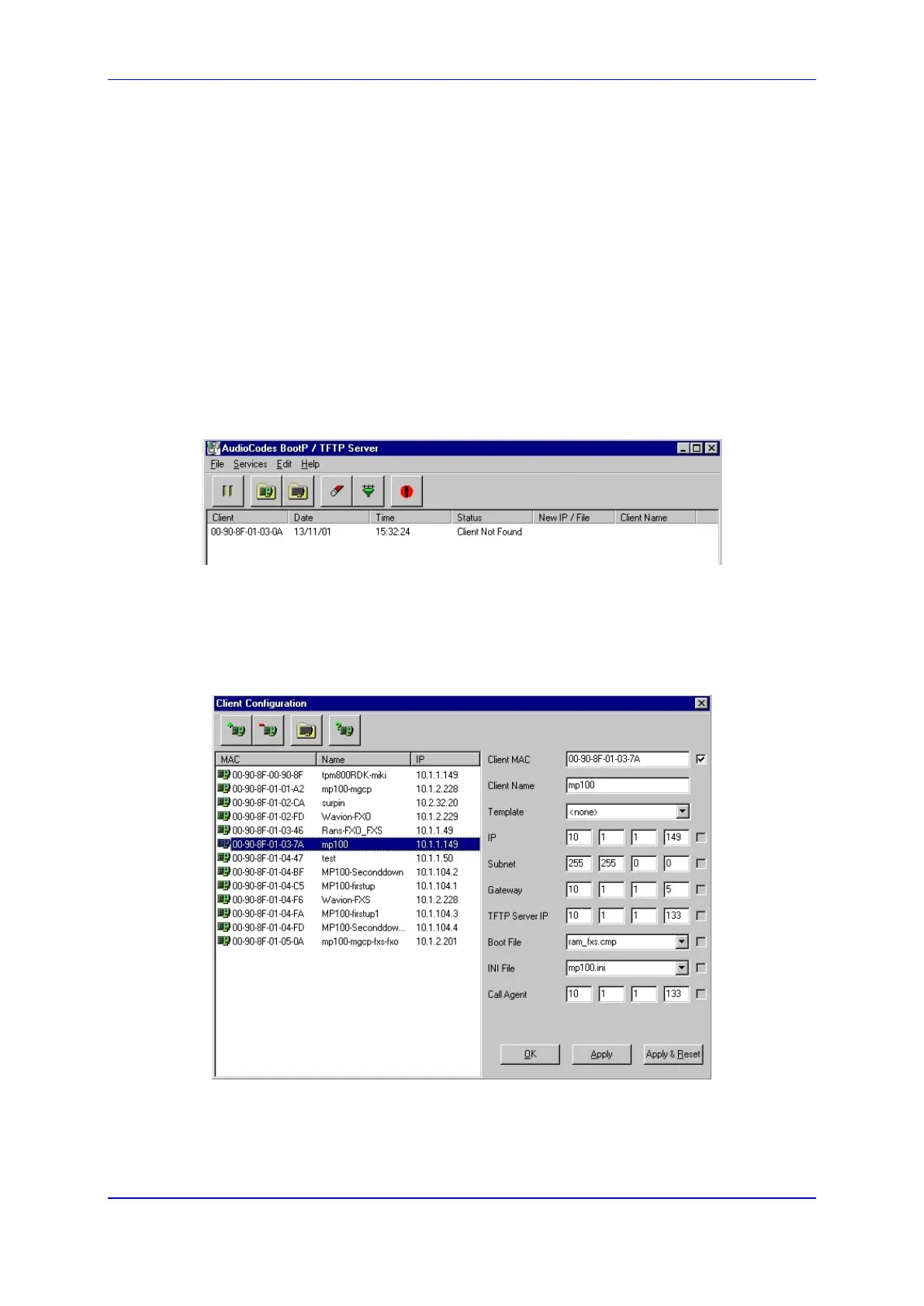
2. Open the BootP/TFTP Server from Start>Programs>BootP. The BootP/TFTP Server
main screen opens:
Figure 106: BootP/TFTP Server Main Screen
3. In the Services menu, choose Edit Clients. Alternately, double-click on the Client Not
Found log entry. The Client Configuration screen appears. (Refer to the figure below).
The parameter fields displayed on the right side of the screen constitute the
MediaPack software profile configuration. For a Client Not Found, the parameter fields
are all blank.
Figure 107: Client Configuration













 To Next Page