User's Manual 6. Configuration Using the Web Interface
Version 6.6 79 MediaPack Series
To add Web user accounts with advanced settings:
1. Open the Web Users Table page:
• Upon initial access:
a. Open the Web User Accounts page (Configuration tab > System menu >
Web User Accounts).
b. Under the Web Users Table group, click the Create Table button.
• Subsequent access: Configuration tab > System menu > Web User Accounts.
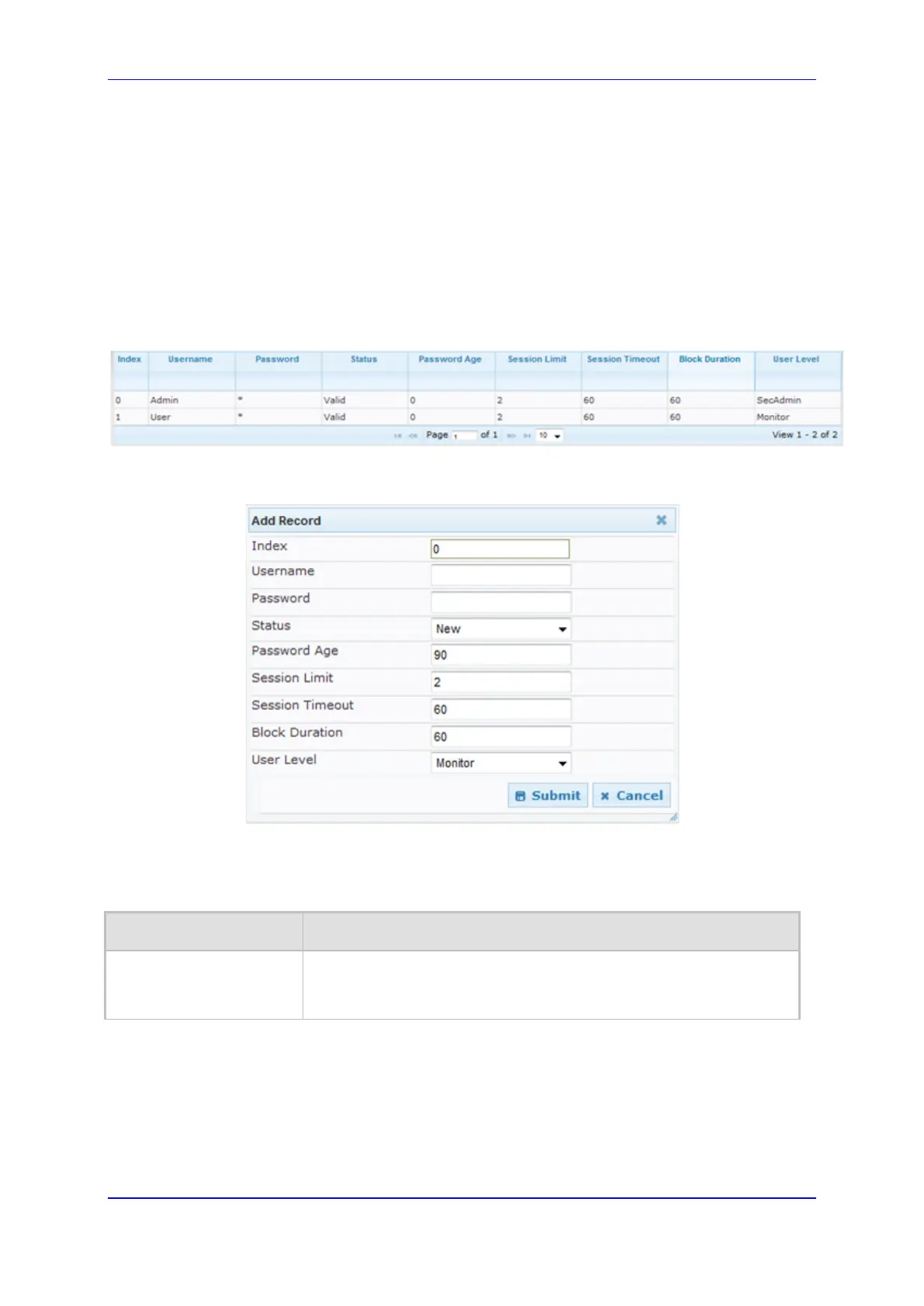
The Web Users table appears, listing the two default, pre-configured Web use
accounts - Security Administrator ("Admin") and Monitor ("User"):
Figure 43: Web Users Table Page
2. Click the Add button; the following dialog box is displayed:
Figure 44: Web Users Table - Add Record Dialog Box
3. Add a user as required. For a description of the parameters, see the table below.
4. Click Submit.
Web User Parameters Description
Parameter Description
Web: Username
Defines the Web user's username.
The valid value is a string of up to 40 alphanumeric characters,
including the period ".", underscore "_", and hyphen "-" signs.













 To Next Page