USER’S MANUAL / bit Tune /
80
2. Connect the SPK IN LEFT and RIGHT inputs of the bit Tune to the power outputs using the (supplied)
connection cables (see fig. 1) and turn on the amplifier.
3. Using the “SIGNAL INPUT SELECT” switch set the SPK IN measurement input and disconnect the
PRE IN and BNC inputs, if connected.
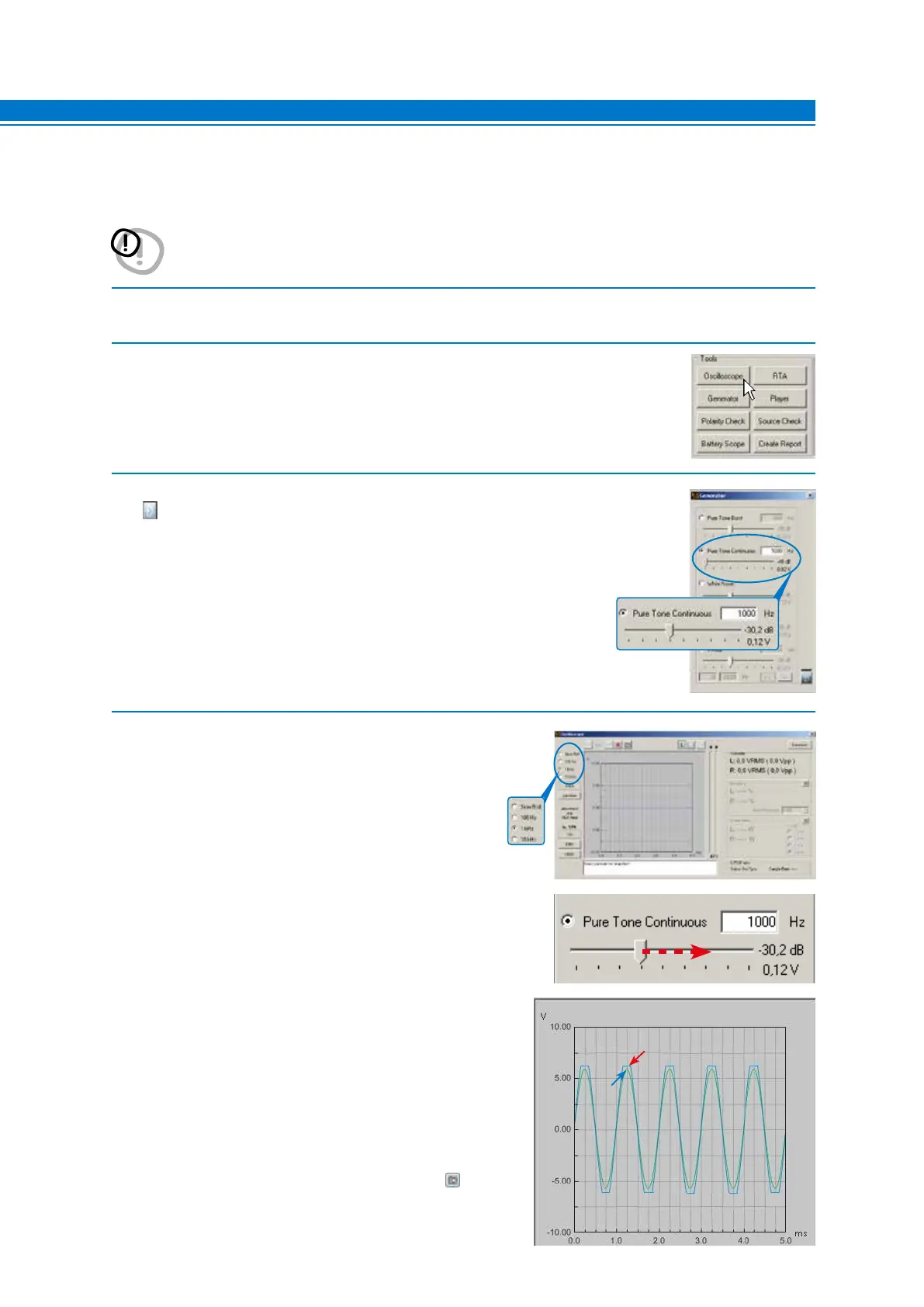
4. - Choose the Oscilloscope tool from the main menu of the bit Tune’s PC Software
5. Select the Generator tool and set it as shown on the right.
- Activate the signal on the bit Tune outputs.
6. - Set the time base as shown in the window on the right.
Increase the level of Pure Tone Continuous until the oscilloscope
shows a sine wave at the edge of clipping, as in the graph shown
below.
Verify that the sine wave shown on the screen is within the
maximum width displayed, otherwise change the scale
(1 V, 10 V, 100 V).
- The snapshot of the measurement can be saved
to store the measurement graph that will also appear in
the final report.
WARNING: A continuous signal level which is too high may cause permanent damage to the speakers.
Disconnect the speakers and connect the amplifier’s outputs to a power resistive load properly
sized to the power of the amplifier.
NO
OK
7



 To Next Page