USER’S MANUAL / bit Tune /
95
2. In order to access the download page that contains the updated versions of documentation, Software and
Firmware, you must enter the LOGIN and PASSWORD created during product registration (see sect. 6.2.3.5).
3. Find the latest file whose name contains the word Firmware followed by four digits and click on its symbol
to start the download. When prompted, save the file on your PC.
4. Exit the browser and the PC software of the bit Tune.
5. Remove the power connector of the bit Tune and the USB port.
6. Remove the side panels and top cover of the bit Tune.
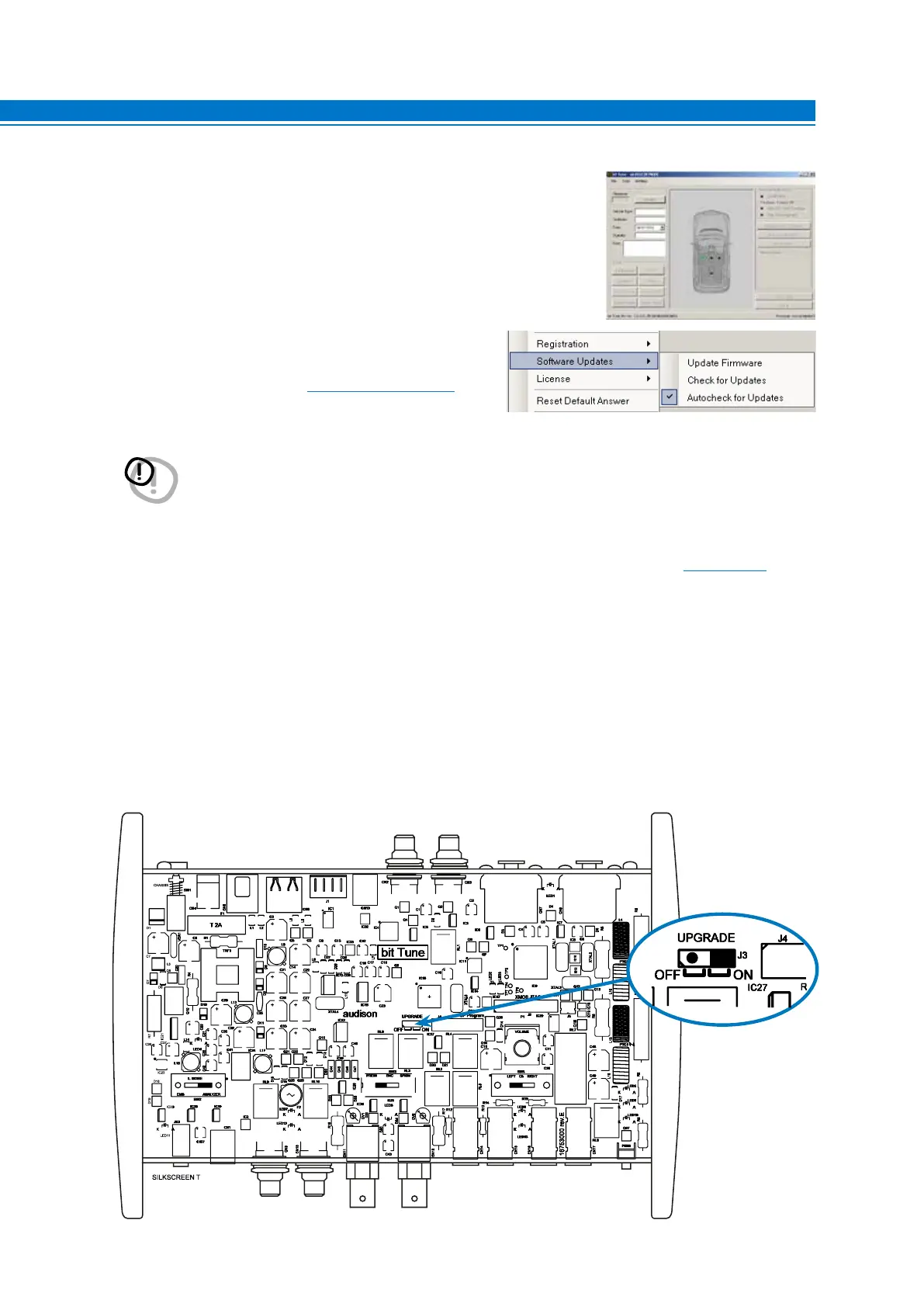
7. Switch the JUMPER to ON as shown in the figure below.
9
1. Access the “FILE” menu of the software on your PC and
click “Check for Updates”. This will open the Internet
browser on your PC and it will automatically start to search
for the bit Drive Portal URL: www.audisonbitdrive.eu
- The screen on the right shows the version of the Boot Loader in
the processor, the program will only be able to access the menu for
the update.
WARNING: The files have to be manually downloaded from the bit Drive Portal. The access method to the software
may be different from the one described as follows. Please always refer to the instructions available on
the bit Drive Portal.



 To Next Page