USER’S MANUAL / bit Tune /
97
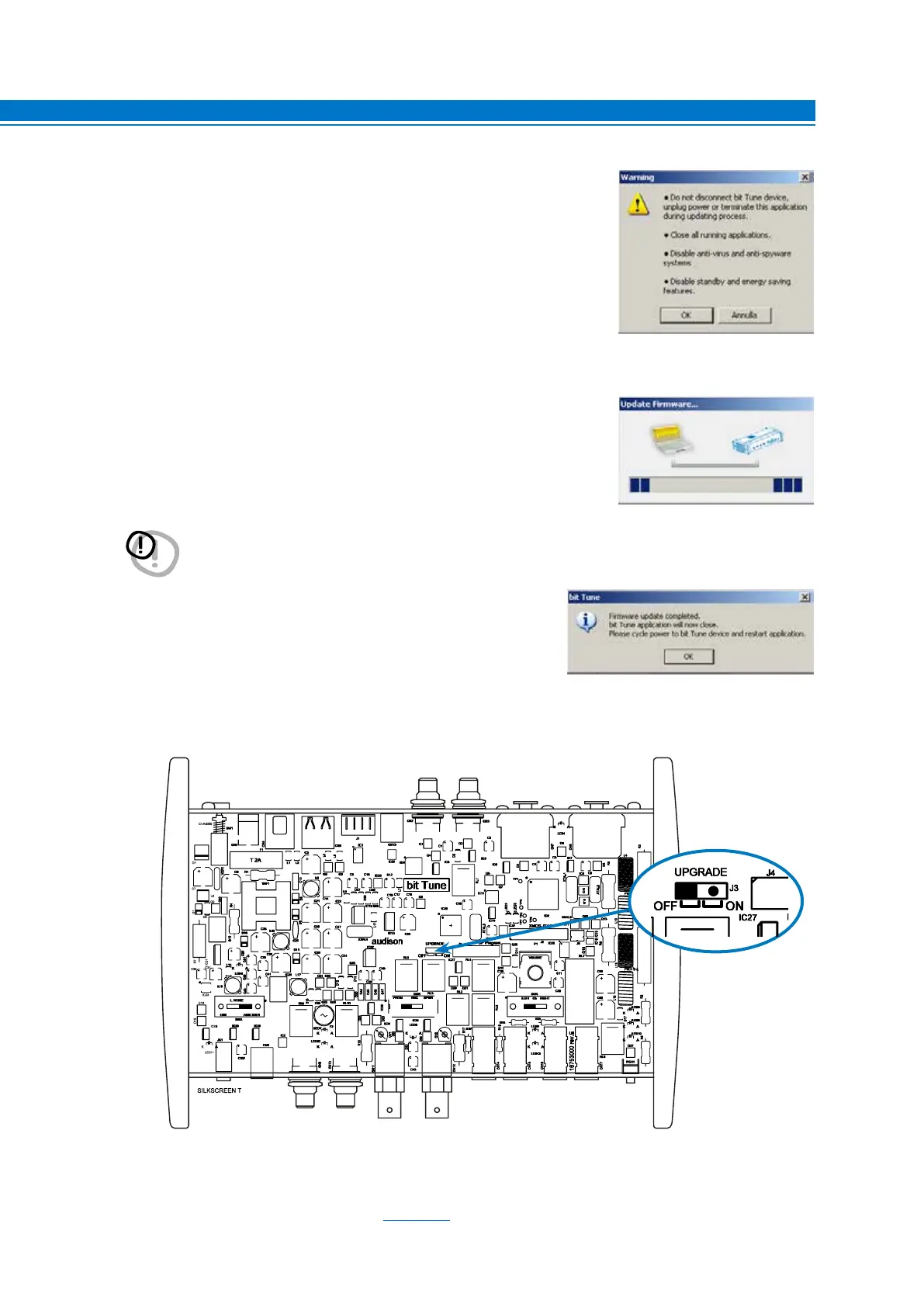
12. Before starting the update of the bit Tune, the program provides the
following warnings:
- Do not disconnect the Tune-bit from the PC.
- Do not disconnect the bit Tune from power supply.
- Temporarily disable the automatic suspension processes on your PC.
- Temporarily disable the Screen Saver processes on your PC.
- Close any other open application.
- Temporarily disable anti-virus and anti-spy ware software.
13. Once the OK is given, start the Firmware update of the processor.
This process takes from 30 seconds to 1 minute and its correct
progress will be indicated by the green bar.
14. The successful update is indicated by the message window.
15. Disconnect the power cord and the USB cable from the bit Tune.
16. Replace the JUMPER internal to the PCB as shown in the figure.
17. Assemble the top cover and side panels of the bit Tune.
18. The product is updated.
19. Repeat the HSM microphone calibration (see sect. 7.2).
WARNING: During the upgrade, the progress of the bar may stop for a few seconds.
Do not interrupt the process in any way.
9



 To Next Page